Unassigned nodes in BW query are a common case. This wasn’t available in SAP Datasphere for a long time and leads to some incorrect data while displaying the aggregated data in hierarchy form.
There is also an influence request in the influence portal. SAP still hasn’t implemented yet a good soulation and the request is still open but there is a hint for a SAP online help entry how to
solve the issue. The request is 304831.
It is only available through the validation rules. The validation rules allow you to identify missing or enhanced hierarchy notes in your hierarchy.
The help entry is found under the name „Collect Unassigned Fact Records for Inclusion in Aggregations and Visualizations“. It has no link to the Hierarchy with Directoy entry nor is it
linked with the Creating Analytic Model page.
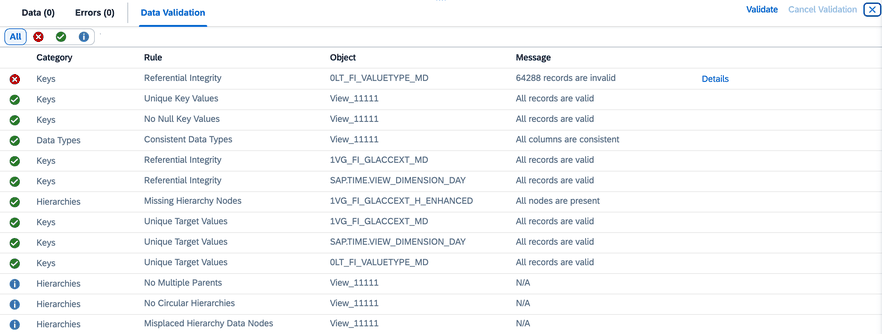
With click on the validation of the fact view you get the information about missing hierarchy nodes in my GL Account hierarchy.

Under „Details,“ you can find information on how to disable this behavior.

You can download the automatically created CSN files. After importing them to your Datasphere tenant, you will see these three objects.

Now we have to change the hierarchy association in the dimension to the enhanced object.
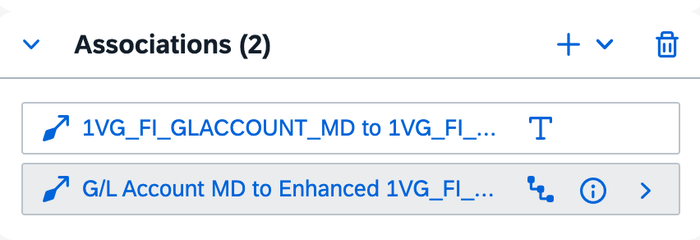
Now you deploy the dimension and make the validation again. As you can see now there are no missing hierarchy nodes.
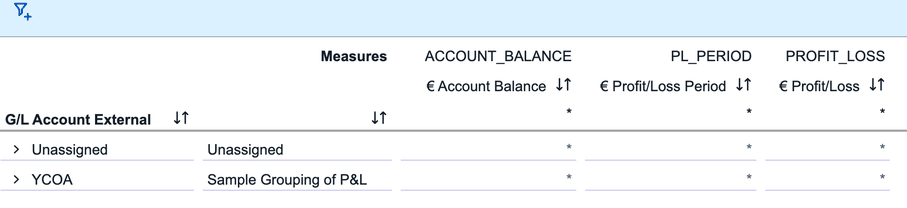
The analytic model now correctly displays the unassigned nodes when I display the hierarchy.
Conclusion
I don’t understand why SAP doesn’t do this automatically or why it’s hidden under the validation rules of a fact model. After completing the validation and changing the dimension association, the
dimension can be used anywhere, and unassigned nodes will appear under „Unassigned Node.“
I hope this information helps you correctly display unassigned nodes in the hierarchy.
author.

Schreibe einen Kommentar