sap bw.
Analysis for Office 2.8 SP14 is available
Unfortunately, I didn’t make it to publish the post in the last month. There were several reasons that I didn’t make it, like the internal BI days or to prepare the next deep dive for Data
Warehouse Cloud. But back to topic. SAP published Analysis for Office 2.8 SP14. Maybe there is something with the SP14 because Analysis Office 1.4 had also a SP14 before Analysis office 2.0 was
released. So perhaps we see some new feature in the future?
But back to Analysis for Office 2.8 SP14. Now you are able to connect to Data warehouse Cloud and consume the analytical data sets directly in Excel. This is the biggest update with for a long
time with features. The last updates were mostly bug fixing and some technical setting parameter, but nothing what is fascinating.
Besides the function in Analysis Office 2.8 SP12 repeat titles of a crosstab. The latest version also offers a new API method called SaveBwComments and some new technical settings like
- AllowFlatPresentationForHierarchyNodeVariables
- SapGetDataClientSideValidationOnly
- UseServerTypeParamForOlapConnections
But for me the best part is now the Data Warehouse Cloud connection. For this, you have to create a connection in the Insert Data Source dialog.
Comparing of data flows through SAP landscape
It is quite a while since I published my last post. A lot happened since then. Analysis for Office 2.8 SP10 is now available, the summer and the vacation are over. But in the meantime
I developed some new ABAP tools, had quite some interesting exchange and took the SQL Script course by Jörg
Brandeis. But in this blog post I want to share with you the latest tool I developed which compare transformations in SAP Business Warehouse systems through the landscape.
Here is a short overview:
BW/4HANA Query Link Components
In BW/4HANA SAP offers you the possibility to link restricted or calculated key figures across different Composite Providers. The advantage of the link components concept is that they can
automatically synchronize whenever you make changes in the source or master component. If you are not familiar with this concept.
SAP Help:
„A linked component can be automatically synchronized whenever changes are made to the corresponding source component.
Example scenario: You have two highly similar InfoProviders, IP_A and IP_B. You have created the query Q_A for IP_A. You now want to create the query Q_B for
InfoProvider IP_B. You want this query to be very similar to query Q_A and to be automatically adjusted whenever changes are made to query Q_A.
To do this, you use the link component concept: You create the linked target query Q_B for source query Q_A. This is more than just a copy, as the system also
retains the mapping information. This mapping information makes it possible to synchronize the queries.„
BW/4HANA XXL InfoObjects
Last week a colleague and I look into the XXL InfoObjects in SAP BW/4HANA. We searched the online help and there is a short video about the topic. But after that we
had no clue how we can use it. Can we use it in Analysis for Office? Or just in the query or Composite Provider? What is the purpose of these InfoObjects? Can we store a documentation and open it
directly from the query?
BW/4HANA 2.0 Composite Provider with InfoObject Join
At the end of last month I ask on Twitter why I should create a join between an Advanced DataStoreObject and an InfoObject to read the attributes from
this InfoObject when I even can activate the attributes on the output tab of the Composite Provider in SAP BW/4HANA. The answers on Twitter was not satisfactory, and I ask a colleague if he
knew a reason. So I build a Composite Provider with a join between an InfoObject and an ADSO in our BW/4HANA system.
BW/4HANA 2.0 Agile Open ODS View Modeling
Open ODS are a long time available in SAP NetWeaver BW. You can access directly database tables, database views or BW/4HANA DataSources (for direct access). In this blog post I want to look into
the fast and agile modeling with Open ODS Views. So we start with a flat file we for example received from our customer to build a new data flow for reporting. The file has the following
structure:
- Country
- Product
- Business Category
- Controlling Area
- Profit Center
- Month
- Year
- Amount
BW/4HANA 2.0 Composite Provider Modeling
I lately looked deeper into the modeling of Composite Provider in BW/4HANA 2.0 and found some difference between a BW/4HANA 1.0, BWonHANA 7.50 and the latest version BW/4HANA 2.0. So let’s
compare them and see what’s new, and we can go deeper in further posts. We start with the context menu of the scenario for the provider.
BW/4HANA: Customer Exit Variable with dynamic assignment
You have different ways to store the logic of your customer exit variables in SAP BW/4HANA. After my last post about Customer Exit Variables with an own enhancement spot I want to share another solution
with you. In this blog post I want to show you how you can implement a BAdI implementation with a Z-Table (Customer Table). In this table you find the assignment between the BEx variable and the corresponding class for the customer exit. This is how the table will look like:
BW/4HANA 2.0 Customer Exit Variables with own enhancement spot
For a long time we used for checking and manipulation of customer exit variables the enhancement RSR00001. Since SAP BW 7.3
SAP offers the BAdI RSROA_VARIABLES_EXIT_BADI. Since BW/4 you only could use this BAdI and not anymore the enhancement RSR00001.
The BAdI RSROA_VARIABLES_EXIT_BADI is a filter based BAdI. As filter object is used the InfoObject which the variable is based on. Every implementation calls the interface
IF_RSROA_VARIABLES_EXIT_BADI~PROCESS. So now let’s create an example customer exit variable. The variable is based on Sales Channel (ZQV_ZSALCH_CEO_001) and can handle
multiple single values.
BW/4HANA 2.0 first impressions
I recently got a BW/4HANA 2.0 project. So I want to share some ideas and thoughts I discover in the whole process. First things first. Everything and I mean everything is only available in the
BW/4 cockpit now. ADSO, InfoObject, Hierarchy management and even the Process Chain management is only available in the web. Some things are very confusing when you see it first. But let’s dive
in.
SAP BW F4 BAdI to restrict hierarchy nodes
In our current project we had to deal with the requirement that the enduser only want to show a certain node of a hierarchy to filter. So we used the F4 restriction from the transaction spro. You
find the entry under Business Warehouse >> Enhancements >> BAdI: Restricting the Value Help in the Variables Screen. We implemented it in
the method GET_RESTRICTION_NODE.
At this time I had only experience with the method GET_RESTRICTION_FLAT and searched for implementation examples. I found a wiki entry on scn. In our case we had bookable nodes so we implemented it like
this to get these node and all children of it.
l_s_node-nodename = ‚NODE1‘.
l_s_node-niobnjm = ‚ZZ_IO‘.
Append l_s_node to c_t_node.
But it didn’t work out. The debugging showed no error, but the restriction always showed the complete hierarchy. After a little digging we found our mistake, it have to look like the follwing:
l_s_node-nodename = ‚LEAF1‘.
Append l_s_node to c_t_node.
l_s_node-nodename = ‚LEAF2‘.
Append l_s_node to c_t_node.
And so on for all leafs. So we had to add all leafs and not the nodes. I didn’t found any good explanation so here is the short article about it. Thanks to my
collegue who had the problem.
SAP BW fix incorrect data in a DataStore-Object
Here just a short notice if somebody doesn’t know it yet. If you have a false information in a data record you can fix this manually either in a PSA or (A)DSO. Just select the desired entry and
click Display (F7).
Customer exit variable to hide hierachy node
In my current project we have the hide a position in a hierarchy, because it is a departmental requirement. The hierarchy is used by many departments so we cannot change it and we also don’t want
to have the same hierarchy two times (except for the one position). So we first excluded the position in the query.
SAP Business Warehouse DTP Filter with ABAP Routine
In my current project I have to filter data with a lot of logic. So I build some ABAP routines in a DTP filter to receive the necessary data.
First you have to open the DataTransferProcess (DTP) in change mode and select the Filter button on the Extraction tab.
SAP BW Reset request/task status
In my current project we have a go live. So I needed a function to reset the transport status of some transports. So if you release your transport falsely the transport is locked by release and
can no longer be removed from the transport status. Maybe you also want to delete the entire transport request. This option is also denied as soon as the tasks have been released. The standard
procedures are very laborious and not only cost a lot of time, but also have a certain risk potential. SAP offers a report which solves your problem. The report is RDDIT076.
As you see in the next picture, the transport is released.
Analysis Office Data Source for Defining Formulas
A new function in Analysis Office 2.7 is „Select Data Source for Defining Formulas“. But what does this mean? First
the prerequisites:
- BW/4HANA SP8 and apply the following notes: 2624495
and 2600508 - BW 7.50 SP12 (or >= SP8 and apply the following notes: 2579842, 2627315, 2624495 and 2600508)
So I just logged into my BW 7.50 test system and what I have to see, we only have a BW 7.5 SP11. So I have applied the notes and each note need further notes to implemented. I just want to test
something and now I have to implement more than 30 notes.
After this was done I could start finally to test this function. Alexander
Peter showed in the latest DSAG webcast an example so I had a slight idea what to do.
SAP BW Assign navigation attribute to InfoObject
In my current project we run into an issue that we have to match navigation attributes from one ADSO to an infoobject of another ADSO. The old feature of a MultiProvider was to Identify (assign).
Book about BW Backend tips & tricks
I hope you can help me, to find out if there is any interesting about a book that covers BW Backend topics. I think about a book which covers SAP HANA, AMDP/ABAP, BW Administration and so on.
Thanks for your time.
SAP BW Decode String during Import
In my current project I have a file to import, which only delivers me a string with a length of 1000. I also get a description what is in this file. Like the following points:
- Customer from 1 to 10
- City from 11 to 50
The file looks like: 0000123456London………………………. So I have a file and a description how to decode this file. Now I need to find a way to separate this information into
InfoObjects. I build a Z-Table which contains the decode information.
SAP BW Create own reversal entry
Lately, all my posts started with „In my current project“, so now something else, even if it was developed in the current project. The problem we are facing with is that we get a data extraction
which deliver us only the new data records, not the reverse data record.
SAP BW: Keyfigure to Account Model
In my current project we have a lots of source systems which delivers our data in a key figure model. In a normal case is this not a problem. But we need the values of the key figures in a
hierarchy. So there are two ways to realize it. First way would be we build a structure with restricted key figures and get our hierarchy. Here is the problem, the customer will need different
queries to realize his needs. If there is a change, we need to adjust different queries (each has a light different hierarchy) and the maintainace is immense.
SAP BW Use Pattern in Variable with Customer Exit
In my current project I created with a collegue a really cool function to analyze a string with 1333 characters. We are using a BW 7.4 SP 17 on HANA. First we have to build an Advanced DataStoreObject with a Field which has a length of 1333. For further understanding, we call the
field Field_1333. As data type I used SSTRING.
BW/4HANA Export Transports
I know that I don’t publish a lot of new posts the last few weeks. The reason is I am writing on my diploma thesis. The title is „S/4HANA versus BW/4HANA – Zukunft der Datenanalyse“. My deadline
is in the middle of September so I have to write a lot these days. At the moment, I have access to a BW/4HANA instance in the cloud and I want to share how you could export your development
before you terminate the instance. First you have to log on with the SAP* user in the client 000. Go to the transaction stms and select the System Overview.
Install your own SAP BW on a virtual machine
I described in a earlier post how to use BW/4HANA on Amazon AWS. But if you just need a developing system for some time
and don’t want to use BW/4HANA, you can use the BW 7.5 SP2 developer edition on a virtual machine.
SAP BW Visio Shapes
I want to document a BW data model and searched for a Microsoft Visio shape, but I found nothing. So I build my own Visio shapes. At the
moment there are the following types available:
- DataSource
- Transformation
- DataStoreObject
- InfoCube
- SPO
- MultiProvider
- DTP
- InfoSource
- OpenHub
- Query
I used them in my last blogpost about Copy Queries to a new MultiProvider.
SAP BW Copy Queries to a new MultiProvider
In my current project, we want to separate the current MultiProvider with VirtualProvider underneath into one MultiProvider with VirtualProvider and one MultiProvider without VirtualProvider.
This step is necessary, because we receive a lot of data and don’t want to push all these data through the VirtualProvider. The VirtualProvider only add one field which we haven’t got in our
InfoCubes and it isn’t necessary in all queries just a few.
SAP BW Analysis Process Designer (APD)
At the moment I had to deal with a special problem. I have data in a SPO from two different sources and the goal
was to find the corresponding two data lines and make one out of it. This line should marked with a special character. So I decided to build an Analysis Process (APD).
SAP BW Check your data model
Sometimes it is necessary to check your data model if it still fit your needs. For this you can use the transaction rsrv. Select there under All Elementary Tests >>
Database >> Database information about InfoProvider tables.
SAP BW find meta chain
In my current project I had to clean up the existing process chains. A lot of process chains were created via SPOs and not really used in the system. First I had to check, if one is used in a another process chain or in which one they are used.
SAP BW Change Object Directory Entries
In my current project we have to transport from a maintenance system to our development system. The problem is when you now transport the objects into quality system, you have to check the option
„Overwrite Originals“ so that your transport is working. But you have to put this flag on every transport you make in the future from your development system to quality.
SAP BW Transport of Copies
In my current project, we have a copy of the productive system as a maintenance system, because we made huge changes in
the development system in case of the project. So if there is an error in the production, we can easily repair it.
Some changes have also be transported into the development system, so we have the same state and our future request can be transported into production. For this we use the functionality
Transport of Copies. All objects of the originally request are still locked. If you want to create a transport of copies, open the transaction SE01. Check the
option “Transport of Copies” and click on Display.
SAP BW Create SPO via BAdI – Part 3
After we created in Part 1 the transparent tables and in Part 2 all BAdI implementation, we can now maintain and create our SPO. First we have to fill our table ZSPOPATTERN with a
PATTERNID and a corresponding INFOOBJECT. Go to the se16 and create a new table entry. As PATTERNID enter a unique id for
example CALYEAR and as INFOOBJECT 0CALYEAR. For TXTLG and TXTSM enter a useful text. Depending on how many InfoObject are used for a partition, create the other
pattern.
SAP BW Create SPO via BAdI – Part 2
After we created in part 1 all tables and objects, we can now create a new BAdI to generate the partitions. Go to
the transaction se19 and create a new implementation with the Name RSLPO_BADI_PARTITIONING.
SAP BW Create SPO via BAdI – Part 1
At my current project I needed a way to create Semantic Partitioning Object (SPO) via BAdI to reduce the end-of-year work. After a little search via Google (you cannot find anything on the new
SAP Community Page), I found these threads.
Setup BW/4HANA on Amazon AWS
So after I read a lot about BW/4HANA, I decided to create a own SAP BW/4HANA 1.0 [Developer Edition] instance on my Amazon AWS account. First I had to extend my normal AWS account with a IAM
user. For this you choose under Security, Identity & Compliance >> IAM. Under Users you click on Add user.
How to build a RFC Server with NCo 3.0 Part 2
So it is done, Part 2 finally is written and an example is uploaded to github. It took me about 8 months to release Part 2 of these series. Part 1 was released in March 2016 and now I had time to write an example for Part 2 and upload it to
github. Part 1 discover the basics about a
RFC Server with the SAP NCo Connector, part 2 now explain how to build a RFC Server more flexible.
BW Modeling Tools
This week the new open SAP course BW/4HANA in a Nutshell started. It is a free course.
One big thing is that BW/4HANA no longer supports the good old BEx Suite. You now have to use the BW Modeling Tools based on Eclipse. In this and further posts I will go deeper into the BW Modeling Tools and what is possible and what is not possible at the
moment.
If you have any questions feel free to ask or correct me 😉 So let’s get started.
Error while executing function module BICS_PROV_OPEN
I just got access to a NetWeaver 7.5 SP2 and I want to test it with Analysis for Office 2.3. So I open Excel and insert a query. And here we go first error: „unable to open data
source“, so I thought maybe the query is broken and I developed a new query and insert it. Here we go, same error. Maybe queries don’t work, so I insert a InfoCube directly. Same error…
Now I refresh the insert query and got an Analysis for Office message: Error while executing function module: BICS_PROV_OPEN
In the explanation was one line with the hint „wrong parameter type in an rfc call“, so I looked into st22 and saw a dump which the message: CALL_FUNCTION_ILLEGAL_P_TYPE
Change Requests after release
- Open transaction se38
- Open program RDDIT076
- Execute (F8)
- Enter a request or task number
- Execute (F8)
- Doubleclick on a selected entry
- Switch between Display and Change (F9)
- Change your request
- Save (CTRL + S)
Process Chain Change Process Type
- Call transaction sm30
- Open Table/View RSPROCESSTYPES
How to build a RFC Server with NCo 3.0 Part 1
In some cases you want to trigger an external program from a SAP system. In this part 1 I explain how to build a RFC Server with NCo 3.0. I had several problems when I started with this topic so
I decided to write a short example. If someone want the Visual Studio project files, please contact me.
So let’s go.
This Post describes how to build a simple RFC Server using SAP NCo 3.0 and the app.config. Part 2 will be describe how to build a RFC Server with RFC Parameter. As example program I use
STFC_CONNECTION. It is a good example, because it contains importing and exporting parameters.
First you have to download and install NCo 3.0 (OSS login required). Afterwards you have
to start a new project in Visual Studio.
Setting up the Visual Studio Project:
In the properties of the project you have to use a new console application. As target framework I use .Net Framework 4.5.
Support SAP Connector for Microsoft .Net (NCo)
In the last time I had several problems with external access to a SAP BW System. The access was realized with an old version of the SAP Connector. And that is the problem. If you have a SAP Business Warehouse System
version which is greater than 7.3, you maybe get troubles. For example SAP added new fields or like in 7.4 you now have the option for „Long text is XL“ in the master data. So the old versions
would not work with this.
I just found a very good table about the maintenance of all versions in Martins blog.
Rename and delete an Analysis for Office Workbook
If you want to delete or rename an Analysis for Office Workbook, you have to right click on the Workbook Opendialog.
Video How to maintain Master Data in SAP 7.4
After „SAP BW 7.4 Maintain characteristics“ is one of the most read posts. I visualize this post in a short
video.
Analysis for Office Goto ala BEx Query
In BEx Analyzer you could jump into another query from a query / workbook. The GoTo-Function make sense if you have one query for overview and
one for detail.
SAP BW find orphaned workbooks
You can use the ABAP program RRMX_WORKBOOKS_GARBAGE_COLLECT to find workbooks that are currently assigned to a user or group of users via the transaction SE38. Through
the hook „Workbooks found erase“ these are removed from the system.
Relocation of OLAP functions on SAP HANA
With every new release of SAP HANA functions are moved from the OLAP engine into the database. The current state of the push down can be found in note 2063449. So check this note from time to time, if it is interesting
to implement a service pack.
Note: You need a S-User to access this note.
SAP BW hierarchy and attribute change run for all InfoObjects
- Call transaction se38
- Run Program RSDDS_AGGREGATES_MAINTAIN
- Select InfoObjects or hierarchy
- Run
SAP BW 7.4 Maintain characteristics
Unfortunately, SAP shifted the maintenance of master data in SAP BW 7.4 into the Web. Not everyone wants to maintain the master data on the
Web. Here is a small workaround.
SAP COPA keyfigure assignment
- Call transaction sbiw
- Select menu item „Settings for Application-Specific DataSources (PI) >> Profitability Analysis >> Assign Key Figures
- Choose either „New Entries“ or modify existing one.
Define SAP COPA key figure schemes
- Call transaction SPRO
- Calling SAP Reference IMG
- Controlling >> Profitability Analysis >> Information System >> Report Components >> Define Key Figure Schemes
- Choose Operating concern
- Select Elements of the key figure scheme
- Select a key figure
Remove BW Query from user favorites
- Call transaction se16
- Select table SMEN_BUFFC
- Enter Username and/or Report
- Run
- Select entry
- Go to menu >> table entry >> Delete the entry
Explosion of structured items 2LIS_03_BF
From time to time there is a mistake in the resolution of structured items and the transfer of material hierarchies to BW. It helps the Note 1410263.
SAP BW ABAP remove symbols
From time to time it happens that the source system delivers special characters and the Business Warehouse system can not handle it. So the
loading process may be crashed.
One solution is the following ABAP code:
1 2 3 4 5 6 7 8 9 10 11 12 13 14 15 16 17 18 19 |
DATA: zeichen(1) TYPE c, muster(2) TYPE c, field TYPE c LENGTH 000060. field = SOURCE_FIELDS-YYSTREET. DO. IF field CO ' !"%&()*+,-./:;<=>?_0123456789ABCDEFGHIJKLMNOPQRSTUVWXYZÄÖÜßabcdefg' && 'hijklmnopqrstuvwxyzäöü '. EXIT. ELSE. zeichen = field+sy-fdpos(1). muster+0(1) = zeichen. muster+1(1) = space. TRANSLATE field USING muster. ENDIF. ENDDO. RESULT = field. |
Overview SAP Business Objects tools
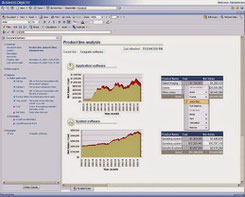
SAP BusinessObjects Web Intelligence
- For executives of middle manager, business analysts and employees without management responsonsibility
- Access to data from various sources without technical background
- Mobile access via SAP Business Objects Mobile
Change key figures of an used InfoProvider
There is a SAP Note which was released 2009. This Note shows how to change key figures of an InfoProvider, even though they are used. The Note is 579342.
Unlock InfoObjects in Business Warehouse
- Transaction rsa1 or rsdcube
- Menu >> Extras
- Select „Unlock InfoObjects“
Unlock Business Warehouse database lock
When the BEx Query Designer crashes while you are creating or modify a query, the user lock this query in the database. You can remove the lock
with the Transaction sm12 and erase the entry.
- Open TA sm12
- Click list
- Select the required entry
- Click delete
Replicate SAP BW DataSource
From time to time it is necessary to replicate DataSources from other SAP systems, eg if the DataSource has changed in the source system. To replicate a DataSource, use the transaction
rsa1.
- Open the TA rsa1
- Search for your InfoSource
- Right-click on the InfoSource and replicate DataSource
- Change and activate DataSource
- Replicate DataSource again
Now the DataSource can be used.
SAP BW Query Read Mode
Query to Read All Data at Once
Advantages:
- query navigation after first call very quickly as data completely present in OLAP cache
Disadvantages:
- Initial call slow
- Using characteristics aggregates greatly restricted
- Large memory requirement in the OLAP cache
Recommendation:
- Using the read mode only for small InfoCubes
- Using the read mode only in queries with a few free characteristics
Query to Read Data During Navigation
Advantages:
- Good hit rate in characteristic aggregates
- Quick response times for small hierarchies
Disadvantages:
- Waiting period required in successive runs when selection is not identical to Initial call
Recommendation:
- Using the read mode for small hierarchies
- Using the read mode for large result sets
Query to Read When You Navigate or Expaned Hierarchies
Advantages:
- Initial call of the query quickly because only the necessary data is selected
Disadvantages:
- Selects the least amount of data in the Initial call, so read access to database with modified navigation required
Recommendation:
- Using the read mode when hierarchy aggregates required
How to use a remote enabled function module in SAP BW with VBA
If you have created your own SAP function module, you can use this with the following VBA code.
Sub FunctionModule()
‚Variables Definition
Dim MyFunc As Object
Dim E_INSERTED As Object
Dim E_MODIFIED As Object
Dim DATA As Object
Set MyFunc = R3.Add(„Z_RSDRI_UPDATE_LCP“) ‚FunctionModule Name in SAP BW
Set E_INSERTED = MyFunc.imports(„E_INSERTED“) ‚InsertFunction
in SAP BW
Set E_MODIFIED = MyFunc.imports(„E_MODIFIED“) ‚ModifyFunction
in SAP BW
Set DATA = MyFunc.tables(„I_T_DATA“) ‚Table to store data and write to BW.
‚Add data
DATA.Rows.Add ‚add new data
rowDATA.Value(1, 1) = Sheet1.Cells(1, 10).Value ‚First Cell of the data table is filled with the value from Sheet1.Cells(1,10)
‚Call Insert or Modify
Result = MyFunc.CALL
‚Message to the User
If Result = True Then
MsgBox „Insert Rows: „ & E_INSERTED.Value & “ Modify Rows: „ & E_MODIFIED.Value,
vbInformation
Else
MsgBox MyFunc.EXCEPTION ‚Exception
End If
End Sub
List of all SAP BW Users
Sometimes you want to know which users are created on a Business Warehouse system and if these have access or have been blocked from by
incorrect logon. For this you can use the transaction rsusr200. In the transaction you can see the last login, the users validity, etc.
- Call transaction rsusr200
- Run
- List of all users appears
SAP BW Authorization check
Sometimes you have to check the rights of users. For this you can use the transaction su53.
Activate all inactive transformations
If you adjusts many objects in the Business Warehouse, a lot of transformations are automatically inactive. So you don’t have to activate each
transformation by hand, there is a ABAP program named RSDG_TRFN_ACTIVATE.
- Call transaction se38
- Run program RSDG_TRFN_ACTIVATE
How to check the InfoCube scheme
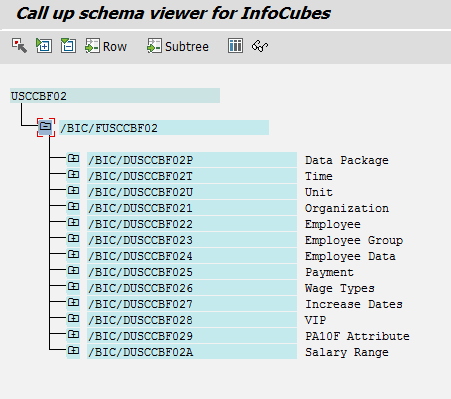
There are several ways to look at the structure of an InfoCube. One way possibility would be to analyze it on the transaction rsa1. Another way to show the structure of an
InfoCube is the transaction listschema.
- Call transaction listschema
- Choose a type of InfoCube
- Select a specific InfoCube
- Run
Connecting via VBA to a SAP system
If you want to create automated reports with data from an SAP ERP or Business Warehouse system, you first need to connect to a SAP system. The
connection can be used later to access system tables in the ERP or Business Warehouse or to trigger various other action.