In my current project I have to filter data with a lot of logic. So I build some ABAP routines in a DTP filter to receive the necessary data.
First you have to open the DataTransferProcess (DTP) in change mode and select the Filter button on the Extraction tab.

Now a new window is opened. You see the selection for the DTP. If your field is not visible, click on Change Selection and select the necessary field. When you have the field you
want to filter, use the small icon on the right to create a ABAP routine.

Enter a name for the routine and you see the following screen.

And now we have the full power of ABAP to build some really cool stuff. My example is we read a hierarchy and select all leaves under a node and set the DTP Filter with it. Or you read the
attributes of an InfoObject and select all entries which are equal to the attributes and enter them into the filter.
1 2 3 4 5 6 7 8 9 10 11 12 13 14 15 16 17 18 19 20 21 22 23 24 25 26 27 28 29 30 31 32 33 34 35 36 37 |
CONSTANTS: lc_iobjnm_zsaleschannel TYPE rsiobjnm VALUE 'ZSALESCHANNEL'. DATA: ls_rssh_hiedir TYPE rshiedir, lt_rssh_hiedir TYPE rssh_t_hiedir, ls_subtreesel TYPE rssh_s_nodebyname, lt_hierarchy TYPE /bic/whzsaleschannel, FIELD-SYMBOLS: <ls_hierarchy> TYPE /bic/hzsaleschannel, "Get all hierarchies from the object CALL FUNCTION 'RSSH_HIER_OF_IOBJ_GET' EXPORTING i_objvers = rs_c_objvers-active i_iobjnm = lc_iobjnm_zsaleschannel i_langu = sy-langu IMPORTING e_t_rshiedir = lt_rssh_hiedir. "Get technical hierarchy id to hierarchy name CLEAR ls_rssh_hiedir. READ TABLE lt_rssh_hiedir INTO ls_rssh_hiedir WITH KEY hienm = i_zsaleschannel_h objvers = rs_c_objvers-active. "Sub-Tree to Note/Leaf CLEAR: ls_subtreesel. ls_subtreesel-iobjnm = lc_iobjnm_zsaleschannel ls_subtreesel-nodename = i_node. "Get Hierarchy Elements CALL METHOD cl_rssh_hierarchy_func=>get EXPORTING i_objvers = rs_c_objvers-active i_hieid = ls_rssh_hiedir-hieid i_s_subtreesel = ls_subtreesel IMPORTING e_t_hiestrucall = lt_hierachy |
After I have now all elements in an internal table, I can add them to the DTP Filter.
1 2 3 4 5 6 7 8 9 10 11 12 13 |
"Loop over the internal table and assign the value to the dtp filter LOOP AT lt_hierarchy ASSIGNING <ls_hierarchy>. l_t_range-fieldname = '/BIC/ZSALESCHANNEL'. l_t_range-iobjnm = '/BIC/ZSALESCHANNEL'. l_t_range-sign = 'I'. l_t_range-option = 'EQ'. l_t_range-low = <ls_hierarchy>-/bic/zsaleschannel. IF l_idx <> 0. MODIFY l_t_range INDEX l_idx. ELSE. APPEND l_t_range. ENDIF. ENDLOOP. |
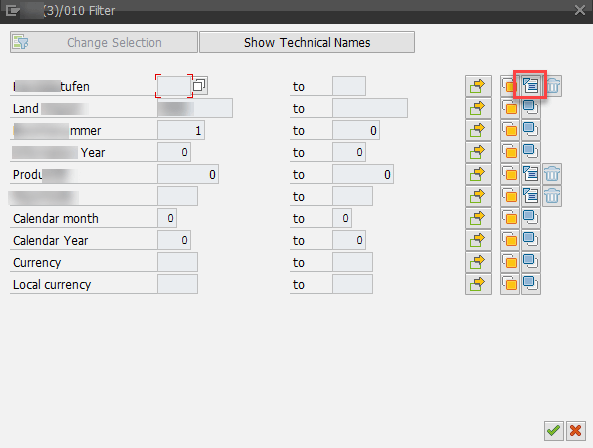
After we saved our development and go back, we see a the little ABAP icon on the right (highlighted in red). If you want to remove a filter, click on the trashcan to remove the logic.
Conclusion
Sometimes it is necessary to filter your data. You could do this in different ways, but the most effiencient way is the DTP filter. Because the loading don’t touch the data you not select. If you
remove the data via a start routine, all the data has to be catched from the database and you select more than you need at the end.
Besides ABAP routine you could also use variables to filter data. In SAP BW/4HANA the filter is a little bit different this will be covered in another post.
author.


Schreibe einen Kommentar