reyemsaibot

SAP BI Blog about SAP BW/4HANA, Analysis for Office and SAP HANA - by Tobias Meyer

Analysis Office 2.5 – Technical Configuration

A really cool feature of Analysis Office 2.5 can you see in the „backend“ under File >> Analysis. The function
Customize Analysis offers now new options. Besides the Customize User Interface from Analysis Office 2.4
which allows you to change the ribbon menu of Analysis Office, you now can directly modify the technical settings of Analysis Office.
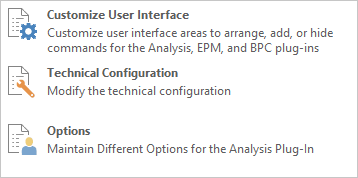
Customize User Interface

With the function Technical Configuration you can modify all setting parameters from the file system settings.
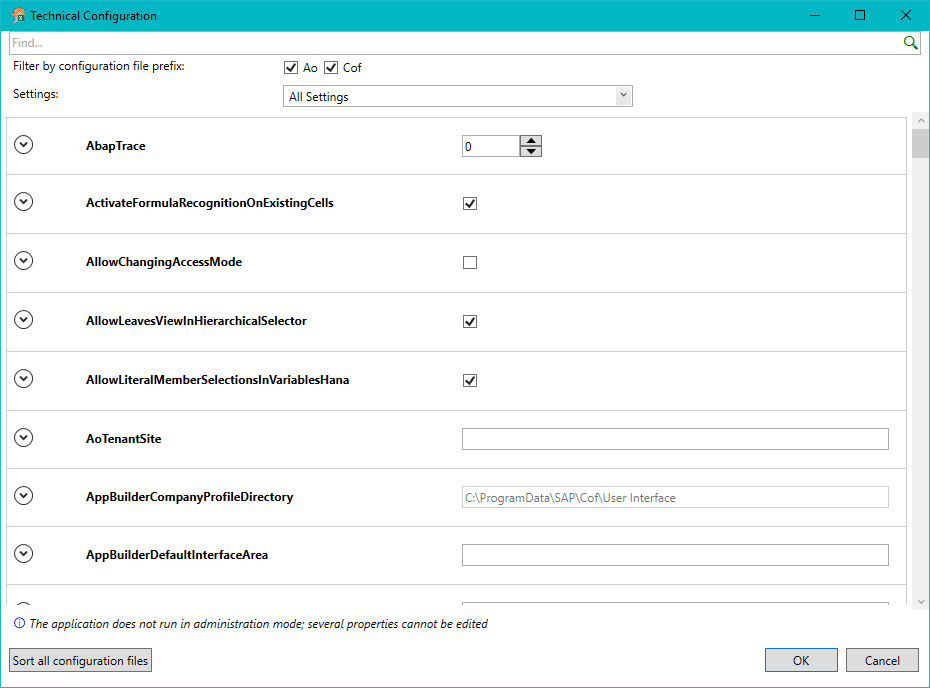
Technical Configuration

This is nice, because several properties could be edit while Excel with Analysis Office Addin is open and you don’t have to search for the parameter files in the file system. You have a little
search bar on the top. The only thing what I am missing is that there is a direct link to a help file oder something similar to see what the property does. Maybe someone from SAP reads this and
add this feature for a future release.

author.


I am Tobias, I write this blog since 2014, you can find me on twitter and youtube. If you want you can leave me a paypal coffee donation. You can also contact me directly if you want.

Kommentare

6 Kommentare zu „Analysis Office 2.5 – Technical Configuration“

  1. Avatar von karan sehjpal
    karan sehjpal

    But i am not getting how this will useful. Is it the case that instead of checking the settings file we can check them here only. or what exactly is the purpose of this. can you quote some example i am not getting this option

  2. Avatar von Tobias
    Tobias

    Hi, the only thing I think at the moment is, that you haven’t to close your Excel and the settings are applied „on the fly“. But as you, I don’t see the „real“ feature here. Tobias

  3. Avatar von Mattias
    Mattias

    Hi Tobias Is it possible to set these parameters using VBA? Thanks!

  4. Avatar von Tobias
    Tobias

    Hi Matthias, no that is not possible, but you can build a master file and distribute it through your IT Department (and set the settings to machine and not user specific.) I hope this will help you. Tobias

  5. Avatar von Charlie Bean
    Charlie Bean

    Hi Tobias, I’m unfamiliar with „Building a master file“. Could you elaborate? I’m looking to have specific settings (eg disabling UseSapUILandscapeComApi) setup for 200+ users . Thanks!

  6. Avatar von Tobias
    Tobias

    Hi Charlie, you could build (or create) a new Ao_app.config (Stored in the ProgramData Folder) with your desired settings and then distrubute them via your Windows AD to all users.

Schreibe einen Kommentar

Deine E-Mail-Adresse wird nicht veröffentlicht. Erforderliche Felder sind mit * markiert