reyemsaibot

SAP BI Blog about SAP BW/4HANA, Analysis for Office and SAP HANA - by Tobias Meyer

Autor: reyemsaibot

  • Analysis Office 2.5 Scaling Factor

    In my current project I work a lot in the backend of a BW 7.4 on HANA but I finally found time to look into Analysis
    Office 2.5
    . Here is a short explanation about the feature that the scaling factor works now with conditional formatting. If you configure your conditional formatting like the following
    screenshot and apply after that your favourite scaling factor. It automatically adjusts.
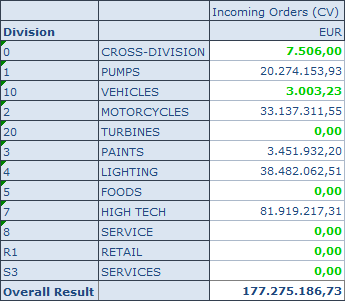
    Define Conditional Formatting
    Define Conditional Formatting

    If you now apply the scaling factor, it adjusts.
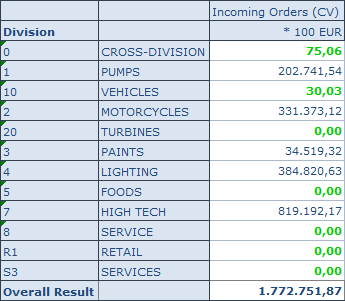
    Scaling Factor applied
    Scaling Factor applied

    Here you can see the difference to Analysis Office 2.4 SP3. After I applied the scaling factor, all items are green.
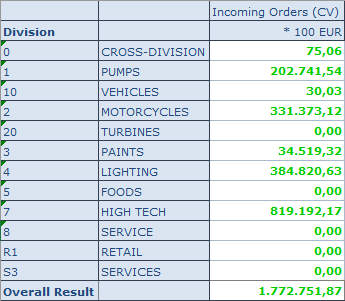
    Scaling Factor in Analysis Office 2.4
    Scaling Factor in Analysis Office 2.4

    author.


    I am Tobias, I write this blog since 2014, you can find me on twitter and youtube. If you want you can leave me a paypal coffee donation. You can also contact me directly if you want.

  • Analysis Office 2.5 is available

    Analysis Office 2.5 is finally available since the end of August for everyone. After I submit my diploma thesis last week, I have now
    time to see whats new in Analysis Office 2.5. Here is the first short overview of the new feature:

    • You are now able to connect to SAP BusinessObjects Cloud
    • Customize User Interface has new options
    • New different troubleshooting modes
    • New options with Table Design
    • A new API method SAPCallMemberSelector
    • Changes on the grouping Crosstab function
    • New file system setting ShowUtcTimeStampsInDataCells

    This is a first view on the What’s new Guide. I am also published Analysis Office – The Comprehensive Guide (2nd
    edition)
    as a Kindle ebook on amazon. Feel free to choose where to buy it. So stay tuned.

    author.


    I am Tobias, I write this blog since 2014, you can find me on twitter and youtube. If you want you can leave me a paypal coffee donation. You can also contact me directly if you want.
  • Analysis Office 2.5 & AMDP

    At the moment it is very quiet about new blog post. This is maybe the summer break everybody talks about. 😉

    I am at the final phase of my diploma thesis and have no time to do cool stuff and also SAP doesn’t release Analysis
    Office 2.5
    . It is still in ramp up and nothing new at the moment.


    So I could only say, my current project is a BW on HANA and I am testing how HANA SQL Script (AMDP) works and how fast we could build some stuff. First tests show a transformation with routines
    for 800.000 records about 1:55 minutes. The same transformation with AMDP (ABAP Managed Database Procedures) only need between 15 – 23 seconds. This is really impressive. 


    So stay tuned, if SAP will release Analysis Office 2.5 and some examples with AMDP.

    author.


    I am Tobias, I write this blog since 2014, you can find me on twitter and youtube. If you want you can leave me a paypal coffee donation. You can also contact me directly if you want.
  • Design Studio Mobile Application

    Mobile Application is the big thing in management. If you want to create a mobile application in SAP Design Studio, SAP have some
    recommendations:

    • Keep the application simple and don’t use too many components
    • Don’t use crosstab components for smartphone applications
    • Limit the total number of cells in your crosstab to 500 for tablet applications

    I hope everybody stick to this recommendations or we will see people looking like that:

    To scale sensibly an application on the mobile platform, the setting for height and width for tables and diagrams must be set to AUTO. Butons and other components must be
    displayed large enough to be used. After the mobile application is build, it must be published on the BI platform.

    Publish a mobile application on BIP

    Step 1: Log on to BI platfrom and select the desired application

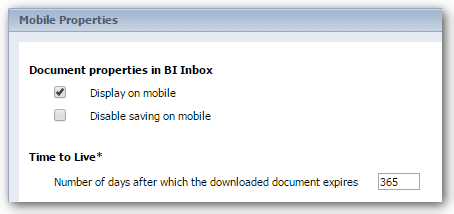
    Step 2: Right click and select Mobile Properties

    BI Platform Mobile Properties
    BI Platform Mobile Properties

    Step 3: Select Display on mobile

    Step 4: Send application into the BI Inbox

    Step 5: Application is now available on mobile

    author.


    I am Tobias, I write this blog since 2014, you can find me on twitter and youtube. If you want you can leave me a paypal coffee donation. You can also contact me directly if you want.
  • BW/4HANA Export Transports

    I know that I don’t publish a lot of new posts the last few weeks. The reason is I am writing on my diploma thesis. The title is „S/4HANA versus BW/4HANA – Zukunft der Datenanalyse“. My deadline
    is in the middle of September so I have to write a lot these days. At the moment, I have access to a BW/4HANA instance in the cloud and I want to share how you could export your development
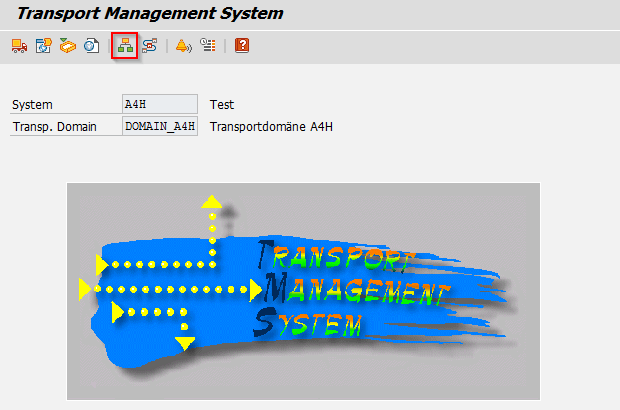
    before you terminate the instance. First you have to log on with the SAP* user in the client 000. Go to the transaction stms and select the System Overview.

    BW/4HANA Transaction stms
    BW/4HANA Transaction stms

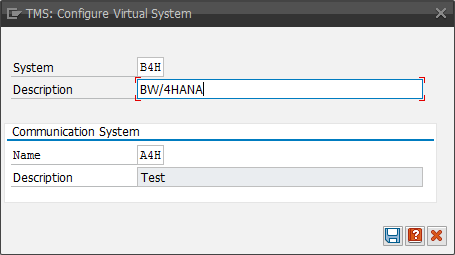
    After you select the System Overview, choose SAP System > Create > Virtual System.

    BW/4HANA Create Virtual System
    BW/4HANA Create Virtual System

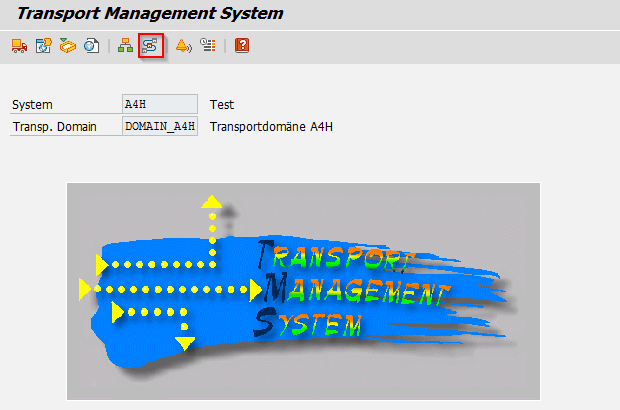
    Return to the stms transaction and select Transport Routes.

    BW/4HANA Select Transport Routes
    BW/4HANA Select Transport Routes

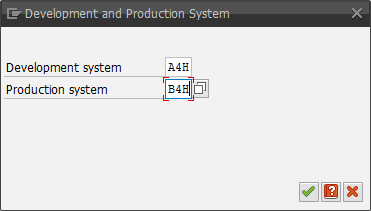
    Open it in change mode and select Open Configuration > Standard Configuration > Development and Production System. Assign the current system as Develeopment System and the virtual system as
    Production System.

    BW/4HANA Connection between Development and Production System
    BW/4HANA Connection between Development and Production System

    The route will be created. Now saveand activate the configuration. Now you can release your transport. After you have released your transport, have a look into the DIR_TRANS
    directory in the transaction al11. There you find the folder cofiles and data. In this folders you find the necessary files. You can download
    these files with the function module ARCHIVFILE_SERVER_TO_CLIENT. If you want to import the files again, use the function module ARCHIVFILE_CLIENT_TO_SERVER.

    author.


    I am Tobias, I write this blog since 2014, you can find me on twitter and youtube. If you want you can leave me a paypal coffee donation. You can also contact me directly if you want.
  • Analysis Office 2.4 SP3 is released

    Last week the Analysis Office 2.4 SP3 was released. Here is a short overview of notes, which may solves some problems.

    • 2460877 – Excel crashes when opening several workbooks with SAPListOfMessages
    • 2461196 – Advanced calculation editor throws error when inserting a member
    • 2468933 – Effective filter shows only # for compounded characteristic
    • 2463167 – Non-SAP (built-in) formula cells of workbook are not refreshed
    • 2467459 – Prompts dialog clears variable

    I am still waiting for Analysis Office 2.5, which is still in ramp up. Here is a first look from Tammy.

    author.


    I am Tobias, I write this blog since 2014, you can find me on twitter and youtube. If you want you can leave me a paypal coffee donation. You can also contact me directly if you want.
  • BW Modeling Tools create advanced DataStore-Object

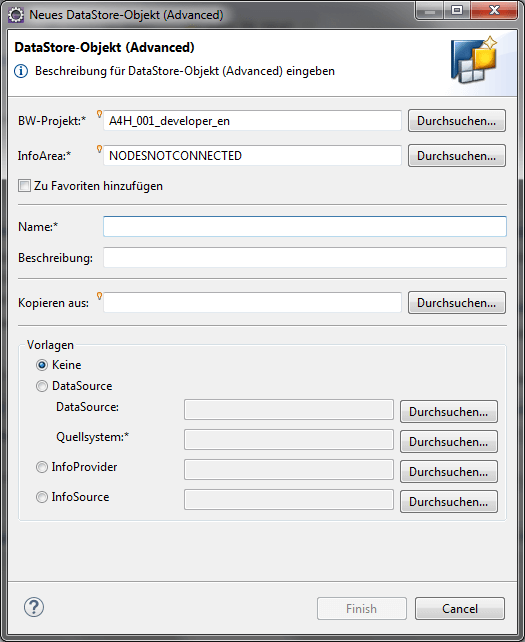
    If you use a BW/4HANA instance, you have to use the BW Modeling Tools (BWMT) to build your data model. You could only build Advanced DataStore-Objects (ADSO). If you create a new ADSO, you have
    to select a BW-Project and an InfoArea. After that you have to define a technical name and a description. You could also use a template to build your ADSO.

    Create new Advanced DSO
    Create new Advanced DSO

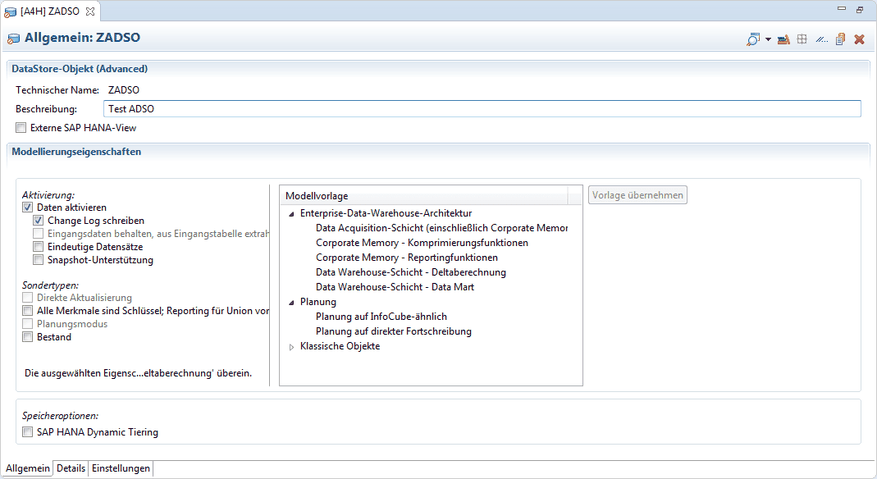
    On the general view of the ADSO you can choose a model template and define the technical settings of it.

    General View of an ADSO
    General View of an ADSO

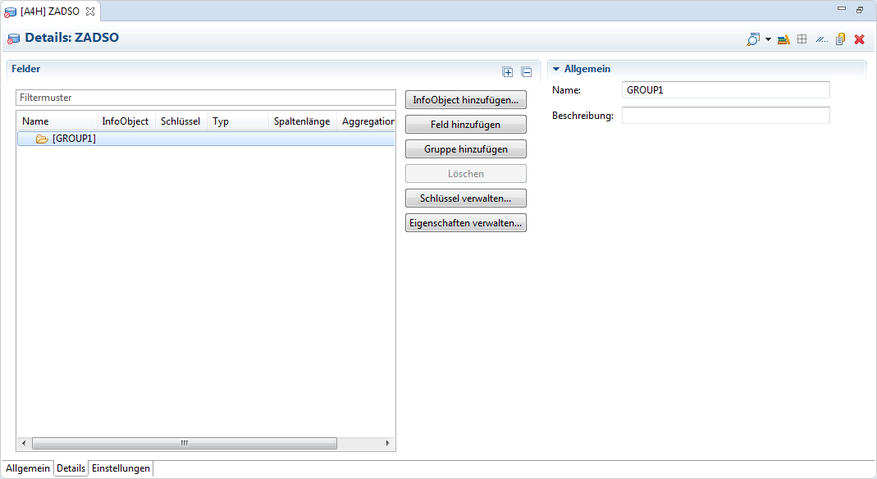
    Under Details you can add your InfoObjects, own fields, define keys and group your objects to logical groups. Really cool is the feature of own fields. You do not have to create a lot of
    InfoObjects anymore.

    Detail View of an ADSO
    Detail View of an ADSO

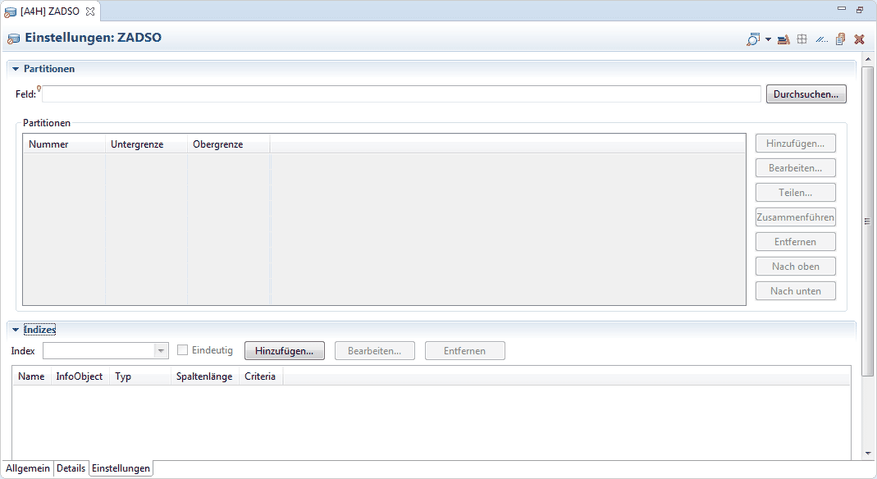
    After you have add your InfoObjects you can define under settings the partitions and indizes of your object.

    As you can see it is very easy to build an Advanced DataStore-Object with the BW Modeling Tools. After you have done all your settings, you have to activate it.

    author.


    I am Tobias, I write this blog since 2014, you can find me on twitter and youtube. If you want you can leave me a paypal coffee donation. You can also contact me directly if you want.
  • Install your own SAP BW on a virtual machine

    I described in a earlier post how to use BW/4HANA on Amazon AWS. But if you just need a developing system for some time
    and don’t want to use BW/4HANA, you can use the BW 7.5 SP2 developer edition on a virtual machine.

    There are a good post on the SCN. First you have to download Oracle VirtualBox. After that you have
    to download openSUSE. If you are a Linux Newbie you can read the following post how to install openSUSE on VirtualBox. The BW 7.5 SP2 developer edition can be found
    here.


    After you have downloaded everything and your openSUSE is running you should read this post to get the installation of the BW done. I needed a BW 7.5 for the new
    edition of my book, so it was a nice variety for me. 

    author.


    I am Tobias, I write this blog since 2014, you can find me on twitter and youtube. If you want you can leave me a paypal coffee donation. You can also contact me directly if you want.
  • Analysis Office – The Comprehensive Guide 2nd edition

    After I had time in my parental leave to read proof the second edition of my book, I can say it is now finished. The second edition is now available in the store. You can download the table of content here. This version is only available here and at the
    moment not on Amazon.


    If you have any questions feel free to ask and send me either an email or a comment. I hope to publish regularly in the next weeks so stay tuned.

    author.


    I am Tobias, I write this blog since 2014, you can find me on twitter and youtube. If you want you can leave me a paypal coffee donation. You can also contact me directly if you want.
  • Analysis Office Video Course

    In this blogpost I want to know if there is an interesting about an Analysis Office Video Course. Thanks for your time and your answers. Open the survey.

    author.


    I am Tobias, I write this blog since 2014, you can find me on twitter and youtube. If you want you can leave me a paypal coffee donation. You can also contact me directly if you want.