reyemsaibot

SAP BI Blog about SAP BW/4HANA, Analysis for Office and SAP HANA - by Tobias Meyer

Schlagwort: BW4

  • Comparing of data flows through SAP Landscape

    It is quite a while since I published my last post. A lot happened since then. Analysis for Office 2.8 SP10 is now available, the summer and the vacation  are over. But in the meantime
    I developed some new ABAP tools, had quite some interesting exchange and took the SQL Script course by Jörg
    Brandeis
    . But in this blog post I want to share with you the latest tool I developed which compare transformations in SAP Business Warehouse systems through the landscape.


    Here is a short overview:

    The tool allows you to compare and check the following information:

    • Global Transformation Information
    • Global Routine
    • Field, Start, End and Expert routine
    • Mapping
    • Constants
    • Data Transfer Process Information
    • Data Transfer Process Filter (Fields and Coding)
    • Data Transfer Process Semantic Groups

    So you see on the first sight if something is different between your SAP landscape. You can also see on which transports are your transformation was and how the import status is.

    Conclusion

    This tool allows you to reduce the maintenance in your SAP landscape and display directly the differences. You can either start with a specific transformation or with a source or target, which
    means the complete data flow will be analyzed. If you have any ideas to extend this program, please let me know.

    author.


    Hi,

    I am Tobias, I write this blog since 2014, you can find me on Twitter,
    LinkedInFacebook and YouTube. I work as a Senior Business Warehouse Consultant. In 2016, I wrote the first edition of . If you want, you can leave me a PayPal coffee donation. You can also contact me directly if you want.


    You want to know SAP Analysis for Office in a perfect detail?
    You want to know how to build an Excel Dashboard with your Query in Analysis for Office? 
    You want to know how functions in SAP Analysis for Office works?


    Then you have to take a look into Analysis for Office  – The Comprehensive Guide. Either as a video course or as an e-book.


  • BW/4HANA Query Link Components

    In BW/4HANA SAP offers you the possibility to link restricted or calculated key figures across different Composite Providers. The advantage of the link components concept is that they can
    automatically synchronize whenever you make changes in the source or master component. If you are not familiar with this concept.


    SAP Help:

    A linked component can be automatically synchronized whenever changes are made to the corresponding source component.

    Example scenario: You have two highly similar InfoProviders, IP_A and IP_B. You have created the query Q_A for IP_A. You now want to create the query Q_B for
    InfoProvider IP_B. You want this query to be very similar to query Q_A and to be automatically adjusted whenever changes are made to query Q_A.

    To do this, you use the link component concept: You create the linked target query Q_B for source query Q_A. This is more than just a copy, as the system also
    retains the mapping information. This mapping information makes it possible to synchronize the queries.

    So the concept is really nice because you can ensure that your key figures with the same name has also the same configuration, e.g. your turnover is configured correctly on any Composite Provider
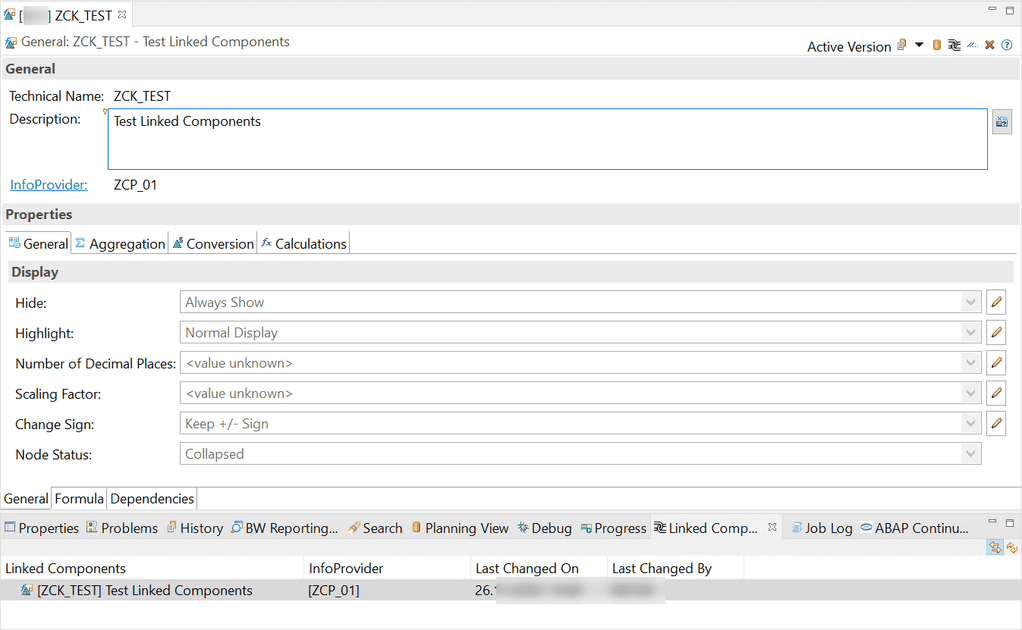
    in your system. Now let’s create a new link component. First we select a restricted key figure on our Composite Provider and goto „Linked Component“ view in Eclipse.

    New Keyfigure in Eclipse
    New Keyfigure in Eclipse

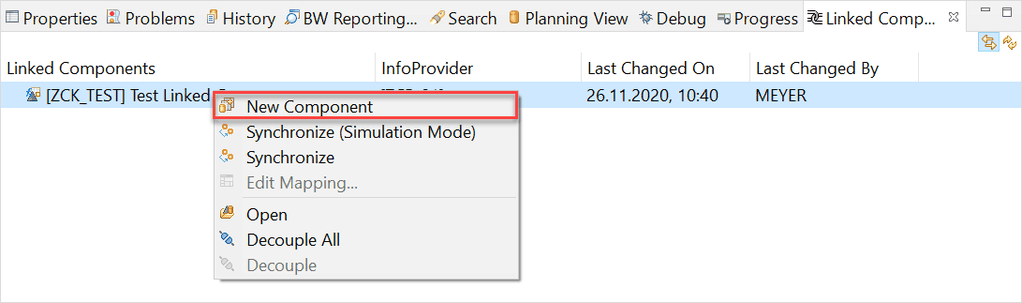
    Use the right click on the key figure in the „Linked Component“ view and select „New Component“

    New Query Link Component
    New Query Link Component

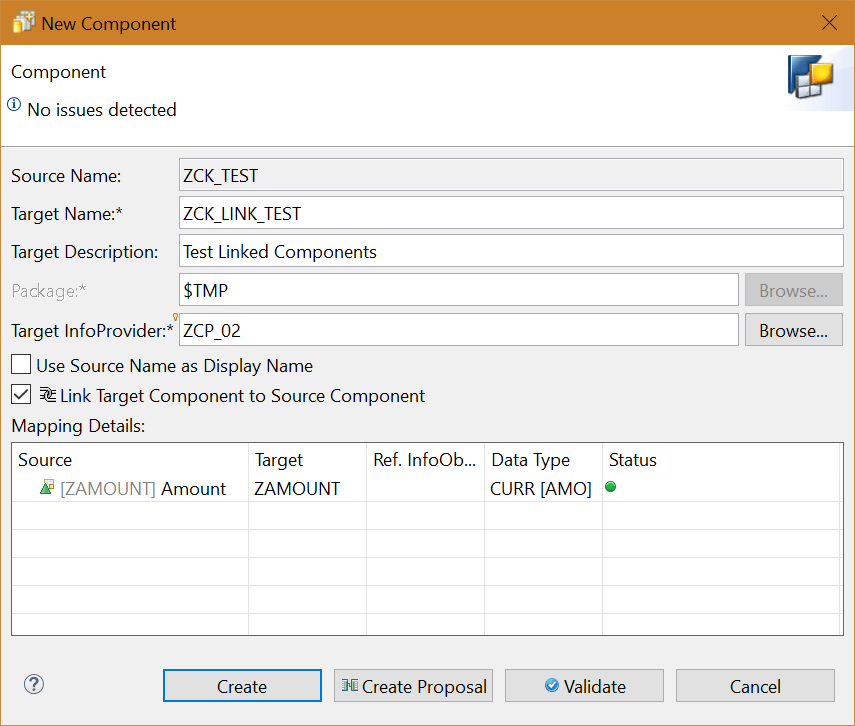
    A new dialog appears, which allows us to create a new linked key figure. First we have to define a Target Name and a Target InfoProvider. Now we can click on Create Proposal.

    Create new Query Link Component
    Create new Query Link Component

    After the status is green, we can create this new link component.

    Keyfigure with Link Component
    Keyfigure with Link Component

    So now let’s come to an issue what happen when you unlink your query components by mistake. Here the trouble begins. There is no function to link your broken query link component again to the
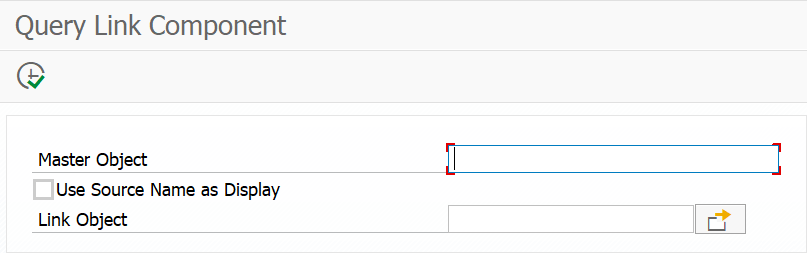
    original target. Which means you have to create a new link component and replace it in all your queries but for this I create a little tool called Query Link Component to link the components again.


    Query Link Component Tool
    Query Link Component Tool

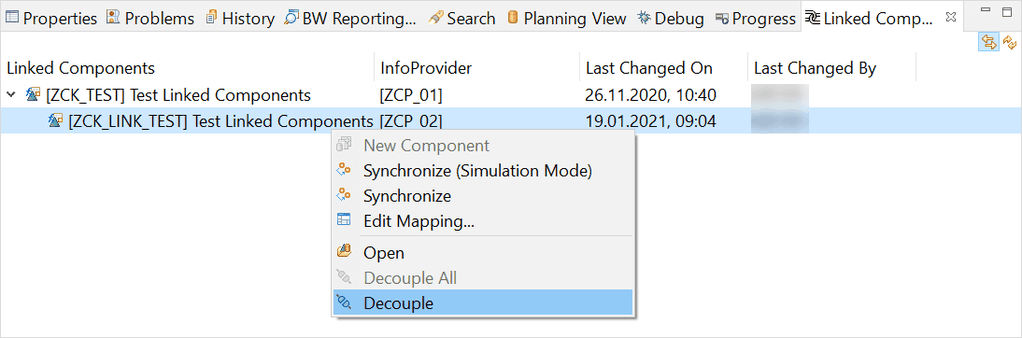
    So let’s make an example, we just decouple our created link component and link it afterwards again.

    Decouple an existing link component
    Decouple an existing link component
    Keyfigure without Link Component
    Keyfigure without Link Component

    Now we open the Query Link Component program and fill out all necessary information and link our key figure again.

    Create the Link Component again
    Create the Link Component again

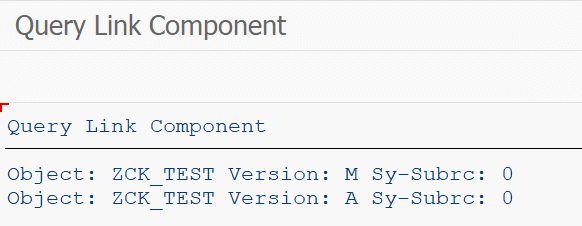
    Click on Execute (F8)

    Linking was successful
    Linking was successful

    Now we close and reopen the key figure in Eclipse, and we will see the link component is back again.

    Query Link Component works again
    Query Link Component works again

    Conclusion

    I like the concept of linked components in BW/4HANA, but I don’t know why SAP has no such function to link a broken query component again. My little tool helps me to fix this issue and save me a
    lot of time. Do you use the Link Components Concept in your BW/4HANA?

    author.


    Hi,

    I am Tobias, I write this blog since 2014, you can find me on Twitter,
    LinkedInFacebook and YouTube. I work as a Senior Business Warehouse Consultant. In 2016, I wrote the first edition of . If you want, you can leave me a PayPal coffee donation. You can also contact me directly if you want.


  • BW/4HANA XXL InfoObjects

    Last week a colleague and I look into the XXL InfoObjects in SAP BW/4HANA. We searched the online help and there is a short video about the topic. But after that we
    had no clue how we can use it. Can we use it in Analysis for Office? Or just in the query or Composite Provider? What is the purpose of these InfoObjects? Can we store a documentation and open it
    directly from the query?

    So I build an example XXL InfoObject and added it as a XXL Attribute to an InfoObject. This InfoObject was in my Composite Provider, so I looked into the Composite Provider with Analysis for
    Office and don’t see the XXL InfoObject. So we are back to start. What can I do with it? Now I asked around on twitter. And I was surprised about the answers.

    Jakob wrote:

    „Its not only to use it. You have to maintain, visualize and to report it. One of the miracles. Man people wants it , test it……a few scenarios which is
    valueble…..“


    Roland
    wrote:

    „Indeed, looked
    promising, never found a usecase“


    Georgios
    wrote:

    „I don’t see any use case to be honest. I wanted to use them once to report on some quite long text values until I realized they can’t be used in reporting.“


    Jakob wrote:

    We used it in planning application to comment keyfigures. Onother case was to integrate PDF in dashbords for documentations. Another usecase was to Integrated CAD
    drawings in a dashboard for Real Estate application. To store is not the problem anymore. To visualize edit etc..


    Jakob wrote:

    We used WAD and in the row there was displays a icon. After clicking you got a separete window. I have to look for the fuba or Some documentation. It was not
    completly visible! Thats what i mean vizualising and reporting can be a challenge 🙂


    Marc wrote:

    Haven’t tried but the announcement included an example https://blogs.sap.com/2019/09/23/improvements-of-bw4hana-analytical-engine-in-q3-2019-with-nw-bw-sp16-or-q1-2020-with-bw4hana-2.0-sp4/


    Conclusion

    So now I have a possible purpose but no clue how to use it exactly. Maybe someone from SAP can light me up? Or show some use cases? Thanks to all answers, maybe someone has another good idea? You
    can leave it in the comments.

    author.


    Hi,

    I am Tobias, I write this blog since 2014, you can find me on Twitter,
    LinkedInFacebook and YouTube. I work as a Senior Business Warehouse Consultant. In 2016, I wrote the first edition of . If you want, you can leave me a PayPal coffee donation. You can also contact me directly if you want.