If you want to create automated reports with data from an SAP ERP or Business Warehouse system, you first need to connect to a SAP system. The
connection can be used later to access system tables in the ERP or Business Warehouse or to trigger various other action.
1 2 3 4 5 6 7 8 9 10 11 12 13 14 15 16 17 18 19 20 21 |
Function Connect_to_SAP() Dim myConnection As Object Set myConnection = CreateObject("SAP.Functions") With myConnection .Connection.System = "ABC" 'Systemname .Connection.client = "100" 'Client .Connection.user = "xyz" 'User .Connection.password = "123" 'Password .Connection.Language = "DE" 'Language .Connection.systemnumber = "00" 'Systemnumber .Connection.hostname = "" 'Hostname End With 'Establish connection. If myConnection.Connection.logon(0, False) <> True Then Exit Function 'System Logoff myConnection.Connection.LOGOFF End Function |
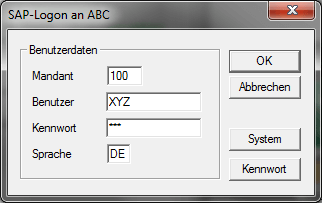
Due to the parameters False in the connection following Logon screen appears. Should this not be displayed, the parameter must be changed from False to
True.
Update:
Since Analysis Office the connection is a little bit different, you now have to use the Analysis Office API command SAPLogon. Here is
an example Application.Run(„SAPLogon“, „DS_1“, „MyClient“, „MyUser“, „MyPWD“, „EN“)
You may also be interested in these posts:
author.

Schreibe einen Kommentar