Update: Since Analysis for Office 2.3 you also can filter your data by uploading a file.
There is either the chance to filter multiple items directly when you refresh a query in Analysis for Office. To use this option
you have to click on the arrow on the plus button. A menu will be open and then you choose the entry „Add Lines Using Filter by Member„.
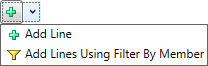
Now following the following dialog appears.
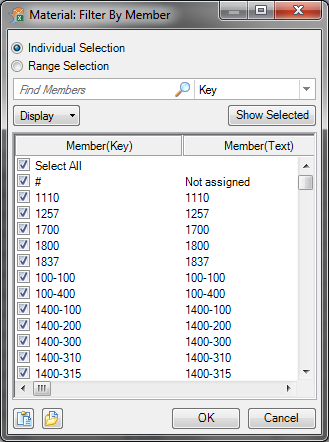
There you can either select everything by hand or you click on the small button on the left. This button adds the items from your clipboard. If you want to realize a filter with VBA, you have to
use the command =SAPSetVariable. You find more information in the Analysis for Office Helpfile.
These posts might also be intersting:
author.
I am Tobias, I write this blog since 2014, you can find me on twitter and youtube. If you want you can leave me a paypal coffee donation. You can also contact me directly if you want.
Schreibe einen Kommentar