Until now, we speak of Analysis Office 2.8, if you have different text maintained for an infoobject, Analysis Office shows only the short text in the prompt dialog. The maintenance view of the
InfoObject shows all different texts.
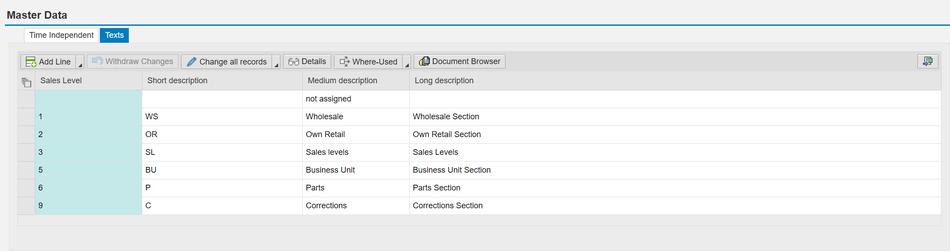
But the filter dialog in Analysis Office shows only the short text of this InfoObject and you cannot change it.
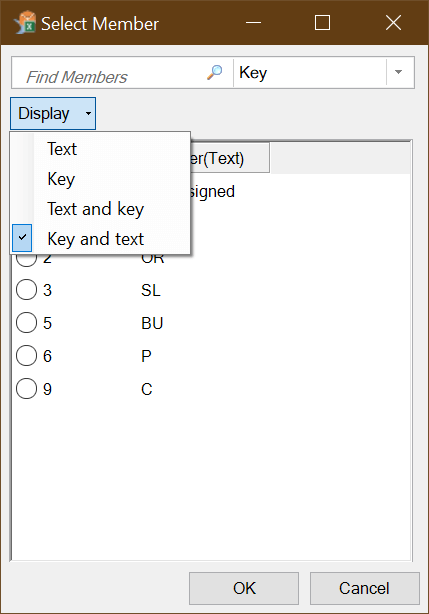
So this is very annoying because sometimes the short text does not explain the selection in a proper way. But there is a solution for this. You have to change the setting Display in the
Reporting Properties of the Composite Provider. You find this setting under Output of every Composite Provider for each InfoObject.

You can change the setting Display to the following options:
- Key and text
- Text
- Key
- Text and key
- Long text
- Medium-length text
- No display
- Short text
- Text and key as short text
- Text and key as medium text
- Text and key as long text
- Key and text as short text
- Key and text as medium text
- Key and text as long text
So when you now change it for example to Key and text as medium text, the prompt dialog filter shows the medium text.

I hope this help someone to solve a problem. If you have any questions write them in the comments.
author.
I am Tobias, I write this blog since 2014, you can find me on twitter and youtube. If you want you can leave me a paypal coffee donation. You can also contact me directly if you want.

Schreibe einen Kommentar