It was quite a bit silent here. That’s a fact. I had a lot on my plate since I have a new job and also before the promotion. But now I have a super cool topic on my mind I want to share with you.
Hierarchies are a common topic in companies. They offer the business users‘ flexibility to navigate in the frontend reports. In this example, I flatten the hierarchy structure to consume a
hierarchy with text nodes and infoobjects. The Product Group hierarchy looks like the following screenshot.

The hierarchy has one top node for all entries and then different groups with some nodes. (I only have this screenshot with German descriptions because the data model has here German words used).
The following screenshot shows the hierarchy displayed in SE16 with all levels and relations.

I have this idea from this blog post on blogs.sap.com, and I now use this
technique to get my hierarchy into SAP Datasphere. I use here a SQLScript View to build all necessary information in one view. You can also choose a different approach.
First View
This code on the hierarchy table restrict the data to get the top level, so we only have the root in the result.
top_level = select "NODEID",
                   "NODENAME" as "LEVEL1",
                   "TLEVEL",
                   "PARENTID",
                   "IOBJNM"
              from "HZCDWC001"
             where "OBJVERS" = 'A'
             and   "NODEID" = '00000006';
Second View
This code defines on the same hierarchy table all levels, excluding the top level.
top_level = select "NODEID",
                   "NODENAME" as "LEVEL1",
                   "TLEVEL",
                   "PARENTID",
                   "IOBJNM"
              from "HZCDWC001"
             where "OBJVERS" = 'A'
             and   "NODEID" = '00000006';

child_level = select "NODEID",
                     "NODENAME" as "LEVEL1",
                     "TLEVEL",
                     "PARENTID",
                     "IOBJNM"
                from "HZCDWC001"
               where "OBJVERS" = 'A'
               and   "NODEID" <> '00000006';
Third View
To achieve the outcome (a flat hierarchy) I join now the first internal table with the second using nested joins between NODEID and PARENTID to get the parent child relationship.
It is only flattened up to level 3, because the hierarchy does not have more levels, but can be extended even further if needed.
top_level = select "NODEID",
                   "NODENAME" as "LEVEL1",
                   "TLEVEL",
                   "PARENTID",
                   "IOBJNM"
              from "HZCDWC001"
             where "OBJVERS" = 'A'
             and   "NODEID" = '00000006';

child_level = select "NODEID",
                     "NODENAME" as "LEVEL1",
                     "TLEVEL",
                     "PARENTID",
                     "IOBJNM"
                from "HZCDWC001"
               where "OBJVERS" = 'A'
               and   "NODEID" <> '00000006';

all_levels = select L1."LEVEL1",
                    L2."LEVEL1" as "LEVEL2",
                    L3."LEVEL1" as "LEVEL3"
               from :top_level as "L1"
               left outer join :child_level as "L2"
               on L1."NODEID" = L2."PARENTID"
               left outer join :child_level as "L3"
               on L2."NODEID" = L3."PARENTID";

return select "LEVEL1",
              "LEVEL2",
              "LEVEL3"
         from :all_levels;
The data preview displays the flatten structure of the hierarchy

Now I can create a dimension with a level hierarchy and consume it in my transactional data. Therefor I change the semantic usages to Dimension

After that is done, I create a hierarchy.
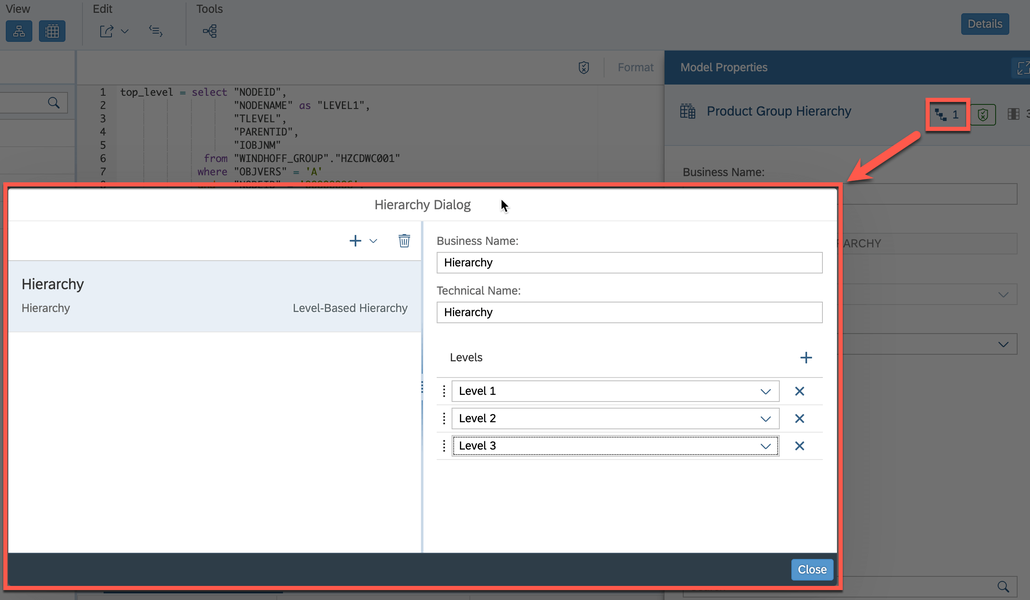
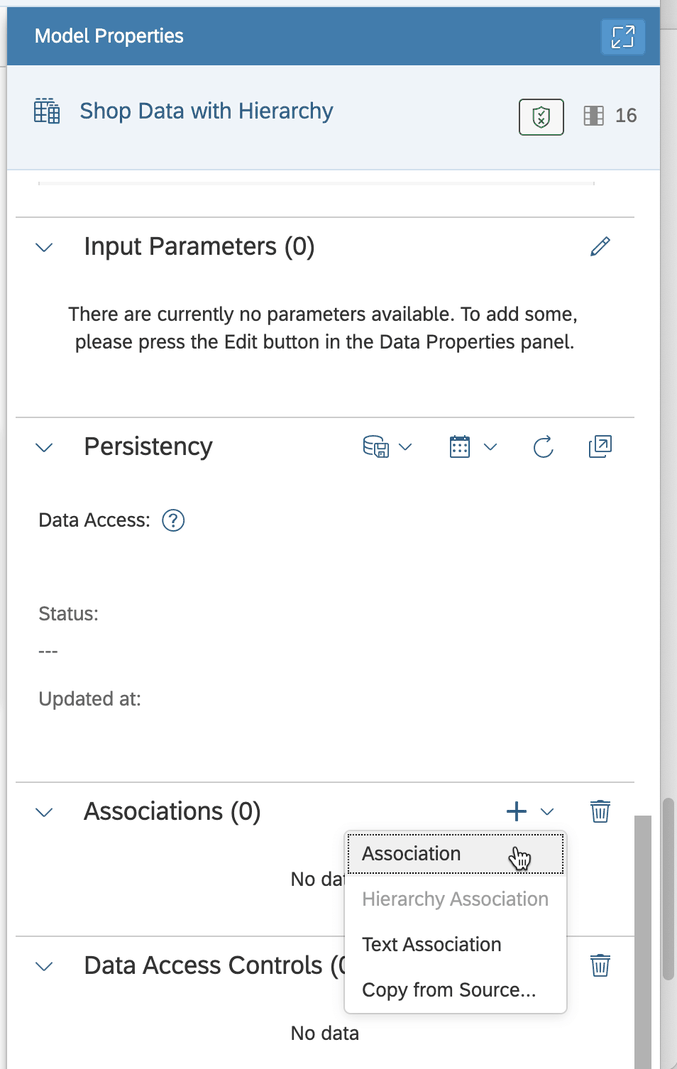
Now we can deploy the dimension and use it in the transactional view. Add the association.
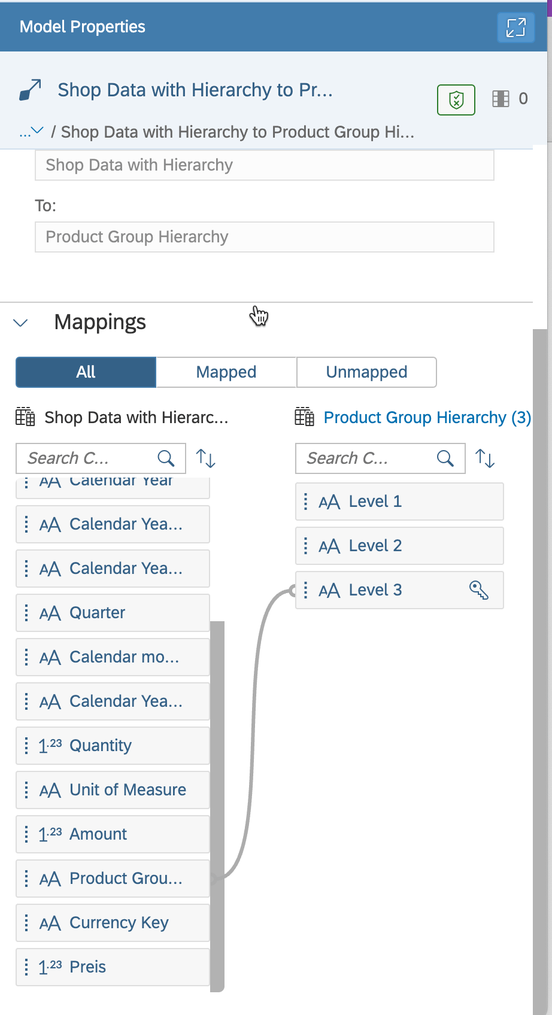
Create the mapping between the fact data and the hierarchy dimension.
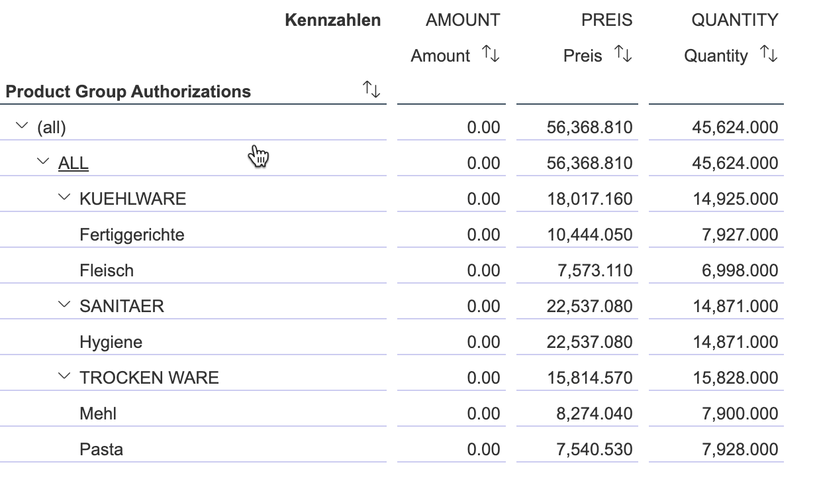
The last step is to use the fact model in an Analytic Model and analyze the data.
Conclusion
At the moment (end of May 2023) the hierarchies with text nodes are not supported yet from SAP Datasphere. So I think it is one way to go. If you have another way, please let me know in the
comments or through LinkedIn. Next post will be how to use this concept and authorizations in SAP Datasphere.
author.


Schreibe einen Kommentar