reyemsaibot

SAP BI Blog about SAP BW/4HANA, Analysis for Office and SAP HANA - by Tobias Meyer

Analysis Office Size Limit of result set exceeded with small query

It has been a quite while since the last post. But with a go live and a reorganization of my current project I hadn’t time to look into some topic. But here is a new kind of interessting bug. We
had an open task from a user of the controlling department, that a query display the message:

„Size Limit of result set exceeded.“

That’s an odd thing, because the query has only six columns and 110 rows and when the user dragged the calendar month into the columns it should have 12 columns for the actual year and 110 rows.
Which is defintily lower than the limit of Analysis for Office, which is 500.000 cells.
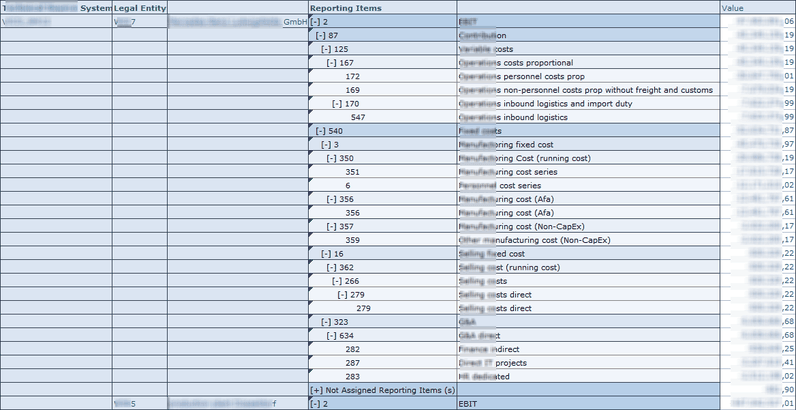
Query with a simple layout

So I tested the query in the BW backend with the transaction rsrt. It worked perfectly.
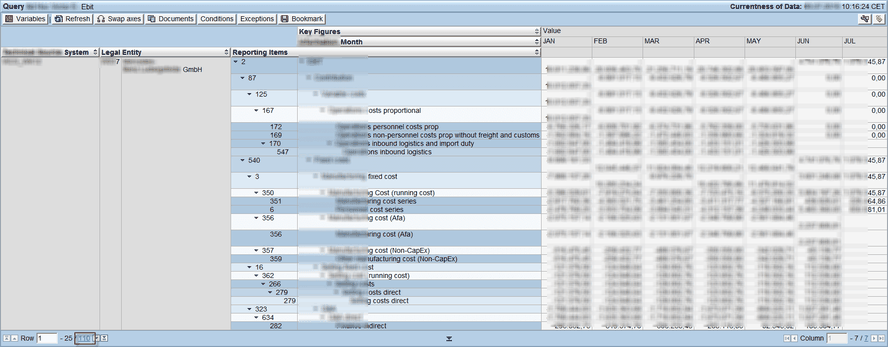
Query with calendar month in the columns

So the query is working correctly. But why Analysis for Office throw me the error? It appears on different computers and the rsadmin
parameter was default by 500.000 cells. After a little search I found the problem. The query dimensions were all set to show Vales from Master Data instead of Posted
Values
and the query has the option to suppress zeros in columns and rows. So when I deselect the suppress zero option, the query now shows around 83.000 rows and 6
columns which are 498.000 cells and this is short below the limit of 500.000 cells. 


Now we change the option from Show Values of Master Data to Posted Value and the query worked for the controlling deparment.The only question which is not answer is why does it work in RSRT
with the same option it doesn’t work in Analysis for Office? Does anyone have an idea?

author.


Hi,

I am Tobias, I write this blog since 2014, you can find me on twitterfacebook and youtube. I work as a Senior Business
Warehouse Consultant. In 2016 I wrote the first edition of . If you want you can leave me a paypal coffee
donation. You can also contact me directly if you want.


Kommentare

7 Kommentare zu „Analysis Office Size Limit of result set exceeded with small query“

  1. Avatar von Guy Lamoureux
    Guy Lamoureux

    My guess : there is no .NET involved in RSRT (?)

  2. Avatar von Tobias
    Tobias

    Hi, I think this must be a problem with the BICS Connection, because the limit is the BICS_DA_RESULT_SET_LIMIT_DEF of the table rsadmin, but it worked in rsrt with the ABAP BICS Query Display. See here https://twitter.com/reyemsaibot/status/1149270699510554625

  3. Avatar von Aaron Benner
    Aaron Benner

    I have seen this before. Are you using IP functions to add planning data and thus need the „all values from master data“ option? Internally what is happening is that the tuple of all combinations of master data across all the dimensions is being calculated (although it is not displayed in the query) and is running up into the 500K limit. I believe it is more of a in-memory-calculation limit than the number of cells actually displayed. Separate thought – have you tried the 64 bit version of Excel / AO? It lets you bring in much more data and may resolve the issue, if it is possible to install in your environment politically.

  4. Avatar von Tobias
    Tobias

    Hi, I haven’t tired the 64Bit version. But this is hard in a bigger company to accomplish. But I will give it a try when I have time to test it and give feedback.

  5. Avatar von Peter
    Peter

    Hi! Even if it is no explaination. But why not adapt setting ResultSetSizeLimit? Even if it is not recommended. In some cases even on 32 Bit installation I have no bad experiences. We had a similar problem beeing just in the area of 25×17.000 cells. But I don’t do Analysis very often so you have maybe other experiences. I assume that internal calculation of this 500.000 cell limit is different to what is seen. I think this is what you already show with the change to posted values.

  6. Avatar von Tobias
    Tobias

    Hi Peter, the setting has to be set on every user who uses this query (and may slow down the system after all). I think it is the wrong way to show as default the master data view in a query and not only the posted values.

  7. Avatar von Maximilian K.
    Maximilian K.

    First i thought about inventory data aandd Non-cum keyfigures that produce always Problems. And yes i think it is more the BICS Resultat limit or .NET in combi with the MD/Posted values

Schreibe einen Kommentar

Deine E-Mail-Adresse wird nicht veröffentlicht. Erforderliche Felder sind mit * markiert