staging.tobiasmeyer.net

Schlagwort: analysis for office

  • Analysis for Office 2.8 SP14 is available

    Unfortunately, I didn’t make it to publish the post in the last month. There were several reasons that I didn’t make it, like the internal BI days or to prepare the next deep dive for Data
    Warehouse Cloud. But back to topic. SAP published Analysis for Office 2.8 SP14. Maybe there is something with the SP14 because Analysis Office 1.4 had also a SP14 before Analysis office 2.0 was
    released. So perhaps we see some new feature in the future?


    But back to Analysis for Office 2.8 SP14. Now you are able to connect to Data warehouse Cloud and consume the analytical data sets directly in Excel. This is the biggest update with for a long
    time with features. The last updates were mostly bug fixing and some technical setting parameter, but nothing what is fascinating.


    Besides the function in Analysis Office 2.8 SP12 repeat titles of a crosstab. The latest version also offers a new API method called SaveBwComments and some new technical settings like

    • AllowFlatPresentationForHierarchyNodeVariables
    • SapGetDataClientSideValidationOnly
    • UseServerTypeParamForOlapConnections

    But for me the best part is now the Data Warehouse Cloud connection. For this, you have to create a connection in the Insert Data Source dialog.
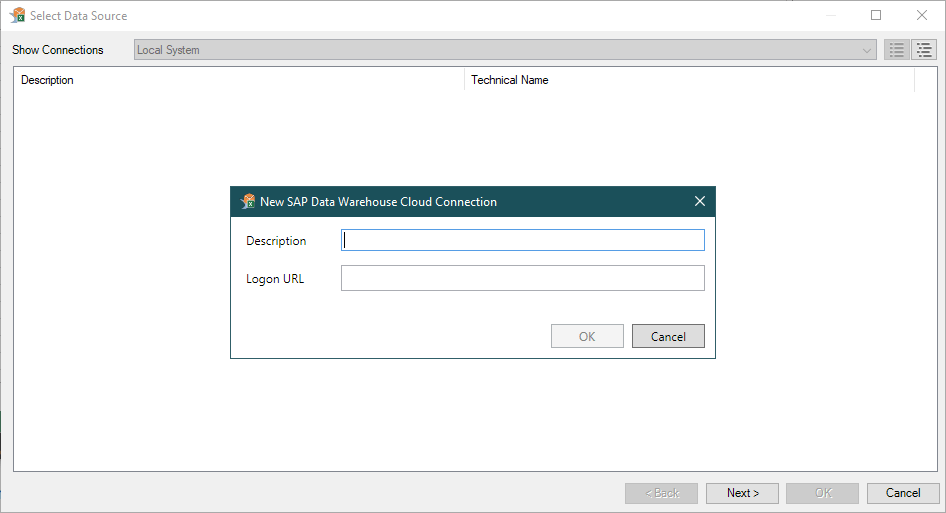
    Create Data Warehouse Cloud connection in Analysis for Office
    Create Data Warehouse Cloud connection in Analysis for Office

    There, you have to define a description and a logon URL to your Data Warehouse Cloud tenant. To logon, just double-click the created entry and enter your credentials.


    Now you get the typical Analysis office select data source dialog, and you can search for the analytical datasets of each space you are assigned to. You can search for the technical or business
    name of a view, and also for the space name. This is nice, but the Data Builder is still missing the folder or Info Area structure. So it can be a bit too much to scroll through the entire
    space if you have a lot of analytical data sets in it. By double click you can insert the crosstab and work like before in Analysis for Office

    Conclusion

    So this is the new function. And other than the SAP Analytics Cloud Addin for Microsoft Office, which has no really useful functions. You can now use the one and only Analysis for Office to
    analyze your data from the Data Warehouse Cloud (DWC). Maybe there will be sometimes also the relation data set available and not only the analytical ones.

    author.


    Hi,

    I am Tobias, I write this blog since 2014, you can find me on Twitter,
    LinkedInFacebook and YouTube. I work as a Senior Business Warehouse Consultant. In 2016, I wrote the first edition of Analysis Office – The Comprehensive Guide. If you want, you can leave me a PayPal coffee donation. You can also contact me directly if you want.


    Subscribe


    • In my newsletter, you get informed about new topics
    • You learn how to use Analysis Office
    • You get tips and tricks about SAP BI topics
    • You get the first 3 chapters of my e-book Analysis Office – The Comprehensive Guide for free
    /**/

    * indicates required

    You want to know SAP Analysis Office in a perfect detail?
    You want to know how to build an Excel Dashboard with your Query in Analysis Office? 
    You want to know how functions in SAP Analysis Office works?


    Then you have to take a look into Analysis Office  – The Comprehensive Guide. Either as a video course or as an e-book.


  • Analysis for Office 2.8 SP8 is available

    Since last week Analysis for Office 2.8 SP8 is available, and you can download it with your S-User. I just got a question if I could write about it, so here are the notes which fixes some bugs:


    • AO 2.x: Template for patch for AO and AO_SAC (s-note 3035301)
    • AO: SAC Live Data Connections – Input Readiness of BW planning queries can’t get restored when opening a saved workbook (s-note 3038493)
    • Array formula cannot be updated via VBA (s-note 3017643)
    • BW OLAP Connection in Analysis Office Workbook Targets a Wrong System after Promotion (s-note 2972912)
    • Date format in AfO Schedule different than normal run (s-note 3001137)
    • New Lines – Value Help exception while opening if search is disabled [f197-731f-8e] (s-note 3019161)
    • SAPSetData: Introduced Option „InitValue“ (s-note 3028120)


    Conclusion

    So you see the latest update of Analysis for Office don’t fix very much. I think SAP is almost done with Analysis for Office, because the what’s new guide only shows two new features:

    • SAP Analytics Cloud Live Data connections
    • Technical Setting DisableBWDirectSearch 


    So the product is almost finished? What is still with a connection to Data Warehouse Cloud?

    author.


    Hi,

    I am Tobias, I write this blog since 2014, you can find me on Twitter,
    LinkedInFacebook and YouTube. I work as a Senior Business Warehouse Consultant. In 2016, I wrote the first edition of Analysis Office – The Comprehensive Guide. If you want, you can leave me a PayPal coffee donation. You can also contact me directly if you want.


    Subscribe


    • In my newsletter you get informed about new topics
    • You learn how to use Analysis Office
    • You get tips and tricks about SAP BI topics
    • You get the first 3 chapters of my ebook Analysis Office – The Comprehensive Guide for free
    /**/

    * indicates required

    You want to know SAP Analysis Office in a perfect detail?
    You want to know how to build an Excel Dashboard with your Query in Analysis Office? 
    You want to know how functions in SAP Analysis Office works?


    Then you have to take a look into Analysis Office  – The Comprehensive Guide. Either as a video course or as a ebook.


  • SAP Analysis for Office 2.8 SP6 is available

    Since last Friday the latest version of SAP Analysis for Office is now available. You can download it in the SAP Launchpad. As the last version we have some bugs which are now hopefully fixed:


    • All crosstabs are removed from workbook (s-note 2990456)
    • Date picker control using wrong calendar or chosen date is incorrect (s-note 2981896)
    • Exception when saving a workbook with a chart sheet (s-note 2981234)
    • Search result does not show translated texts (s-note 2977530)
    • Planning sequence execution uses wrong variable values (s-note 2975399)
    • Excel hangs after copy and paste as Worksheet object (s-note 2974961)
    • Non-SAP worksheet cell referencing SAP Crosstab cell changes its number format (s-note 2974435)
    • AO: SAC – Unsupported S/4HANA Cloud connections are listed in Live Data Connections overview (s-note 2973887)
    • [a42d-4b73-7e] ServerGroup and SNC Information are Missing When Used Analysis Office Recent List (s-note 2972745)
    • Input has invalid format error when using exponential / scientific notation in new lines (s-note 2971200)
    • The Chart has empty data series or categories after swap crosstab axes or data refresh (s-note 2970169)
    • Suppressing all messages (s-note 2970000)
    • Refresh All button is disabled for AO workbook (s-note 2969805)
    • Incorrect sort order of BW systems in Replace System dialog (s-note 2968291)
    • Error [3291-74de-1b] when using Excel with Traditional Chinese or ClientLanguage is set to „ZF“ (s-note 2967800)
    • Opening a workbook from BIP results in a nested exception [1b72-be52-de] (s-note 2967546)
    • Exception when using an embedded sheet in Word (s-note 2966861)
    • Saving a workbook results in a nested exception [e525-fb53-d4] (s-note 2966368)
    • Symbols of the Conditional Formatting are not removed (s-note 2966312)
    • SAC Logon Error in Analysis Office – No connection to system INA_SAC (s-note 2964461)

    The online help of SAP Analysis for Office is not updated yet. A lot of s-notes for a Service Pack 6. I had some issues when I refresh my data source with the last version, I hope this will be
    fixed now. Do you have any problems with Analysis Office?

    author.


    Hi,

    I am Tobias, I write this blog since 2014, you can find me on twitter,
    facebook and youtube. I work as a Senior Business
    Warehouse Consultant. In 2016, I wrote the first edition of Analysis Office – The
    Comprehensive Guide
    . If you want you can leave me a paypal coffee donation.
    You can also contact me directly if you want.


    Subscribe


    • In my newsletter you get informed about new topics
    • You learn how to use Analysis Office
    • You get tips and tricks about SAP BI topics
    • You get the first 3 chapters of my e-book Analysis Office – The Comprehensive Guide for free
    /**/

    * indicates required

    You want to know SAP Analysis Office in a perfect detail?
    You want to know how to build an Excel Dashboard with your Query in Analysis Office? 
    You want to know how functions in SAP Analysis Office works?


    Then you have to take a look into Analysis Office  – The Comprehensive Guide. Either as a video course or as an e-book.


  • Analysis Office 2.8 SP5 is available

    Since a couple of days the latest version of Analysis for Office 2.8 is available. Michael was a little faster and notice it on Twitter
    before me. So let’s look into it. SAP fixes a bunch of bugs with this service pack. Here is an overview:


    • AO 4 SAC: „Group Members“ functionality not available when using BW Live Data Connections (s-note 2962476)
    • AO: BEx Workbook Conversion – An exception occurs when trying to save a converted BEx workbook which contains formulas (s-note 2965890)
    • Action has been cancelled due to invalid input values (s-note 2958731)
    • Analysis for office responds slow in AO 2.8 (s-note 2966651)
    • BIP Logon Issues (s-note 2976169)
    • BIP OLAP Connection targeting another system (s-note 2972912)
    • BIP Workbook fails to save back to the platform (s-note
      2963966
      )
    • Error [3291-74de-1b] when using Excel with Traditional Chinese or ClientLanguage is set to „ZF“ (s-note 2967800)
    • Exception when the Number of NewLines is set to 0 (s-note 2961082)
    • Exception when using an embedded sheet in Word (s-note
      2966861
      )
    • Filter Dialog – Change state of Tree Node if its text was clicked (s-note 2938903)
    • Input has invalid format error when using exponential / scientific notation in new lines (s-note 2971200)
    • Insecure Connection Message with BIP OLAP (s-note 2967910)
    • New Lines – F4 help does not display member of respective cell (s-note 2963872)
    • Refresh All button is disabled for AO workbook (s-note
      2969805
      )
    • Refresh Workbook with BIP OLAP SSO Connection Fails in Analysis Office (s-note 2957833)
    • SAC Logon Error in Analysis Office – No connection to system INA_SAC (s-note 2964461)
    • SAP Formulas in Scheduled Workbooks are Displayed as #NAME? in Excel (s-note 2765716)
    • Saving a workbook results in a nested exception [e525-fb53-d4] (s-note 2966368)

    A lot of s-notes for a Service Pack 5. I hope Analysis for Office will get a stable version again. Do you have any problems with Analysis Office?

    author.


    Hi,

    I am Tobias, I write this blog since 2014, you can find me on twitter,
    facebook and youtube. I work as a Senior Business
    Warehouse Consultant. In 2016, I wrote the first edition of Analysis Office – The
    Comprehensive Guide
    . If you want you can leave me a paypal coffee donation.
    You can also contact me directly if you want.


    Subscribe


    • In my newsletter you get informed about new topics
    • You learn how to use Analysis Office
    • You get tips and tricks about SAP BI topics
    • You get the first 3 chapters of my e-book Analysis Office – The Comprehensive Guide for free
    /**/

    * indicates required

    You want to know SAP Analysis Office in a perfect detail?
    You want to know how to build an Excel Dashboard with your Query in Analysis Office? 
    You want to know how functions in SAP Analysis Office works?


    Then you have to take a look into Analysis Office  – The Comprehensive Guide. Either as a video course or as an e-book.


  • Analysis Office Video Course is done

    My video course about Analysis for Office is done. It will be released on 06.07.2020 @ 8:00 am MESZ. You find it under video.analysisoffice.net and you get more than 4 hours of 4k content for only 199€. The content will be
    extended if it is necessary. Here is a overview of the curriulum. 

    • Installation and Configuration
    • Customize Analysis Office 
    • Basic Functionality
    • Advanced Funtions
    • Reporting with Analysis API and VBA

    Every chapter has a lot of videos to explain certain functions in detail. You can also view some letures as a preview for the course so have a look into it. Here are some examples with to show
    you what you can expect.

    Previews

    Get the ebook Analysis Office – The Comprehensive Guide for free

    I hope you can imagine what you get in this course. I speeded the videos above a little bit up but on the site you see the whole preview. If you have any questions please feel free to contact me.
    So join now the Analysis Office video course and the first 5 get my ebook Analysis Office – The Comprehensive Guide for free.

    • Get more than 4 hours of 4k content for 199€
    • The first 5 get my ebook for free (value 59,99€)

    author.


    I am Tobias, I write this blog since 2014, you can find me on twitter and youtube. If you want you can leave me a paypal coffee donation. You can also contact me directly if you want.

    You want to know SAP Analysis Office in a perfect detail?
    You want to know how to build an Excel Dashboard with your Query in Analysis Office? 
    You want to know how functions in SAP Analysis Office works?


    Then you have to take a look into Analysis Office  – The Comprehensive Guide.


    SAP Analysis for Office – The Comprehensive Guide

    The book SAP Analysis for Office – The Comprehensive Guide by Tobias Meyer is a pdf book about SAP Analysis for Office. It is based on Analysis for Office 2.8 and contains 346 Pages.

    45,00 €


    SAP Analysis for Office – The Comprehensive Guide

    SAP Analysis for Office – The Comprehensive Guide is a pdf book about SAP BusinessObjects Analysis for Office. It is based on Analysis for Office 2.7 and contains
    299 Pages.

    37,00 €

  • Analysis Office 2.8 SP3 is available

    I know its been a while since the last blog post. But I am currently working on the Analysis Office Video course to get
    it done. When you follow me on Twitter or Linkedin you get an update all the time. But back to topic. Analysis Office 2.8 SP3
    is available almost over one week so let’s look into it.


    These bugs are fixed now:

    • #VALUE error for hierarchy leaves in SAPGetData in Fomula-optimized mode (s-note 2928899)
    • BAdI is not executed when launching (s-note 2923786)
    • Exception After Deleting an Excel Sheet (s-note 2907359)
    • Saving a workbook results in exception 0x800AC472 (s-note 2925165)

    So its not much but after SAP released the standalone addin for SAP Analytics Cloud, they still working on Analysis for Office.


    author.


    I am Tobias, I write this blog since 2014, you can find me on twitter and youtube. If you want you can leave me a paypal coffee donation. You can also contact me directly if you want.

    You want to know SAP Analysis Office in a perfect detail?
    You want to know how to build an Excel Dashboard with your Query in Analysis Office? 
    You want to know how functions in SAP Analysis Office works?


    Then you have to take a look into Analysis Office  – The Comprehensive Guide.


    SAP Analysis for Office – The Comprehensive Guide

    The book SAP Analysis for Office – The Comprehensive Guide by Tobias Meyer is a pdf book about SAP Analysis for Office. It is based on Analysis for Office 2.8 and contains 346 Pages.

    45,00 €


    SAP Analysis for Office – The Comprehensive Guide

    SAP Analysis for Office – The Comprehensive Guide is a pdf book about SAP BusinessObjects Analysis for Office. It is based on Analysis for Office 2.7 and contains
    299 Pages.

    37,00 €

  • Analysis Office Video Course

    Currently I am working on my Analysis Office Video Course. It will be a full discover of Analysis for Office. So if you are interested in it, you can join the list to get a special price when it
    will be launched. 


    Thank you for all your support.

    /**/

    Subscribe

    * indicates required

    author.


    I am Tobias, I write this blog since 2014, you can find me on twitter and youtube. If you want you can leave me a paypal coffee donation. You can also contact me directly if you want.

    You want to know SAP Analysis Office in a perfect detail?
    You want to know how to build an Excel Dashboard with your Query in Analysis Office? 
    You want to know how functions in SAP Analysis Office works?


    Then you have to take a look into Analysis Office  – The Comprehensive Guide.


    SAP Analysis for Office – The Comprehensive Guide

    The book SAP Analysis for Office – The Comprehensive Guide by Tobias Meyer is a pdf book about SAP Analysis for Office. It is based on Analysis for Office 2.8 and contains 346 Pages.

    45,00 €


    SAP Analysis for Office – The Comprehensive Guide

    SAP Analysis for Office – The Comprehensive Guide is a pdf book about SAP BusinessObjects Analysis for Office. It is based on Analysis for Office 2.7 and contains
    299 Pages.

    37,00 €

  • Analysis Office: Time Dependent Hierarchies

    author.


    I am Tobias, I write this blog since 2014, you can find me on twitter and youtube. If you want you can leave me a paypal coffee donation. You can also contact me directly if you want.

    You want to know SAP Analysis Office in a perfect detail?
    You want to know how to build an Excel Dashboard with your Query in Analysis Office? 
    You want to know how functions in SAP Analysis Office works?


    Then you have to take a look into Analysis Office  – The Comprehensive Guide.


    SAP Analysis for Office – The Comprehensive Guide

    The book SAP Analysis for Office – The Comprehensive Guide by Tobias Meyer is a pdf book about SAP Analysis for Office. It is based on Analysis for Office 2.8 and contains 346 Pages.

    45,00 €


    SAP Analysis for Office – The Comprehensive Guide

    SAP Analysis for Office – The Comprehensive Guide is a pdf book about SAP BusinessObjects Analysis for Office. It is based on Analysis for Office 2.7 and contains
    299 Pages.

    37,00 €

  • What’s new in Analysis Office 2.8 SP2

    After the latest service pack of Analysis Office 2.8 was released this week, the online help is now available.
    Analysis Office now offers a button for creating and deleting of comments in the ribbon menu. In former versions, SAP used the text of Microsoft Excel for comments. As Microsoft renamed the
    comments to notes, it was inconsistent in the ribbon and the context menu. Now it is consistently again.


    Also new is the file system setting UseLegacyModeForFormulaContext which allows you to specify the mode for creating formulas with Table Design. And in the planning area
    there is a new setting called PlanningFunctionUploadFolder, which allows you to upload the values for executing planning objects from a file.


    So it is nothing big, but Analysis Office is still developing and not dead, even if there is a new SAC Addin. I hope there will be some feature I submitted. 

    author.


    I am Tobias, I write this blog since 2014, you can find me on twitter and youtube. If you want you can leave me a paypal coffee donation. You can also contact me directly if you want.

    You want to know SAP Analysis Office in a perfect detail?
    You want to know how to build an Excel Dashboard with your Query in Analysis Office? 
    You want to know how functions in SAP Analysis Office works?


    Then you have to take a look into Analysis Office  – The Comprehensive Guide.


    SAP Analysis for Office – The Comprehensive Guide

    The book SAP Analysis for Office – The Comprehensive Guide by Tobias Meyer is a pdf book about SAP Analysis for Office. It is based on Analysis for Office 2.8 and contains 346 Pages.

    45,00 €


    SAP Analysis for Office – The Comprehensive Guide

    SAP Analysis for Office – The Comprehensive Guide is a pdf book about SAP BusinessObjects Analysis for Office. It is based on Analysis for Office 2.7 and contains
    299 Pages.

    37,00 €

  • Analysis Office 2.8 SP2 is available

    Since today the latest version of Analysis Office 2.8 (release notes) is available. You can download it with your s-user in the SAP Support Portal.  There are only a few fixes:

    • AO: BEx Analyzer Workbook Conversion – Not all filters of Text Element converted (s-note 2902130)
    • Chart Data Series are added again as Chart Data (s-note
      2898931
      )
    • Exception thrown when the login process is interrupted (s-note 2900972)
    • Hierarchy selection disappears after confirming Filter Dialog in case of HANA (s-note 2897838)

    The online help is not updated, but will be in a few days I think. Also the special addin for SAP Analytics Cloud 2.8 SP2 is released. If you have any questions feel free to ask.

    author.


    I am Tobias, I write this blog since 2014, you can find me on twitter and youtube. If you want you can leave me a paypal coffee donation. You can also contact me directly if you want.

    You want to know SAP Analysis Office in a perfect detail?
    You want to know how to build an Excel Dashboard with your Query in Analysis Office? 
    You want to know how functions in SAP Analysis Office works?


    Then you have to take a look into Analysis Office  – The Comprehensive Guide.


    SAP Analysis for Office – The Comprehensive Guide

    The book SAP Analysis for Office – The Comprehensive Guide by Tobias Meyer is a pdf book about SAP Analysis for Office. It is based on Analysis for Office 2.8 and contains 346 Pages.

    45,00 €


    SAP Analysis for Office – The Comprehensive Guide

    SAP Analysis for Office – The Comprehensive Guide is a pdf book about SAP BusinessObjects Analysis for Office. It is based on Analysis for Office 2.7 and contains
    299 Pages.

    37,00 €