reyemsaibot

SAP BI Blog about SAP BW/4HANA, Analysis for Office and SAP HANA - by Tobias Meyer

Schlagwort: sapbw

  • How to check the scheme of your InfoCube.

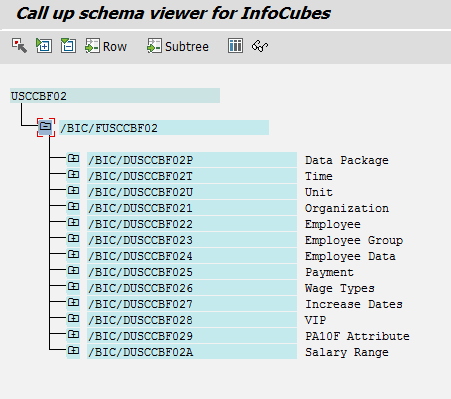
    SAP Business Warehouse transaction listschema
    SAP Business Warehouse transaction listschema

    There are several ways to look at the structure of an InfoCube. One way possibility would be to analyze it on the transaction rsa1. Another way to show the structure of an
    InfoCube is the transaction listschema.


    1. Call transaction listschema
    2. Choose a type of InfoCube
    3. Select a specific InfoCube
    4. Run

    author.


    I am Tobias, I write this blog since 2014, you can find me on twitter and youtube. If you want you can leave me a paypal coffee donation. You can also contact me directly if you want.

  • Connecting via VBA to a SAP system

    If you want to create automated reports with data from an SAP ERP or Business Warehouse system, you first need to connect to a SAP system. The
    connection can be used later to access system tables in the ERP or Business Warehouse or to trigger various other action.

     1
     2
     3
     4
     5
     6
     7
     8
     9
    10
    11
    12
    13
    14
    15
    16
    17
    18
    19
    20
    21
    Function Connect_to_SAP()
    
    Dim myConnection As Object
    Set myConnection = CreateObject("SAP.Functions")
    
    With myConnection
      .Connection.System = "ABC" 'Systemname
      .Connection.client = "100" 'Client
      .Connection.user = "xyz" 'User
      .Connection.password = "123" 'Password
      .Connection.Language = "DE" 'Language
      .Connection.systemnumber = "00" 'Systemnumber
      .Connection.hostname = "" 'Hostname
    End With
    
    'Establish connection.
    If myConnection.Connection.logon(0, False) <> True Then Exit Function
    'System Logoff
    myConnection.Connection.LOGOFF
    
    End Function
    

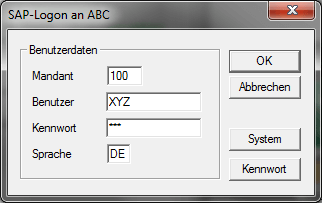
    Due to the parameters False in the connection following Logon screen appears. Should this not be displayed, the parameter must be changed from False to
    True.

    Logon via VBA
    Logon via VBA

    Update:

    Since Analysis Office the connection is a little bit different, you now have to use the Analysis Office API command SAPLogon. Here is
    an example Application.Run(„SAPLogon“, „DS_1“, „MyClient“, „MyUser“, „MyPWD“, „EN“)

    author.


    Hi,

    I am Tobias, I write this blog since 2014, you can find me on LinkedIn and
    YouTube. I work as a Data &
    Analytics Consultant. If you want, you can leave me a PayPal coffee donation.
    You can also contact me directly if you want.