reyemsaibot

SAP BI Blog about SAP BW/4HANA, Analysis for Office and SAP HANA - by Tobias Meyer

Analysis Office Data Analysis Advanced Calculations

Since Analysis Office 2.1 you have a formula editor. You can find this function in the group Data Analysis >>
Calculations >> Add Advanced Calculation.
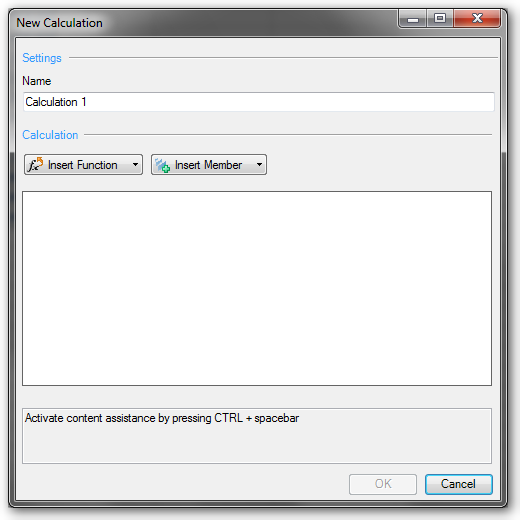
Analysis Office Add new advanced calculation

With this function you can create complex calculations, as you could make earlier in a BEx Query. You can find mathematical functions, data
functions, percentage functions and Boolean operators.


Besides addition and subtraction, you can find functions like logarithm to the base of 10 or decimal part of operand.


In the data functions you will find something like „value without dimension“ or „NOERR(X): Equals 0 for undefined calculations; otherwise x“ or „NDIV0(x): Equals 0 When Divided by 0; otherwise x.
The Boolean operators are found such functions as „AND“ or „EXCLUSIVE OR“


I think the new calculations are great, I haven’t longer to overfill the single query with dozens of calculations and I only need to build the calculations in the Workbook where I needed them.
But this is the greatest disadvantage too. When I need some calculations often, I have to create them each time.


Nevertheless, I am a friend of simple queries, because they are most immediately understandable.

author.


Hi,

I am Tobias, I write this blog since 2014, you can find me on twitterfacebook and youtube. I work as a Senior Business
Warehouse Consultant. In 2016 I wrote the first edition of . If you want you can leave me a paypal coffee
donation. You can also contact me directly if you want.


Kommentare

9 Kommentare zu „Analysis Office Data Analysis Advanced Calculations“

  1. Avatar von dissatisfied
    dissatisfied

    what’s the point of Boolean operators when there is no „IF“ function

  2. Avatar von Tobias
    Tobias

    Hi, the IF-function is build in another way. This is how you build a IF-Then: + NOT * Tobias

  3. Avatar von Gabriel
    Gabriel

    Hello, Is there a way to reference a cell in the workbook through those calculations? For example, if you want to apply a custom rate to a measure that would be calculated in another sheet of the workbook. Thank you,

  4. Avatar von Tobias
    Tobias

    Hi, for this you should use the table design and add a new column/row. Now you can use VLOOKUP to apply your custom rate. Have a look at https://www.youtube.com/watch?v=qxjIx_Rp128 Tobias

  5. Avatar von Fardeen
    Fardeen

    Hi Tobias, I encounter an issue when inserting a new column as an Advanced Calc in a workbook. The issue is when I press Promp to display the filter panel, and then press OK the dataset is reset and the output loses any type of filter (FIlter by Member) or Default Values Filter apply on the BEX query. This issue is on AO 2.6 SP1. Thank you

  6. Avatar von Tobias
    Tobias

    Hi Fardeen, to get it right. You have an applied filter for a dimension and add then the advanced calculation. And after you applied the advanced calculation the crosstab is reseted?

  7. Avatar von Julius
    Julius

    Hello, i have the problem that i can not click on Adv. Calculations. The area is grayed out. Can you help me with this issue? Kind regards, Julius

  8. Avatar von Tobias
    Tobias

    Hi Julius, you have to select a key figure and then it should be available. Best regards, Tobias

  9. Avatar von Aditya
    Aditya

    Hello, I am also facing a similar issue and after selecting key figure also the option Adv. Calculation is greyed out cannot click on it. Regards, Aditya

Schreibe einen Kommentar

Deine E-Mail-Adresse wird nicht veröffentlicht. Erforderliche Felder sind mit * markiert