In my current project we have a lots of source systems which delivers our data in a key figure model. In a normal case is this not a problem. But we need the values of the key figures in a
hierarchy. So there are two ways to realize it. First way would be we build a structure with restricted key figures and get our hierarchy. Here is the problem, the customer will need different
queries to realize his needs. If there is a change, we need to adjust different queries (each has a light different hierarchy) and the maintainace is immense.
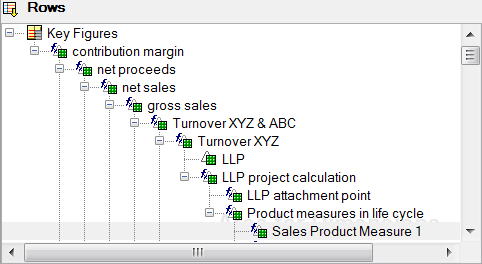
Another way is to use an account model. Here is your first Problem, we only get a key figure model and it is not so easy to use rule groups or a simply routine, because we get around 100 key
figures. So it isn’t easy as Denis wrote in his post (this post is in German). But I found, really I can’t belive I found an article on the former SCN. This post decribes how to transform
a key figure based model to an account based model with some ABAP coding and an expert routine. So I think that must be the answer to my problem, but it isn’t so well writen that I could use it.
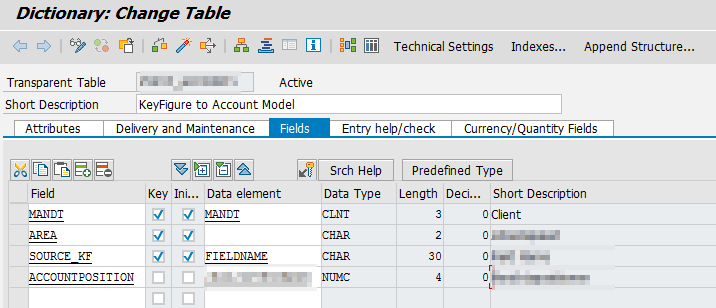
But the start was done. I need a Z-Table and some ABAP. First I created my Z-Table with four fields:
- MANDT
- AREA
- SOURCE_KF
- ACCOUNTPOSITION
AREA is necessary to use this table in different deparments, SOURCE_KF represents the source key figure for example /BIC/ZGROSSVAL and the
ACCOUNTPOSITION is the technical key of the account model, for example 15.
This was the easy part. Now I need some ABAP and here I had some struggle.
1 2 3 4 5 6 7 8 9 10 11 12 13 14 15 16 |
Data: lt_account type HASHED TABLE OF z_account WITH UNIQUE KEY source_kf, ls_account like LINE OF lt_account. FIELD-SYMBOLS: <fv_source> type any. Select * from z_account into table lt_account WHERE area = 'SOMETHING'. LOOP AT SOURCE_PACKAGE ASSIGNING <source_fields>. MOVE-CORRESPONDING <source_fields> to RESULT_FIELDS. Loop at lt_account into ls_account. RESULT_FIELDS-/BIC/VF0CBPOS = ls_account-berichtsposition. ASSIGN COMPONENT ls_account-source_kf of STRUCTURE <source_fields> to <fv_source>. RESULT_FIELDS-/bic/vf0kbehw = <fv_source>. Append RESULT_FIELDS TO RESULT_PACKAGE. Endloop. Endloop. |
The Problem was the ASSIGN COMPONENT part, which I didn’t know how to work, but a colleague helped me here. So that’s it. The Z-Table can be modified to fulfill your needs, but the basic code
should help you to realize a solution.
author.
I am Tobias, I write this blog since 2014, you can find me on twitter and youtube. If you want you can leave me a paypal coffee donation. You can also contact me directly if you want.

Schreibe einen Kommentar