reyemsaibot

SAP BI Blog about SAP BW/4HANA, Analysis for Office and SAP HANA - by Tobias Meyer

Blog

  • SAP BW Performance optimization for mass data

    Introduction

    In my current project, we have to deal with 30.000.000 records for the initialization run and about 10.000.000 records each day. The big problem is we have no SAP HANA system for BW. So, we have
    to build a perfect data model to load the data and push it through the BW to deliver it to another DWH system. First I want to describe how our first steps worked and then which parameter we
    changed to make it more efficient. I will also describe where we had our problems and how we have solved them. So let’s go.

    We receive the data from a Bank Analyzer (BA) system and have to put it into a DataStore-Object (DSO) to get a delta logic. So, we designed a Semantic Partitioning Object (SPO) with the criteria
    0FISCPER. We don’t want to build it on 0CALMONTH because this can nobody administrate. In the routine, we have to do some logic for master data because we get a master data record not every day,
    so we decided to build a DSO which it build like a time-dependent InfoObject. The reason why we would use a time-dependent InfoObject is, because we also have 10.000.000 records and this is hard
    to execute the attribute changes for so many records.

    So when we get a new record we set the valid-to date to 31.12.9999 and when we receive a new entry for the same record, we adjust the valid-to date to new start date minus 1. In case we have to
    make a build the records for the transaction data again, we have a clean history.

    Our first load from the data source into the data acquisition layer for the 30.000.000 records last 3 hours. Plus activation of almost 2 hours. So that we have
    the data only in the first layer of our data model took us 5 hours + 1 hour to extract it from the source system.
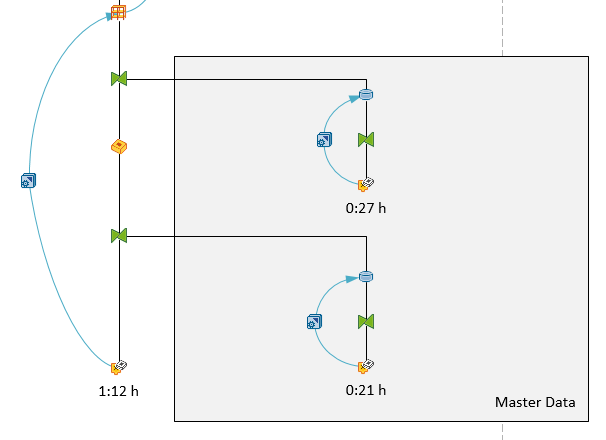
    First Layer of the data model
    First Layer of the data model

    After we had the data in the data acquisition layer we want to load it into InfoCubes for reporting and add also some logic. We build a SPO again, but this time we separated it into 0FISCPER and
    accounting system (AS). So we have now instead of two cubes (2016 and 2017) now four cubes (2016 AS1, 2016 AS2, 2017 AS1, 2017 AS2). So next year we get two new cubes and so on.

    Now we have only around 15.000.000 records for each accounting system. Just a note, the test data is only for 2016 so we have no data for 2017. The initial load of the data from the changelog of
    the DSO took us more than 16 hours.
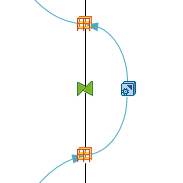
    Second layer of the data model
    Second layer of the data model

    Summary

    Until a user can execute his report with the new data, he had to wait about 22 hours. So we have to analyze what our problems were:

    • Consider the transformation from the data source to the DataStore-Object
    • See if we could accelerate the activation process of the DSO
    • Consider our InfoCube design to see where we lost so much time

    Activities

    So our big issue was that it took us round 7 minutes for one package of 50.000 entries into the InfoCube. So, we analyzed the data model which exists from a former project with the report
    SAP_INFOCUBE_DESIGNS. And it showed us that we have three terrible dimensions. After we fixed the design of the InfoCube we load the data again and it took us now
    3 hours. This is an improvement of to 19% of the original time. So it is very important how your data model is designed. Especially when you have to deal with
    mass data.

    Besides the data model we also add number range buffering for DIM IDs and SIDs. For more information have a consider SAP Note 857998. This also improve our activation time, but
    more about that later. So now we have to deal with the 3 hours of data loading from the data source to our DSO.


    We looked into our start- and end-routines and adjust our ABAP code so now we were down from 3 hours to 42 minutes. This is now only 23% of the
    original time. These two big improvements saved us about 15 hours. So we are now down from 22 to 7 hours for the processing. Besides our data
    model and ABAP correction, we also increased our parallel processing. For this open the RSA1 and click on the administration tab and select under Current Settings >> DataStore
    Objects. You can also execute the report RSODSO_MAINTAIN_SETTINGS.
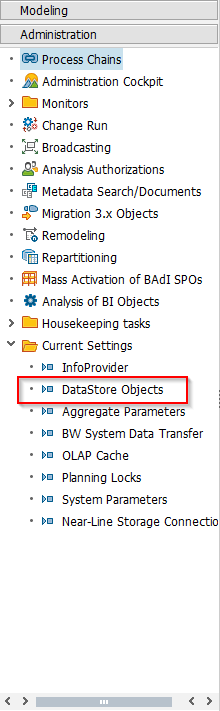
    DataStore Objects Settings
    DataStore Objects Settings

    Select now your DSO and you can edit the parameter on the right side. For example, we choose the Package Size Activation with 50.000 and the Package Size SID Creation with 50.000. Besides these
    two sizes we also adjust the parallel processing of activation and SID generation to 10 processes. This maybe depends how many processes your system have.
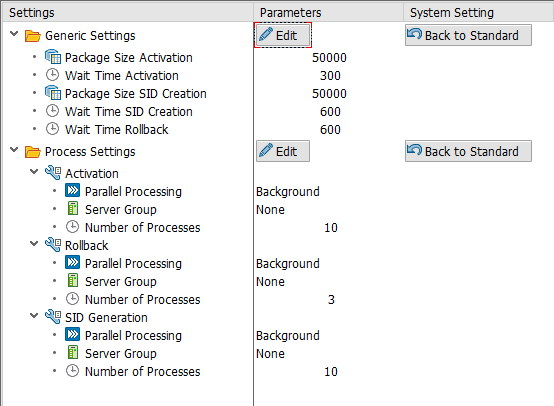
    DataStore Object adapted settings
    DataStore Object adapted settings

    And we also increased the parallel processing of the DTP to 7 from 3 processes.
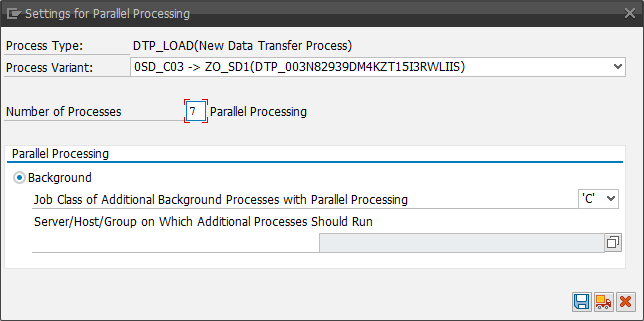
    DTP settings for parallel processing
    DTP settings for parallel processing

    The next step was to improve the activation time. Our first try was 1 hour 54 Minutes. After we add the buffering of number ranges, we went down to
    1 hour 25 Minutes. It is a benefit of 29 Minutes or round 26%.

    So we have now a data loading time down from 23 hours to 6 hours 30 minutes. So we are now only need 28 % from the time of our
    first try. This is really impressive, because you have to keep in mind, that we have no HANA system.
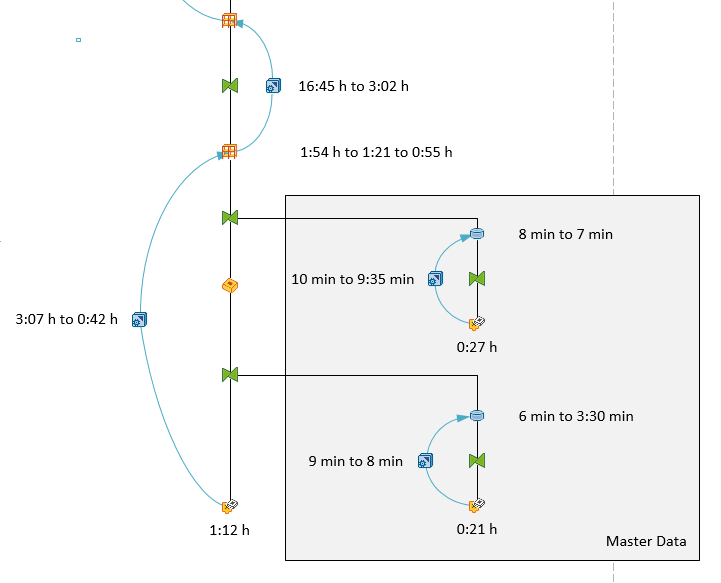
    Complete data model
    Complete data model

    author.


    I am Tobias, I write this blog since 2014, you can find me on twitter and youtube. If you want you can leave me a paypal coffee donation. You can also contact me directly if you want.

  • SAP BW Visio Shapes

    I want to document a BW data model and searched for a Microsoft Visio shape, but I found nothing. So I build my own Visio shapes. At the
    moment there are the following types available:

    • DataSource
    • Transformation
    • DataStoreObject
    • InfoCube
    • SPO
    • MultiProvider
    • DTP
    • InfoSource
    • OpenHub
    • Query

    I used them in my last blogpost about Copy Queries to a new MultiProvider.

    The elements have also shape-data which can be filled. For example DataSource has the following shape data:

    • Name
    • Source System
    • Update Mode
    • Loading Time

    A DataTransferProcess has for example:

    • Technical Name
    • Extraction Mode
    • Loading Time

    This is a first draw and I will add some new items and shape data in the future. So if someone need a Microsoft Visio Shape for SAP NetWeaver
    BW
    feel free to contact me.

    author.


    I am Tobias, I write this blog since 2014, you can find me on twitter and youtube. If you want you can leave me a paypal coffee donation. You can also contact me directly if you want.
  • SAP BW Copy Queries to a new MultiProvider

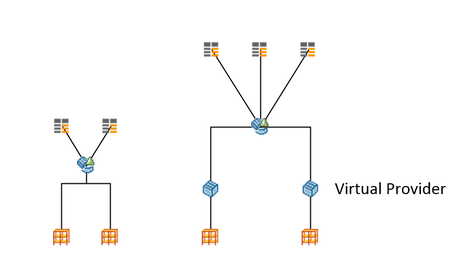
    In my current project, we want to separate the current MultiProvider with VirtualProvider underneath into one MultiProvider with VirtualProvider and one MultiProvider without VirtualProvider.
    This step is necessary, because we receive a lot of data and don’t want to push all these data through the VirtualProvider. The VirtualProvider only add one field which we haven’t got in our
    InfoCubes and it isn’t necessary in all queries just a few.

    Old with only one MultiProvider
    Old with only one MultiProvider
    New with two MultiProviders
    New with two MultiProviders


    So we decided to split the existing MultiProvider into two. This means, we have to transfer some of the existing queries from the current MultiProvider to the new one. Because we don’t want to
    build them, especially when the MultiProviders have the same structure.

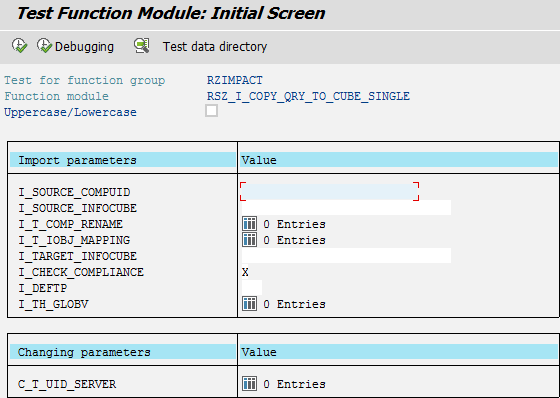
    You can either use the transaction SE37 with the function module RSZ_I_COPY_QRY_TO_CUBE_SINGLE or use the transaction RSZC. I will describe both
    ways. Open the transaction SE37 and execute the function module RSZ_I_COPY_QRY_TO_CUBE_SINGLE. You should see the following screen.

    Function Module RSZ_I_COPY_QRY_TO_CUBE_SINGLE
    Function Module RSZ_I_COPY_QRY_TO_CUBE_SINGLE

    Into the field I_SOURCE_COMPUID you have to fill the COMPUID which you can find out with the table V_REP_JOIN. The field
    I_SOURCE_INFOCUBE is your source provider and the I_TARGET_INFOCUBE is your destination provider. You have also to remove the X in
    I_CHECK_COMPLIANCE. Now you can execute the function module and your query is copied to the new MultiProvider.

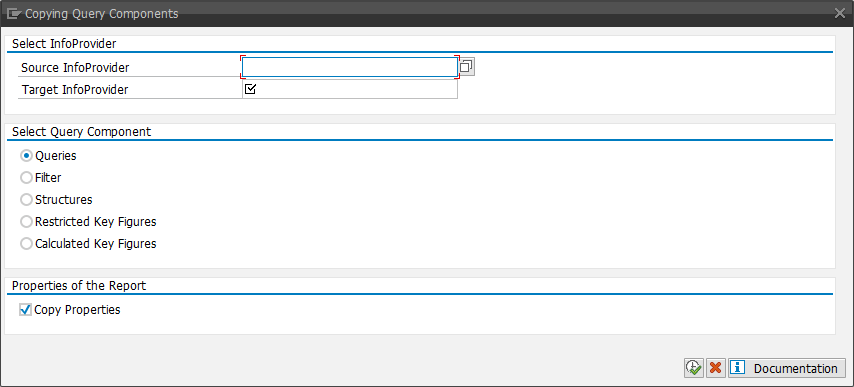
    The other way is to use the transaction RSZC. If you use it, you should see the following screen.

    Transaction RSZC
    Transaction RSZC

    This screen explains itself. Into Source InfoProvider you have to put your source MultiProvider and into Target InfoProvider the destination. You can choose what
    you want to copy. For example:

    • Queries
    • Filter
    • Structures
    • Restricted Key Figures
    • Calculated Key Figures

    The transaction RSZC makes it very easy to copy a lot of queries at once. I hope this help someone, so you haven’t to build all your queries again on a new MultiProvider.

    author.


    I am Tobias, I write this blog since 2014, you can find me on twitter and youtube. If you want you can leave me a paypal coffee donation. You can also contact me directly if you want.
  • SAP BW Analysis Process Designer (APD)

    At the moment I had to deal with a special problem. I have data in a SPO from two different sources and the goal
    was to find the corresponding two data lines and make one out of it. This line should marked with a special character. So I decided to build an Analysis Process (APD).

    Data in InfoCubes before Analysis Process (APD)
    Data in InfoCubes before Analysis Process (APD)

    Open the transaction rsanwb and create a new Analysis Process. Now you can choose between different data sources for example Multiprovider, Query, Flatfile or
    Database Table. In my case I choose a Query that delivers me the last loaded request, so that I don’t have to read the whole SPO. If this works in the future we will see, but the first developer
    test were successful.

    After the query receive the data, I build an aggregation with the function Aggregate Data. So, I made out of two records one record. Which record is from which source, I add the
    same query again as source and restrict the data to one source system. Now I use the Join Data function to join the source system with the aggregated data. I did the same
    with the other source and joined it again with my data from the aggregation. 

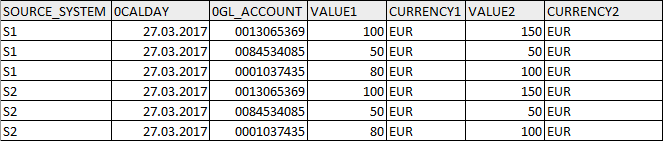
    So now I have my data in the following format:

    Data after Analysis Process
    Data after Analysis Process

    So now I can check with a formula if both (SOURCE_SYSTEM1 and SOURCE_SYSTEM2) is filled or only one. If both are filled, I add another column (SOURCE_SYSTEM3) with S3 or I filled in one of the
    values of SOURCE_SYSTEM1 or SOURCE_SYSTEM2. It looks like this now:

    Data after checking of source system
    Data after checking of source system

    Now I can hide the two columns (SOURCE_SYSTEM1 and SOURCE_SYSTEM2) and have only left the necessary columns for my DataStoreObject. So I find a corresponding record I can reduce my data amount
    but still keep the granularity of the data. Maybe there are different options to do this procedure. If you have any suggestions, feel free to use the comments.

    author.


    I am Tobias, I write this blog since 2014, you can find me on twitter and youtube. If you want you can leave me a paypal coffee donation. You can also contact me directly if you want.
  • SAP BW Check your data model

    Sometimes it is necessary to check your data model if it still fit your needs. For this you can use the transaction rsrv. Select there under All Elementary Tests >>
    Database >> Database information about InfoProvider tables
    .

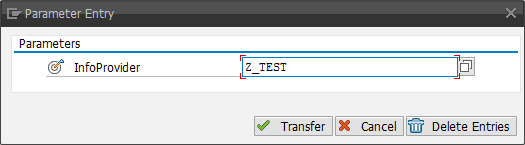
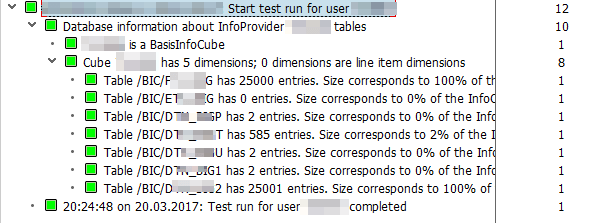
    Now you can enter one InfoCube and choose Transfer. Now you can add more tests or click Execute to run the test.

    Enter Parameter Entry for database information
    Enter Parameter Entry for database information

    After you click execute, you will see the log.

    Log about the test
    Log about the test

    As you can see, the design of dimension 2 is very bad. It contains 100% of the entries of the f-table. So now we can plan our redesign. You can also check your cube design with the report
    SAP_INFOCUBE_DESIGNS. How important a good InfoCube design is, will I show you in a futher post.

    author.


    I am Tobias, I write this blog since 2014, you can find me on twitter and youtube. If you want you can leave me a paypal coffee donation. You can also contact me directly if you want.

  • Analysis Office 2.4 SP2 is released

    On 10.03.2017 a new service pack for Analysis Office was released. The main reason why you should update from SP0 or SP1 is that they fixed a lot of bugs in it (and maybe they build some new).
    Here is a short overview of the fixed problems:

    • 2424808 – AO 2.x: Planning – Error occurs when saving a new line that contains fields of the type „Date“
    • 2431548 – Exception after inserting Query
    • 2431738 – Analysis Office: Swap Axis button active for grouped crosstabs when cursor is outside the grouped crosstabs
    • 2431821 – Analysis Office: SAPContainer visible after ungrouping all crosstabs
    • 2422924 – Paste values: Members containing „-“ are handled like a intervals
    • 2426904 – VBA callbacks of wrong workbook are executed
    • 2422141 – Analysis Office: If saving to NetWeaver platform into ‚My Documents‘ the ‚Save‘ button is not active
    • 2429271 – Analysis Office: Formula =SAPGetWorkbookInfo(„LogonUser“) does return an empty string when logging in to BIP with SSO
    • 2438868 – AO 2.x: Formula SAPGetVariable shows wrong value for Hierarchy Node variable

    And many more. So if you use Analysis Office 2.4 you should consider to update.

    author.


    I am Tobias, I write this blog since 2014, you can find me on twitter and youtube. If you want you can leave me a paypal coffee donation. You can also contact me directly if you want.

  • SAP BW find meta chain

    In my current project I had to clean up the existing process chains. A lot of process chains were created via SPOs and not really used in the system. First I had to check, if one is used in a another process chain or in which one they are used.

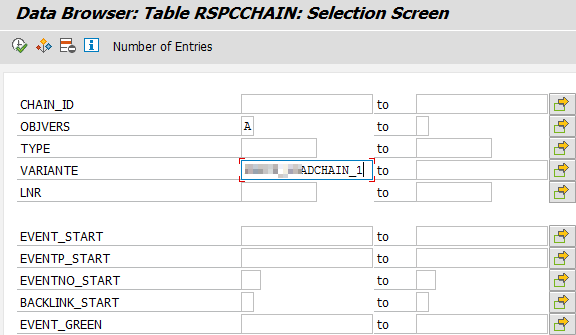
    In the transaction SE16 open table RSPCCHAIN and insert into VARIANTE the technical name of your process chain.

    Table RSPCCHAIN find variante
    Table RSPCCHAIN find variante

    The column CHAIN_ID shows you the corresponding meta-chain.

    Table RSPCCHAIN
    Table RSPCCHAIN

    author.


    I am Tobias, I write this blog since 2014, you can find me on twitter and youtube. If you want you can leave me a paypal coffee donation. You can also contact me directly if you want.
  • SAP BW Change Object Directory Entries

    In my current project we have to transport from a maintenance system to our development system. The problem is when you now transport the objects into quality system, you have to check the option
    „Overwrite Originals“ so that your transport is working. But you have to put this flag on every transport you make in the future from your development system to quality.

    Nobody will remember this after a huge project, so every request has to be transported twice and this is annoying. So we have to find a solution for this. I found a thread on the SCN which describes a solution that worked for me. Yes I found a link which is
    still working after the redesign of the SCN. I was surprised. Here is the solution:

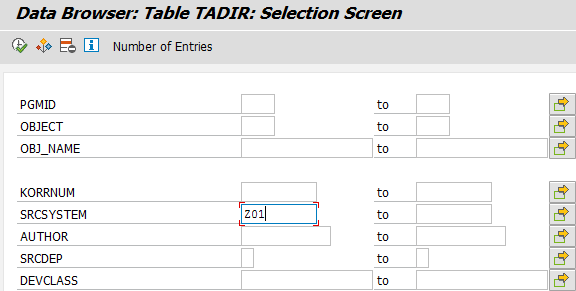
    First you can check in the transaction SE16 the table TADIR how many objects are not correct. You can filter with the field SRCSYSTEM. In my
    case I looked for the SRCSYSTEM Z01.

    SE16 Table TADIR
    SE16 Table TADIR

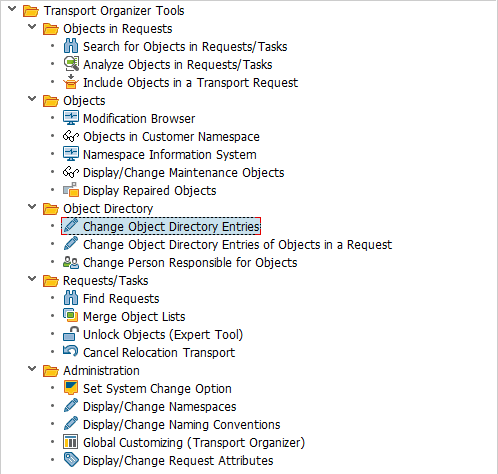
    Now open the transaction SE03 and choose under Object Directory >> Change Object Directory Entries.

    SE03 Change Object Directory Entries
    SE03 Change Object Directory Entries

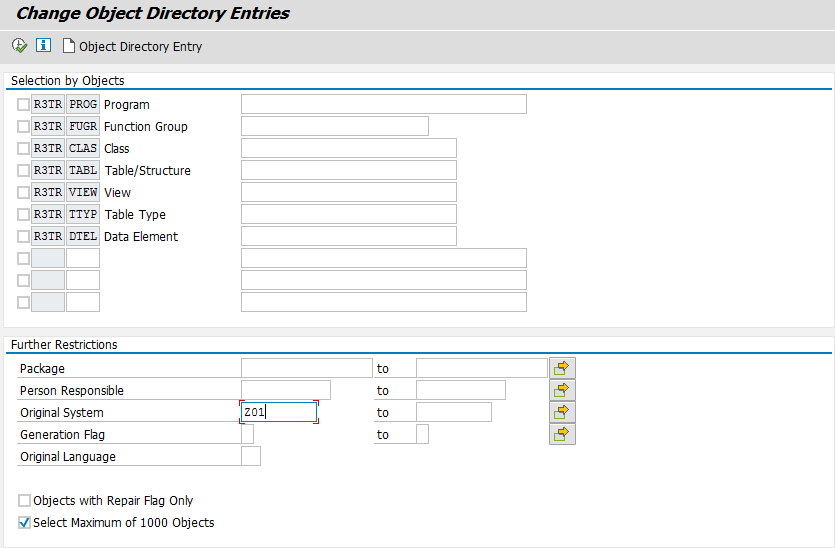
    Now you see a screen, where you can restrict your selection, in my case I want to find all objects which original system is Z01. After you filled your parameters click
    Execute (F8).

    Change Object Directory Entries Restrictions
    Change Object Directory Entries Restrictions

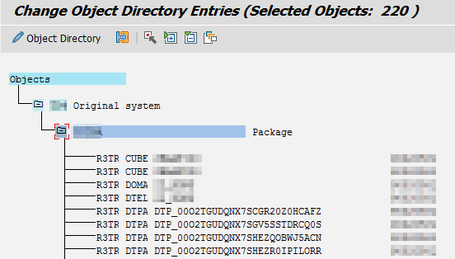
    You can either select each entry with a double click and edit it.

    Change Object Directory Entries
    Change Object Directory Entries
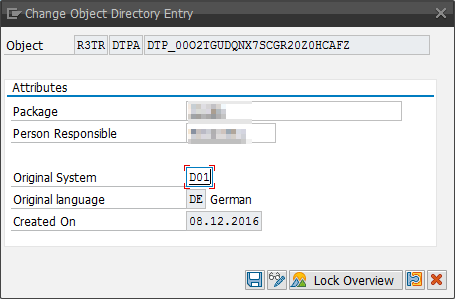
    Change Object Directory Entry
    Change Object Directory Entry

    Or you can select a bunch of entries with F6 or the menu item Select/Deselect.

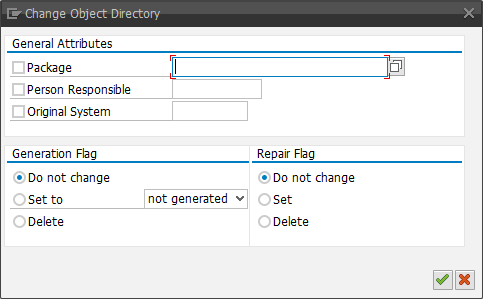
    And enter MASS in the transaction code field and press Enter. Now you get a other dialog displayed, which allows you change all object at once.

    Change Object Directory MASS
    Change Object Directory MASS

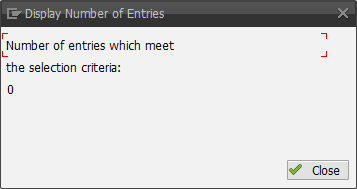
    As you can see it is really easy to change the source system of objects. If you now check the table TADIR, you will see that there are all entries for Z01 are
    gone.

    SE16 Table TADIR check
    SE16 Table TADIR check

    author.


    I am Tobias, I write this blog since 2014, you can find me on twitter and youtube. If you want you can leave me a paypal coffee donation. You can also contact me directly if you want.
  • Analysis Office Get Calendar Week for SAPSetFilter

    A few weeks ago, a colleague of mine, ask me how he can get the calendar week to use it in the Analysis Office API SAPSetFilter. I developed a short macro which defines the calendar week to use it in 0CALWEEK. Maybe someone has another
    solution for this.

    First we need different variables:

    1
    2
    3
    4
    Dim lresult As Long
    Dim week As Integer
    Dim today As Date
    Dim yearCalWeek As String


    After this, I needed the actual date and year, so I used the DateValue-function.

    1
    2
    today = DateValue(Now)
    yearCalWeek = year(today)


    Now I need the week, for this I used the WorksheetFunction IsoWeekNum.

    1
    week = Application.WorksheetFunction.IsoWeekNum(today)


    So I calculated the week and the year and now we have to put it into the SAPSetFilter.

    1
    lresult = Application.Run("SAPSetFilter", "DS_1", "0CALWEEK", week & yearCalWeek, "INPUT_STRING")


     As you can see it is very easy to get the week from the actual date. Here is the complete source code:

     1
     2
     3
     4
     5
     6
     7
     8
     9
    10
    11
    12
    13
    14
    Sub GetCalendarWeekForSAPSetFilter()
      Dim lresult As Long
      Dim week As Integer
      Dim today As Date
      Dim yearCalWeek As String
      
      today = DateValue(Now)
      yearCalWeek = year(today)
    
      week = Application.WorksheetFunction.IsoWeekNum(today)
    
      lresult = Application.Run("SAPSetFilter", "DS_1", "0CALWEEK", week & yearCalWeek, "INPUT_STRING")
    
    End Sub
    

    I hope this idea helps someone to build a dynamic report.

    author.


    I am Tobias, I write this blog since 2014, you can find me on twitter and youtube. If you want you can leave me a paypal coffee donation. You can also contact me directly if you want.
  • Analysis Office Hide Customize User Interface

    In this thread on blogs.sap.com, Michael Hamm asked how to hide or deactivate the
    Customize User Interface button. At first, at the moment SAP doesn’t offer any checkbox which you can
    check and uncheck in the settings.

    But there is a solution how you can hide or deactivate the Customize User Interface button. It is called MinorVersion. The official admin guide define MinorVersion like this:

    You use this setting to specify the minor version that should be used. The default value is the integer value of the installed version, for example value 3 for version 2.3.
    If you change the value to 1, version 2.1 will be used.

    The setting can only be maintained by an administrator and you find it in the file system under C:ProgramDataSAPCof. If you set the value to 3, you can see
    how the Analysis Office Menu Change.

    Analysis Office Menu without MinorVersion
    Analysis Office Menu without MinorVersion
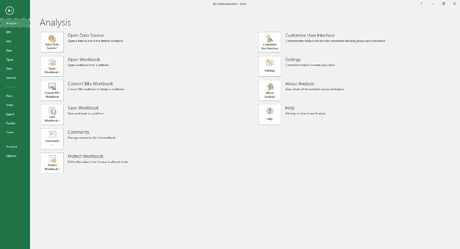
    Analysis Office Menu with MinorVersion
    Analysis Office Menu with MinorVersion


    As you can see the Customize User Interface is gone but also the Protect Workbook functionality. So you have to decide if you need the protection or not. At my first review
    I didn’t found other functions which are not available any more. I hope SAP will release parameters for the file system, so everybody can decide what the user can see and what not.

    author.


    I am Tobias, I write this blog since 2014, you can find me on twitter and youtube. If you want you can leave me a paypal coffee donation. You can also contact me directly if you want.