reyemsaibot

SAP BI Blog about SAP BW/4HANA, Analysis for Office and SAP HANA - by Tobias Meyer

Blog

  • Analysis Office Size Limit of result set exceeded with small query

    It has been a quite while since the last post. But with a go live and a reorganization of my current project I hadn’t time to look into some topic. But here is a new kind of interessting bug. We
    had an open task from a user of the controlling department, that a query display the message:

    „Size Limit of result set exceeded.“

    That’s an odd thing, because the query has only six columns and 110 rows and when the user dragged the calendar month into the columns it should have 12 columns for the actual year and 110 rows.
    Which is defintily lower than the limit of Analysis for Office, which is 500.000 cells.
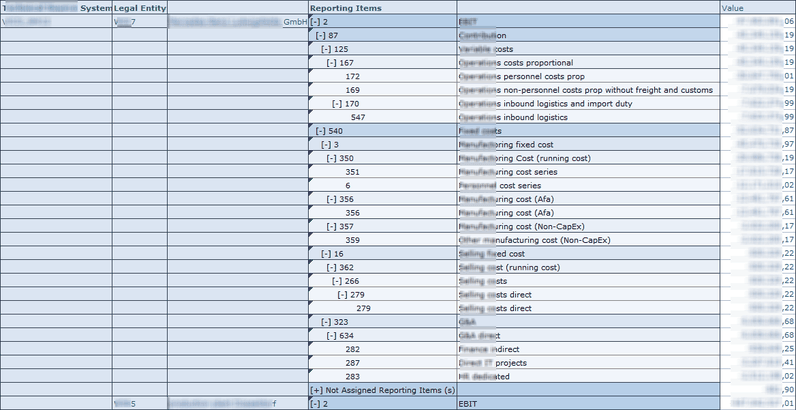
    Query with a simple layout
    Query with a simple layout

    So I tested the query in the BW backend with the transaction rsrt. It worked perfectly.
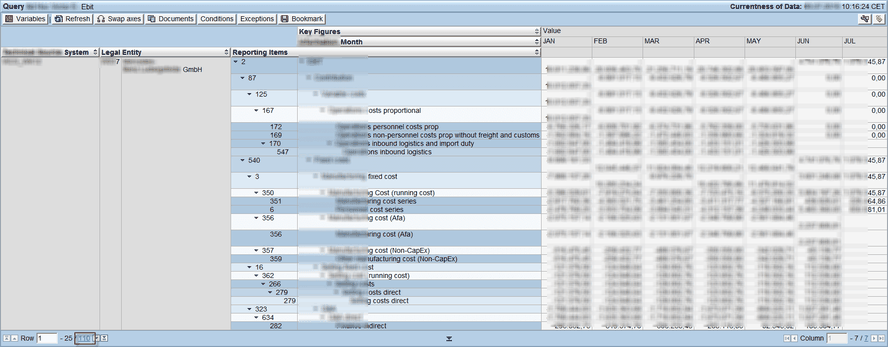
    Query with calendar month in the columns
    Query with calendar month in the columns

    So the query is working correctly. But why Analysis for Office throw me the error? It appears on different computers and the rsadmin
    parameter was default by 500.000 cells. After a little search I found the problem. The query dimensions were all set to show Vales from Master Data instead of Posted
    Values
    and the query has the option to suppress zeros in columns and rows. So when I deselect the suppress zero option, the query now shows around 83.000 rows and 6
    columns which are 498.000 cells and this is short below the limit of 500.000 cells. 


    Now we change the option from Show Values of Master Data to Posted Value and the query worked for the controlling deparment.The only question which is not answer is why does it work in RSRT
    with the same option it doesn’t work in Analysis for Office? Does anyone have an idea?

    author.


    Hi,

    I am Tobias, I write this blog since 2014, you can find me on twitterfacebook and youtube. I work as a Senior Business
    Warehouse Consultant. In 2016 I wrote the first edition of . If you want you can leave me a paypal coffee
    donation. You can also contact me directly if you want.


  • Analysis Office 2.7 SP6 is available

    Since 24.05.2019 the latest service pack of Analysis Office is available. At the moment I am working on a test tool to automate testing in BW so I can easy check if any change of mappings and so
    on has an impact on my ADSO or query result. But I found time to install it. A „bug“ what I found was when I want to insert a data source from the recent list, nothing happend. The solution was
    to reinstall Analysis Office and now it works. Here is the list of bug fixes:

    • Analysis Office: Exception from HRESULT: 0x800A03EC when trying to save a protected workbook (s-note 2781162)
    • Launcher error when launching from BIP (s-note 2781090)
    • Warning message about comments without using comments (s-note 2780925)
    • ALL: Locked cells can be edited when Excel grouping/ungrouping is allowed (s-note 2784832)
    • ALL: Refresh may be incorrect in some cases (s-note 2786604)
    • ALL: Refresh metadata fails when a workbook was closed before (s-note 2786615)
    • AO: End-User-Defined Characters on Prompts (s-note 2781131)
    • AO: Mouse actions don’t work in wbs with brackets in their name (s-note 2782332)
    • All crosstabs are deleted after clicking on cell after editing (s-note 2791886)
    • Analysis Office: After execution of planning sequence or applying filter new lines contain data of the result set (s-note 2789464)
    • Analysis Office: Exception when closing workbook (s-note 2788026)
    • Analysis Office: Grouping of crosstabs containing characteristics with different names but same descriptions (s-note 2784694)
    • Analysis Office: erroneously new lines are displayed after executing a planning sequence (s-note 2785251)
    • New Lines – Value Help does not return selected value (s-note 2780363)
    • Refresh Data fails if additional Workbook appears during opening and one is cleaned (s-note 2790594)
    • Scheduled Workbooks Get Corrupted and Issues with Special Named Ranges and Sheet Names (s-note 2784545)

    Did anyone have the same bug with the Insert DataSource function?

    author.


    I am Tobias, I write this blog since 2014, you can find me on twitter and youtube. If you want you can leave me a paypal coffee donation. You can also contact me directly if you want.

  • SAP BW fix incorrect data in a DataStore-Object

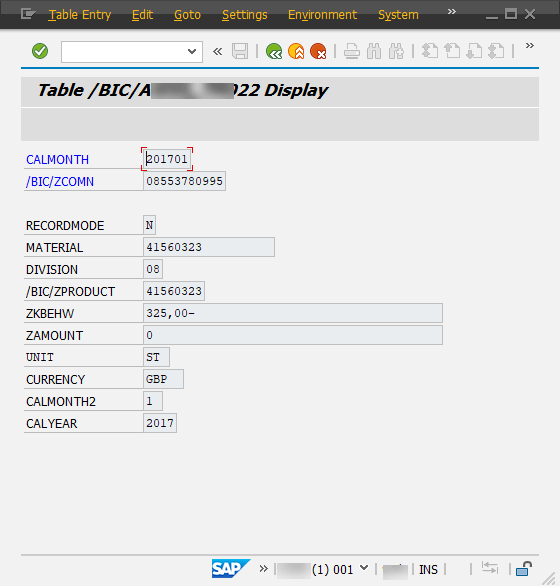
    Here just a short notice if somebody doesn’t know it yet. If you have a false information in a data record you can fix this manually either in a PSA or (A)DSO. Just select the desired entry and
    click Display (F7).

    Detail view of an entry
    Detail view of an entry

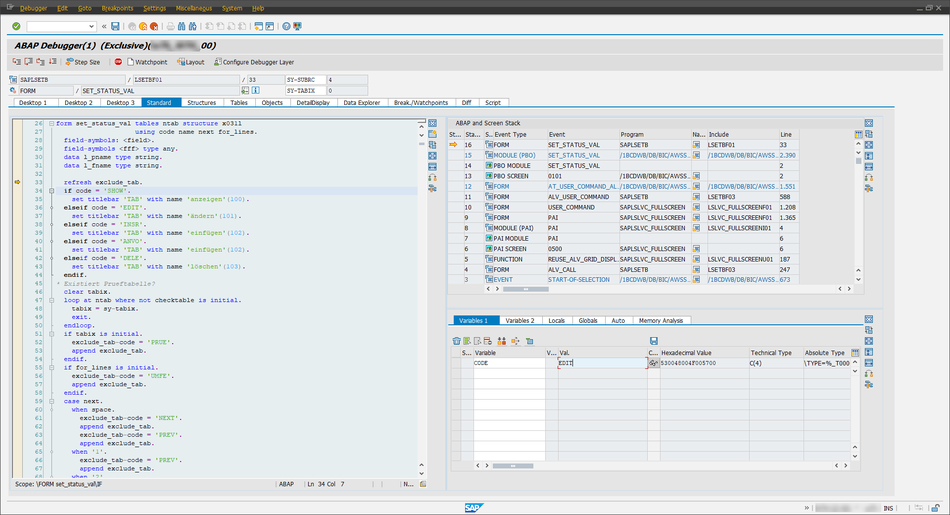
    Now click in the menu bar, write /h and click Enter. You now see in the status bar „Debugging switched on“. When you now click Enter again an
    ABAP Session will be opened.

    ABAP Debugger
    ABAP Debugger

    Click on the variable code and change it with the pensil to your needs. In my case I used EDIT. Click Enter and than Continue
    (F8)
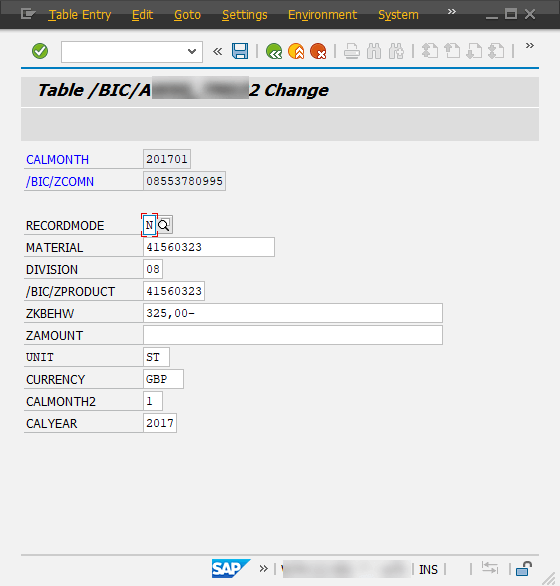
    .

    Entry can be edited
    Entry can be edited

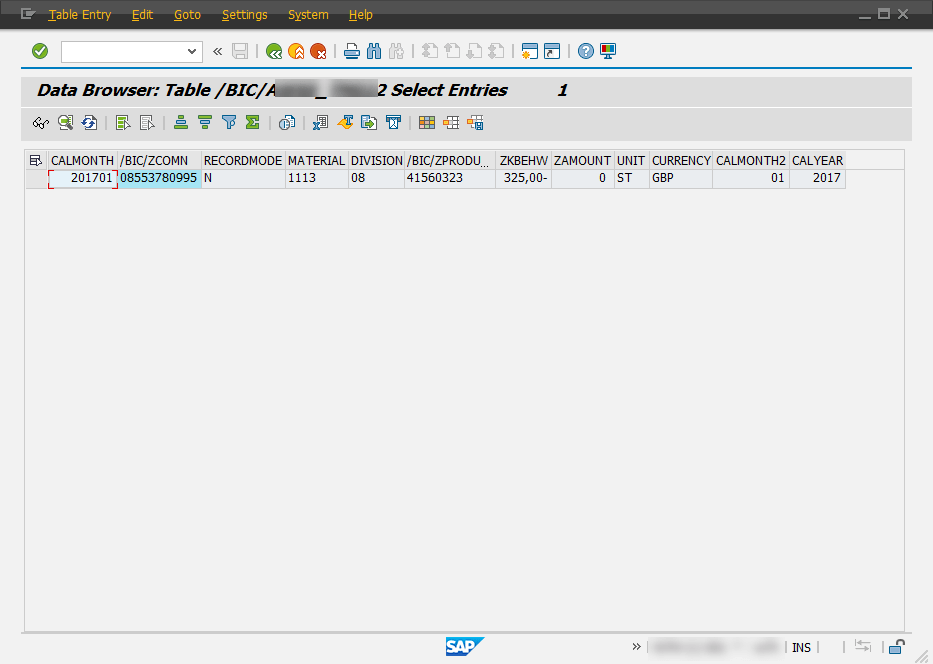
    Now I change the material numer to 1113 and save the entry. Here is the result.

    In normal case every one should know how this can be done, so it is just a little documation 😉


    You can change every SAP table so beware what you are doing.

    author.


    I am Tobias, I write this blog since 2014, you can find me on twitter and youtube. If you want you can leave me a paypal coffee donation. You can also contact me directly if you want.

  • SAP HANA Table Functions

    It has been very quite at the moment.Because nothing spectecular is happening in the Analysis Office world. SAP released Analysis Office 2.7 SP5. I still hope they get Analysis Office 2.8 back on track and without so much problems as they have today.  But back to
    topic.

    Recently I had the opporunity to work with SAP HANA Table Functions. First I had a complex SAP HANA Calculation View with Joins, Aggregations and so on. But I read a blog post on the SCN
    by Konrad Załęski and thought maybe I can use Table Functions to do the same as I do with my Calculation Views.


    I use Eclipse 2018-09 (4.9.0) and the BW Modeling Tools 1.19.35 so maybe the options are not at the same position in another version. As far as I know SAP, the buttons are definitly not at
    the same position anymore. 🙈


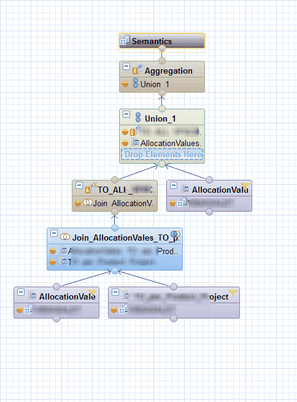
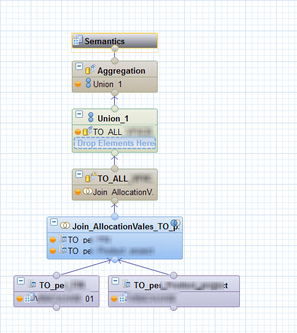
    To reduce the complexity I used three calculation views to narrow down my problem step by step.

    Calculation View 1
    Calculation View 1
    Calculation View 2
    Calculation View 2
    Calculation View 3
    Calculation View 3


    After I tested my SQL commands to get the same results, I could remove Calculation View 1 with this simple SQL Statement.

     1
     2
     3
     4
     5
     6
     7
     8
     9
    10
    11
    12
    13
    14
    15
    16
    17
    18
    19
    20
    21
    22
    23
    24
    25
    26
    27
    28
    29
    30
    31
    32
    33
    34
    35
    36
    37
    38
    FUNCTION "SCHEMA"."test::test_function" ( ) 
    
    RETURNS TABLE ("POSITION" NVARCHAR(4),
                   "CHANNEL" NVARCHAR(3),
                   "PRODUCT" NVARCHAR(20),
                   "MATERIAL" NVARCHAR(18),
                   "CURRENCY" NVARCHAR(5),
                   "AMOUNT" DECIMAL(17,2),
                   "YEAR" NVARCHAR(4))
    LANGUAGE SQLSCRIPT
    SQL SECURITY INVOKER AS
    BEGIN
    RETURN
    
    /*
    * Get all Position, Sales Channels for all Products and Currency 
    * where Process = Allocation and Market Number is empty.
    */
    
    SELECT DISTINCT "POSITION",
                    "CHANNEL",
                    "PRODUCT",
                    "MATERIAL",
                    "CURRENCY",
                    sum( "AMOUNT" ) as "AMOUNT",
                    "YEAR"
    FROM "SAPABAP1"."/BIC/ATEST2" where "PROCESS" = 'A' and "MANUM" = ''
    group by
                    "POSITION",
                    "PROCESS",
                    "CHANNEL",
                    "MANUM",
                    "PRODUCT",
                    "MATERIAL",
                    "CURRENCY",
                    "YEAR";
                    
    END;
    

    After that I was thrilled with SQL commands. It’s been a while since I used SQL. Maybe the last time before I started as a BW consultant. So I looked into it. You find a lot of help on help.sap.com or on udemy.com. Since then I just think about my existing Calculation Views and how I can make them better with
    Table Functions.


    So here is my question for this post. Do you use Table Functions and how complex do you build them?

    These posts might also be interesting:

    author.


    I am Tobias, I write this blog since 2014, you can find me on twitter and youtube. If you want you can leave me a paypal coffee donation. You can also contact me directly if you want.

  • Analysis Office 2.7 SP5 is available

    Since last week SAP published the latest version of Analysis Office 2.7 SP5. I don’t know if any other version ever had a service pack so high like the actual version. At this time SAP doesn’t
    offer the newst help file under help.sap.com/boaa. So stay tuned if there is something happening. Here is
    an overview about what they fixed:

    • ALL: Context Hide and Context Lock issues (s-note 2768898)
    • Workbook is corrupted if contained charts are filtered (s-note 2767246)
    • Errors with SAPSelectMember formula and sheet protection (s-note 2765798)
    • SAP Formulas in Scheduled Workbooks are Displayed as #NAME? in Excel (s-note 2765716)
    • Analysis Office: Exception when a workbook contains combined crosstabs where the master crosstab has no data available (s-note 2765191)
    • BPCNW: HTTP 404 Error when Prompting Password Change in BPC NW 11 (s-note 2763430)
    • Valus of new planning lines are not transferred, if a datasource is set to autorefresh = false (s-note 2762513)
    • Analysis Office: query views not contained in a role are displayed in the role tab of the Select Data Source dialog (s-note 2762494)
    • Analysis Office: router string not used for BW connections maintained on BIP (s-note 2761063)
    • Analysis Office: Error ‚Operation aborted due to invalid input‘ is displayed when no applicable data is found for the query (s-note 2760996)
    • AO: Excel crashes when using shortcut CTRL+S to save workbook which have been opened from the server (s-note 2759142)
    • Data is not removed if Excel Workbook is saved and closed simultaneously (s-note 2757935)
    • Save Workbook cannot be performed for worksheets with Excel Sorting and which don’t contain EPM Report (s-note 2756889)
    • Object Id of workbook is not written to RSDDSTAT_OLAP (s-note 2755181)
    • ALL: Edit report with dimensions containing non-contextual relationship (s-note 2753472)
    • ALL:Issues when refreshing EPM reports in Word document (s-note 2752809)
    • Analysis Office: wrong error message ‚Data source xxx was not found on system yyy‘ is displayed (s-note 2752535)
    • Prompts dialog: Variable shows green tick mark despite error messages (s-note 2752045)
    • Waterfall Chart – ‚Remove Data Before Saving‘ does not work (s-note 2751509)
    • Analysis Office: Excel crashes when trying to save a local workbook using Ctrl+S shortcut (s-note 2751426)
    • AO: Improved Third Party Add-In compatibility – Excel crashes when using AO and Third Party Add-Ins at the same time (s-note 2750514)
    • Opening a workbook twice leads to an exception (s-note
      2750223
      )
    • AO formulas not working when refreshing via Workbook_SAP_Initialize event (s-note 2749895)
    • ALL: Offline mode issue when merged cell reference (s-note 2747950)
    • Saving of Workbook fails when Waterfall Chart contains no Title (s-note 2747066)
    • AO 2.x: Member Selector – Searching for member keys with a backslash in it does not work (s-note 2745608)
    • Improvements: performance tooling/ profiling workbook in Analysis Office (s-note 2744828)
    • Analysis Office: connection to BW system fails if message server is maintained on BIP using router syntax (s-note 2744794)
    • AO 2.x: Can’t logon with language Basque / Euskara (EU) (s-note 2744455)
    • Could not read grid properties (s-note 2744138)
    • Excel hangs during workbook refresh (s-note 2743853)
    • Added Support for PowerPoint Feature ‚Design Ideas‘ (s-note 2743659)
    • AO: SAC – Versions Tab not displayed when opening a saved workbook that contains a planning enabled model (s-note 2743355)
    • AO 2.7: SAC – Exception when editing cell values while characteristic Versions is in Background Filters (s-note 2743351)
    • ALL: Report Recognition issue (s-note 2743045)
    • AO 2.x: HANA – Member Selector – Searching for a date does not return any results for characteristics of data type „DATE“ (s-note 2742728)
    • F4 Help on Input Ready Cells (s-note 2742723)
    • Workbook is corrupted if contained charts are filtered (s-note 2741492)
    • SAPGetData referencing a cell of type numeric (s-note 2741409)
    • Analysis Office: calling SAPSetFilterComponent via Visual Basic throws an exception (s-note 2740920)

    Wow. 😱 That’s a lot what SAP fixes with this service pack. Is Analysis Office meanwhile so complex? I hope they get the product a bit more stable again and I am still looking expectant to
    Analysis Office 2.8


    If someone found any further information about this version, please send me an email.

    author.


    Hi,

    I am Tobias, I write this blog since 2014, you can find me on twitterfacebook and youtube. I work as a Senior Business
    Warehouse Consultant. In 2016 I wrote the first edition of . If you want you can leave me a paypal coffee
    donation. You can also contact me directly if you want.


  • Customer exit variable to hide hierachy node

    In my current project we have the hide a position in a hierarchy, because it is a departmental requirement. The hierarchy is used by many departments so we cannot change it and we also don’t want
    to have the same hierarchy two times (except for the one position). So we first excluded the position in the query.

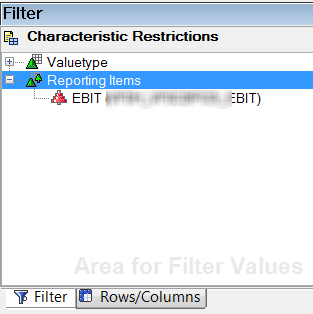
    Hide hierachy node in BEx Query Designer
    Hide hierachy node in BEx Query Designer

    But this didn’t worked.

    Only one position is left in the hierarchy
    Only one position is left in the hierarchy

    So we had to think what could we do to hide the specific position of the hierarchy. So we think how could we hide a specific position and the idea was to use a customer exit variable. You find
    the coding on Github. After I implemented the
    customer exit, only the position „EBIT“ is now hided.

    With the customer exit only EBIT position is hide
    With the customer exit only EBIT position is hide

    author.


    I am Tobias, I write this blog since 2014, you can find me on twitter and youtube. If you want you can leave me a paypal coffee donation. You can also contact me directly if you want.

  • Analysis Office 2.7 SP3 is available

    Since last week the latest SP of Analysis Office is available. You can download it here, but you need a S-User.  I know I am a little bit late but here here is the overview of what is now fixed:

    • AO 2.7: SAC – Exception when editing cell values while characteristic Versions is in Background Filters (s-note 2743351)
    • AO 2.x: HANA – Member Selector – Searching for a date does not return any results for characteristics of data type „DATE“ (s-note 2742728)
    • AO: SAC – Versions Tab not displayed when opening a saved workbook that contains a planning enabled model (s-note 2743355)
    • Analysis Office: Exception when closing Excel workbook (s-note 2741439)
    • Analysis Office: calling SAPSetFilterComponent via Visual Basic throws an exception (s-note 2740920)
    • Analysis Office: connection to BW system fails if message server is maintained on BIP using router syntax (s-note 2744794)
    • Dependent hierarchy node variables have wrong value (s-note 2745229)
    • Excel hangs during workbook refresh (s-note 2743853)
    • F4 Help on Input Ready Cells (s-note 2742723)
    • SAPGetData referencing a cell of type numeric (s-note 2741409)
    • ALL:Report recognition issue (s-note 2743045)
    • AO 2.x: Can’t logon with language Basque / Euskara (EU) (s-note 2744455)
    • Added Support for PowerPoint Feature ‚Design Ideas‘ (s-note 2743659)
    • Could not read grid properties (s-note 2744138)
    • Workbook is corrupted if contained charts are filtered (s-note 2741492)

    It is as always a bugfixing Service Pack and as I mentioned in the last article, there are no new functions. I
    am still looking forward to Analysis Office 2.8.

    author.


    I am Tobias, I write this blog since 2014, you can find me on twitter and youtube. If you want you can leave me a paypal coffee donation. You can also contact me directly if you want.

  • Analysis Office – The Comprehensive Guide 4th edition

    It is done, the newest edtion of Analysis Office  – The Comprehensive Guide is available. It took me this time a little bit longer to update it. There are several reasons like my project
    workload or the the private stuff which make it sometimes difficult to write on a book and tests functions in peace without noise. You can now find it in the store and here is the table of content. It covers Analysis Office 2.7 SP3 and contains 299 Pages. It is only available as PDF but it is as always DRM free. Also is the 3rd edition now
    available on amazon.

    author.


    I am Tobias, I write this blog since 2014, you can find me on twitter and youtube. If you want you can leave me a paypal coffee donation. You can also contact me directly if you want.

  • Analysis Office 2.7 SP3 is available

    Since the 21.12.2018 the latest service pack of Analysis Office 2.7 is available. I looked in the morning into the Support Portal but it wasn’t released and in the afternoon Patrick wrote on
    Twitter, that Analysis Office 2.7 SP3 is
    released. I thought it wouldn’t released anymore in 2018 but here are the fixed problems:

    • New Options in Excel Single Workbook Publication (s-note
      2729417
      )
    • Bad Performance when switching presentations in Member Selector (s-note 2731997)
    • Excel 2010 – „Not enough system resources“ exception after disabling Analysis (s-note 2715429)
    • Rendering issues with hierarchies when opening or saving workbooks (s-note 2730596)
    • After launching document from platform some functionality of Analysis Office is not available (s-note 2725968)
    • Analysis Office Scheduling Fails for Workbooks with Waterfall Charts (s-note 2731173)
    • Analysis Office: Expanding or collapsing hierachical nodes not possible after entering planning data (s-note 2725060)
    • Analysis for Office: empty cell is displayed instead of header text when using grouped crosstabs (s-note 2714938)
    • Array Formulas are not dectected and updated (s-note 2729399)
    • BW comments: document filter (s-note 2709480)
    • CTRL + F4 or ALT + F4 open Value Help on Input Enabled Cell (s-note 2718143)
    • Crosstab Formatting by User is discarded when Data is Removed Before Saving (s-note 2715376)
    • Dynamic calculation initially not visible (s-note 2714787)
    • Error caused by circular dependency with restrictions (s-note 2732084)
    • Error when open workbook from BI Launchpad with local BW data source (s-note 2725798)
    • Exception 0x80020005 when working with several workbooks (s-note 2714665)
    • Exception when selecting measure or key figure of crosstab (s-note 2719635)
    • Known Issues in Application Builder Embedded Profiles in Analysis Office (s-note 2685815)
    • Missing authorization when loading comments from BI Platform (s-note 2717435)
    • Recent List of Open Workbook from SAP Business Objects BI Platform shows all workbook entries as enabled (s-note 2723455)
    • Ribbon controls get duplicated with Embedded profiles in Analysis Office workbooks (s-note 2717113)
    • ValueHelp is shown by pressing F4 even if context is wrong (s-note 2716038)
    • Workbooks are loaded from Netweaver backend although caching is active (s-note 2722138)

    It is as always a bugfixing Service Pack and I don’t see any new functions. If you find one, just write it to the comments. Just little notice, my book Analysis Office  – The Comprehensive
    Guide 4th edtion with Analysis Office 2.7 is almost ready for proofreading and so stay tuned.

    author.


    I am Tobias, I write this blog since 2014, you can find me on twitter and youtube. If you want you can leave me a paypal coffee donation. You can also contact me directly if you want.

  • SAP BW DTP Filter with ABAP Routine

    In my current project I have to filter data with a lot of logic. So I build some ABAP routines in a DTP filter to receive the necessary data.
    First you have to open the DataTransferProcess (DTP) in change mode and select the Filter button on the Extraction tab.

    DTP Extraction tab
    DTP Extraction tab

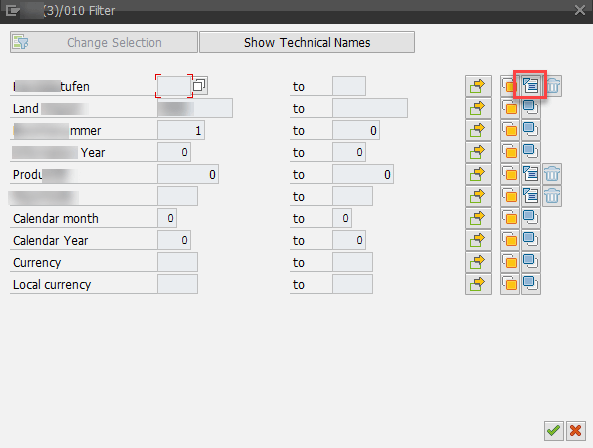
    Now a new window is opened. You see the selection for the DTP. If your field is not visible, click on Change Selection and select the necessary field. When you have the field you
    want to filter, use the small icon on the right to create a ABAP routine.

    DTP Filter
    DTP Filter

    Enter a name for the routine and you see the following screen.

    Create ABAP routine
    Create ABAP routine

    And now we have the full power of ABAP to build some really cool stuff. My example is we read a hierarchy and select all leaves under a node and set the DTP Filter with it. Or you read the
    attributes of an InfoObject and select all entries which are equal to the attributes and enter them into the filter.

     1
     2
     3
     4
     5
     6
     7
     8
     9
    10
    11
    12
    13
    14
    15
    16
    17
    18
    19
    20
    21
    22
    23
    24
    25
    26
    27
    28
    29
    30
    31
    32
    33
    34
    35
    36
    37
    CONSTANTS: lc_iobjnm_zsaleschannel TYPE rsiobjnm VALUE 'ZSALESCHANNEL'.
    
    DATA: ls_rssh_hiedir TYPE rshiedir,
          lt_rssh_hiedir TYPE rssh_t_hiedir,
          ls_subtreesel  TYPE rssh_s_nodebyname,
          lt_hierarchy   TYPE /bic/whzsaleschannel,
    
    FIELD-SYMBOLS: <ls_hierarchy> TYPE /bic/hzsaleschannel,
    
    "Get all hierarchies from the object
    CALL FUNCTION 'RSSH_HIER_OF_IOBJ_GET'
      EXPORTING
        i_objvers = rs_c_objvers-active
        i_iobjnm  = lc_iobjnm_zsaleschannel
        i_langu   = sy-langu
      IMPORTING
       e_t_rshiedir = lt_rssh_hiedir.
    
    "Get technical hierarchy id to hierarchy name
    CLEAR ls_rssh_hiedir.
    
    READ TABLE lt_rssh_hiedir INTO ls_rssh_hiedir WITH KEY hienm   = i_zsaleschannel_h
                                                           objvers = rs_c_objvers-active.
    
    "Sub-Tree to Note/Leaf
    CLEAR: ls_subtreesel.
    ls_subtreesel-iobjnm = lc_iobjnm_zsaleschannel
    ls_subtreesel-nodename = i_node.
    
    "Get Hierarchy Elements
    CALL METHOD cl_rssh_hierarchy_func=>get
      EXPORTING
       i_objvers      = rs_c_objvers-active
       i_hieid        = ls_rssh_hiedir-hieid
       i_s_subtreesel = ls_subtreesel
      IMPORTING
       e_t_hiestrucall = lt_hierachy
    

    After I have now all elements in an internal table, I can add them to the DTP Filter.

     1
     2
     3
     4
     5
     6
     7
     8
     9
    10
    11
    12
    13
    "Loop over the internal table and assign the value to the dtp filter
    LOOP AT lt_hierarchy ASSIGNING <ls_hierarchy>.
      l_t_range-fieldname = '/BIC/ZSALESCHANNEL'.
      l_t_range-iobjnm    = '/BIC/ZSALESCHANNEL'.
      l_t_range-sign      = 'I'.
      l_t_range-option    = 'EQ'.
      l_t_range-low       = <ls_hierarchy>-/bic/zsaleschannel.
      IF l_idx <> 0.
        MODIFY l_t_range INDEX l_idx.
      ELSE.
        APPEND l_t_range.
      ENDIF.
    ENDLOOP.
    

    After we saved our development and go back, we see a the little ABAP icon on the right (highlighted in red). If you want to remove a filter, click on the trashcan to remove the logic.

    DTP with active ABAP method
    DTP with active ABAP method

    Conclusion

    Sometimes it is necessary to filter your data. You could do this in different ways, but the most effiencient way is the DTP filter. Because the loading don’t touch the data you not select. If you
    remove the data via a start routine, all the data has to be catched from the database and you select more than you need at the end. 


    Besides ABAP routine you could also use variables to filter data. In SAP BW/4HANA the filter is a little bit different this will be covered in another post. 

    author.


    Hi,


    I am Tobias, I write this blog since 2014, you can find me on twitterfacebook and youtube. I work as a Senior Business
    Warehouse Consultant. In 2016 I wrote the first edition of . If you want you can leave me a paypal coffee
    donation. You can also contact me directly if you want.