reyemsaibot

SAP BI Blog about SAP BW/4HANA, Analysis for Office and SAP HANA - by Tobias Meyer

Blog

  • Analysis Office 2.8 SP3 is available

    I know its been a while since the last blog post. But I am currently working on the Analysis Office Video course to get
    it done. When you follow me on Twitter or Linkedin you get an update all the time. But back to topic. Analysis Office 2.8 SP3
    is available almost over one week so let’s look into it.


    These bugs are fixed now:

    • #VALUE error for hierarchy leaves in SAPGetData in Fomula-optimized mode (s-note 2928899)
    • BAdI is not executed when launching (s-note 2923786)
    • Exception After Deleting an Excel Sheet (s-note 2907359)
    • Saving a workbook results in exception 0x800AC472 (s-note 2925165)

    So its not much but after SAP released the standalone addin for SAP Analytics Cloud, they still working on Analysis for Office.


    author.


    I am Tobias, I write this blog since 2014, you can find me on twitter and youtube. If you want you can leave me a paypal coffee donation. You can also contact me directly if you want.

  • Analysis Office Video Course

    Currently I am working on my Analysis Office Video Course. It will be a full discover of Analysis for Office. So if you are interested in it, you can join the list to get a special price when it
    will be launched. 


    Thank you for all your support.

    author.


    I am Tobias, I write this blog since 2014, you can find me on twitter and youtube. If you want you can leave me a paypal coffee donation. You can also contact me directly if you want.
  • Analysis Office: Time Dependent Hierarchies

    author.


    I am Tobias, I write this blog since 2014, you can find me on twitter and youtube. If you want you can leave me a paypal coffee donation. You can also contact me directly if you want.
  • What’s new in Analysis Office 2.8 SP2

    After the latest service pack of Analysis Office 2.8 was released this week, the online help is now available.
    Analysis Office now offers a button for creating and deleting of comments in the ribbon menu. In former versions, SAP used the text of Microsoft Excel for comments. As Microsoft renamed the
    comments to notes, it was inconsistent in the ribbon and the context menu. Now it is consistently again.


    Also new is the file system setting UseLegacyModeForFormulaContext which allows you to specify the mode for creating formulas with Table Design. And in the planning area
    there is a new setting called PlanningFunctionUploadFolder, which allows you to upload the values for executing planning objects from a file.


    So it is nothing big, but Analysis Office is still developing and not dead, even if there is a new SAC Addin. I hope there will be some feature I submitted. 

    author.


    I am Tobias, I write this blog since 2014, you can find me on twitter and youtube. If you want you can leave me a paypal coffee donation. You can also contact me directly if you want.
  • SAP Transport Dependency Check

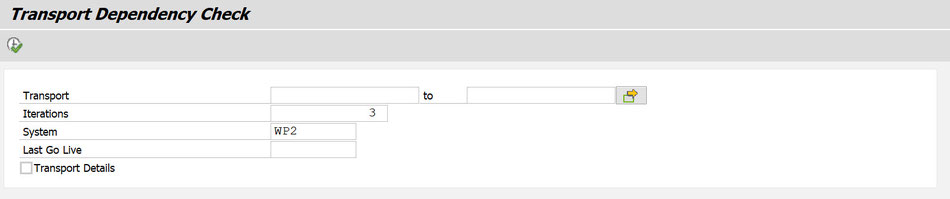
    The SAP Transport Dependency Check (TDC) is a little tool that helps you to find corresponding transport requests in your SAP NetWeaver Business Warehouse  which are not imported yet in your
    target system (e.g. production system). First you have to enter a transport request you want to check and also a target system and the last considered date (e.g. last go live).


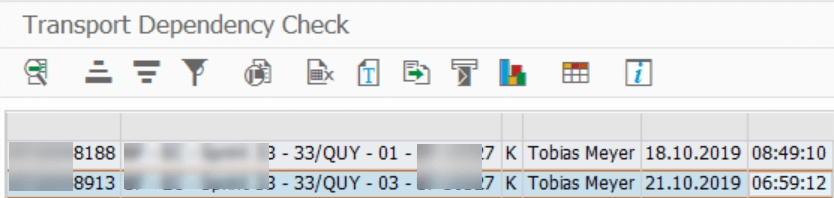
    You can either have a look at a compressed view where you can only see the transport requests.

    Transport Dependency Check compact view
    Transport Dependency Check compact view

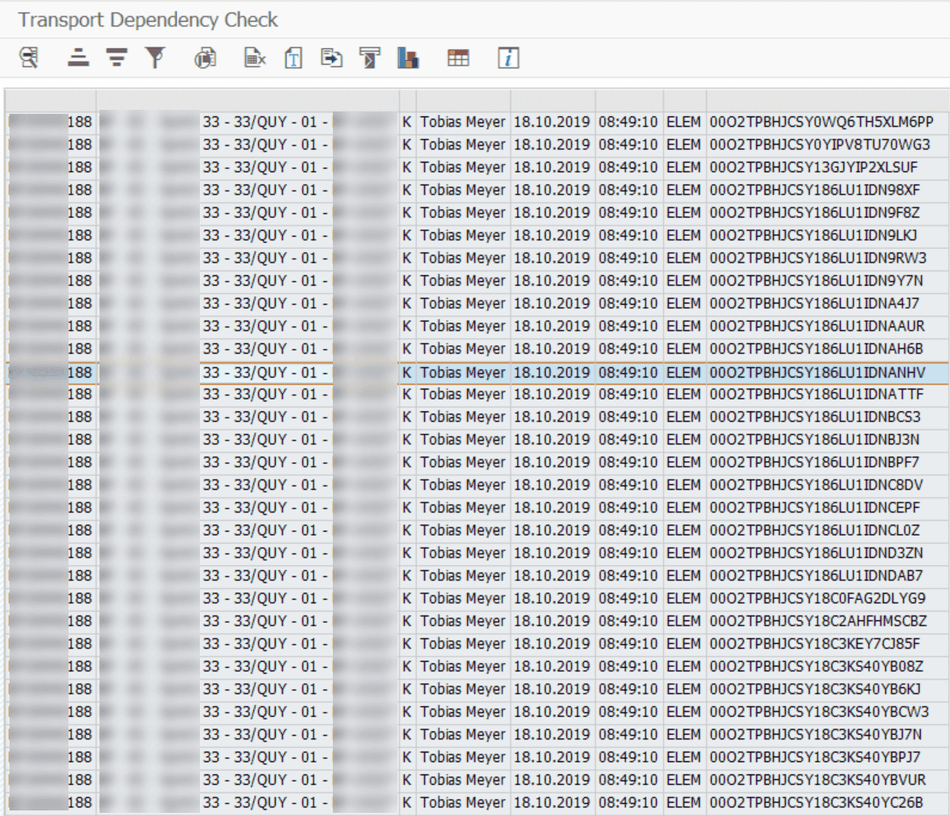
    Or you choose the detail view which allows you to see every object on the transport request.

    Transport Dependency Check detail view
    Transport Dependency Check detail view

    If you have the same problems as I do in some projects you will love this tool, because it makes your project day easier. If you have any questions feel free to contact me. You can get it in the
    online store and soon there will be other useful ABAP tools available.

  • Analysis Office 2.8 SP2 is available

    Since today the latest version of Analysis Office 2.8 (release notes) is available. You can download it with your s-user in the SAP Support Portal.  There are only a few fixes:

    • AO: BEx Analyzer Workbook Conversion – Not all filters of Text Element converted (s-note 2902130)
    • Chart Data Series are added again as Chart Data (s-note
      2898931
      )
    • Exception thrown when the login process is interrupted (s-note 2900972)
    • Hierarchy selection disappears after confirming Filter Dialog in case of HANA (s-note 2897838)

    The online help is not updated, but will be in a few days I think. Also the special addin for SAP Analytics Cloud 2.8 SP2 is released. If you have any questions feel free to ask.

    author.


    I am Tobias, I write this blog since 2014, you can find me on twitter and youtube. If you want you can leave me a paypal coffee donation. You can also contact me directly if you want.
  • Get Analysis Office – The Comprehensive Guide

    If you want the latest edition of Analysis Office – The Comprehensive Guide, you can get it now with a 20% discount until easter 2020. Use the code Easter2020 in the
    online shop


    If you want to read a review first, have a look at the review from Tammy Powlas or from Xavier Hacking. Tammys review is about the 3rd edition and Xaviers about the 1st
    edition.


    If you have any questions or need any help, don’t hesitate to contact me.

    author.


    I am Tobias, I write this blog since 2014, you can find me on twitter and youtube. If you want you can leave me a paypal coffee donation. You can also contact me directly if you want.
  • Analysis Office Dimension Grouping

    Please share a comment if you like the video.

    author.


    I am Tobias, I write this blog since 2014, you can find me on twitter and youtube. If you want you can leave me a paypal coffee donation. You can also contact me directly if you want.

  • Analysis Office Show medium text in prompt filter

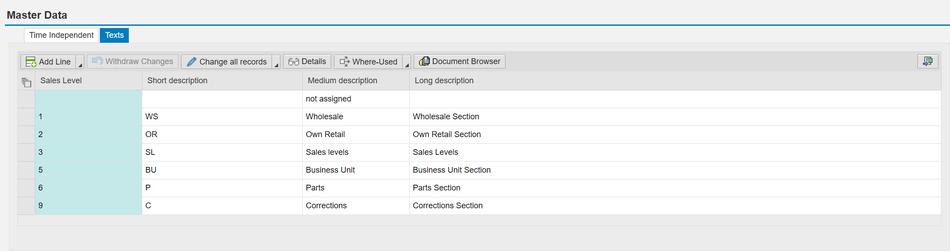
    Until now, we speak of Analysis Office 2.8, if you have different text maintained for an infoobject, Analysis Office shows only the short text in the prompt dialog. The maintenance view of the
    InfoObject shows all different texts.

    Master Data of an InfoObject
    Master Data of an InfoObject

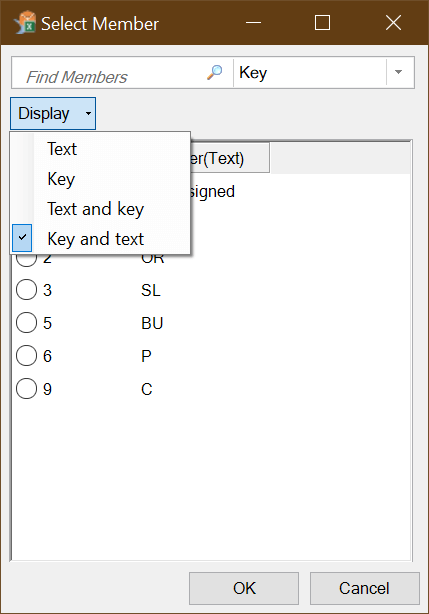
    But the filter dialog in Analysis Office shows only the short text of this InfoObject and you cannot change it.

    Prompt Filter Dialog for specific InfoObject
    Prompt Filter Dialog for specific InfoObject

    So this is very annoying because sometimes the short text does not explain the selection in a proper way. But there is a solution for this. You have to change the setting Display in the
    Reporting Properties of the Composite Provider. You find this setting under Output of every Composite Provider for each InfoObject.

    Composite Provider Reporting Properties
    Composite Provider Reporting Properties

    You can change the setting Display to the following options:

    • Key and text
    • Text
    • Key
    • Text and key
    • Long text
    • Medium-length text
    • No display
    • Short text
    • Text and key as short text
    • Text and key as medium text
    • Text and key as long text
    • Key and text as short text
    • Key and text as medium text
    • Key and text as long text

    So when you now change it for example to Key and text as medium text, the prompt dialog filter shows the medium text.

    Prompt Filter shows medium text
    Prompt Filter shows medium text

    I hope this help someone to solve a problem. If you have any questions write them in the comments.

    author.


    I am Tobias, I write this blog since 2014, you can find me on twitter and youtube. If you want you can leave me a paypal coffee donation. You can also contact me directly if you want.

  • Analysis Office – The Comprehensive Guide 5th edition is available

    It is done, the latest version of my book Analysis for Office – The Comprehensive Guide is available. It was a lot to do and so the book has now 346 pages. The 4th edition had only 299 pages. So
    there is some new stuff inside. The first 5 who contact me will get a promo discount code. Also I am happy if you want to write a review you get a review discount code. 


    So you can buy it in the store. In future I will create more videos if there is any interest. So please leave a comment.

    author.


    I am Tobias, I write this blog since 2014, you can find me on twitter and youtube. If you want you can leave me a paypal coffee donation. You can also contact me directly if you want.

    Analysis Office – The Comprehensive Guide