reyemsaibot

SAP BI Blog about SAP BW/4HANA, Analysis for Office and SAP HANA - by Tobias Meyer

Schlagwort: analysis for office

  • Analysis Office 2.7 SP2 is available

    It’s been a while since the last blog post and I am also late for the news that Analysis Office 2.7 SP2 is available. As Patrick told me on 05.10.2018 Analysis Office 2.7 SP2 is GA. But I was on vaction so I didn’t find the time to write
    about it. So here we are:


    This is fixed in Service Pack 2

    • ‚Value cannot be null.‘ exception in Formula Optimized mode (s-note 2695717)
    • AO 2.7 Reference to another Sheet causes an Error in AO (s-note 2694323)
    • Analysis Office: SSO not working for Olap connections defined in BIP (s-note 2679569)
    • Analysis Office: no connections defined on the BIP are displayed in AO (s-note 2684736)
    • Data cell comments from BI Platform have wrong encoding (s-note 2691438)
    • Error when recalculating new plan values in SAC context (s-note 2696322)
    • Filter Components for non filtered dimensions are removed during scheduling (s-note 2687795)
    • Filter Dialog – Incorrect Selection behavior for SAC Dimensions (s-note 2690868)
    • Filter by Measure defaults to date filter values on non-date measures (s-note 2685511)
    • Installation on a machine without PowerPoint (s-note 2682628)
    • Long text of BW backend messages is not shown in error dialog (s-note 2685807)
    • Missing warning message when opening a workbook with BW comments in an older AO version (s-note 2692393)
    • Parallel HANA connections (s-note 2690486)
    • Precalculation – Exception while saving Workbook (s-note
      2693145
      )
    • SAC/AO/error message when sharing versions (s-note 2688438)
    • Search in Filter Dialog takes long for compound dimension (s-note 2695275)
    • Tabular View lost after converting BEx Workbook (s-note
      2686581
      )

    When I have more time, I will look deeper into Analysis Office 2.7 SP2 and write a short overview.

    author.


    I am Tobias, I write this blog since 2014, you can find me on twitter and youtube. If you want you can leave me a paypal coffee donation. You can also contact me directly if you want.
  • Analysis Office 2.7 SP1 is available

    Since last week Analysis Office 2.7 SP1 is available. Here is a short overview what SAP fixed in this verison.


    • Advanced calculation initially not visible (s-note
      2663436
      )
    • Analysis Office: No connections displayed after login to BIP server (s-note 2667319)
    • Analysis Office: RFC sessions not closed after workbook is closed (s-note 2669330)
    • Analysis Office: data sources contained in workbooks which are deleted on BW server are still visible (s-note 2664623)
    • Error at undo operation of show / hide totals (s-note
      2662791
      )
    • Exception occuring when pasting members with a trailng “ (s-note 2667373)
    • Exception when trying to save a workbook with BW comments (s-note 2673237)
    • F4 Key Support to open Value Help for Formula SAPSelectMember and Insheet Filter Items (s-note 2660900)
    • Formula-optimized workbook – SAPGetData formula doesn’t work with referenced SAPSelectMember formula (s-note 2658258)
    • Grouped Crosstabs: Exception while opening a VBA Workbook (s-note 2670564)
    • OLAP Connection information gets lost in workbook when saving (s-note 2658848)
    • Value Help – Datepickers initial selection differs (s-note 2659885)
    • Wrong values in formula-optimized mode because of unassigned member (s-note 2660581)

    The User and Admin Guide is still on Analysis Office 2.7 and I hope it will be released the next days.

    author.


    I am Tobias, I write this blog since 2014, you can find me on twitter and youtube. If you want you can leave me a paypal coffee donation. You can also contact me directly if you want.
  • Analysis Office Launching Workbooks from BIP with variables

    Since Analysis Office 2.6 you are able to launch workbooks from BIP with variables. The biggest problem is to have a BI Platform 4.2 SP5 and time to test this feature. In case of writing an
    updated version of Analysis Office – The Comprehensive Guide, I now have a BI Platform which fulfilled the conditions. According to SAP slides, the command looks like this:

    &var[<data source alias>]<variable>=<value>

    So I saved a workbook to my BI Platform and looked how it works. Here is my example where I pass the value of 0CALMONTH.

    iDocID=AebeSHZuOw5OicAkEHH47Ws&var[DS_1]CALMONTH=01.2017

    With this the workbook is launched with the variable value January 2017. Another example with a range of 0CALMONTH.

    iDocID=AebeSHZuOw5OicAkEHH47Ws&var[DS_1]CALMONTH=01.2017 – 03.2017

    With this the workbook is launched with the range of January 2017 to March 2017. And here another example with two variables.

    iDocID=AebeSHZuOw5OicAkEHH47Ws&var[DS_1]CALMONTH=01.2017 – 03.2017&var[DS_1]ZCOMN=8553780486

    With this the data source is restricted from January 2017 to March 2017 and the commission number 8553780486. It is a cool feature but you definitely Single-Sign-On
    because without SSO it doesn’t make fun.

    author.


    I am Tobias, I write this blog since 2014, you can find me on twitter and youtube. If you want you can leave me a paypal coffee donation. You can also contact me directly if you want.

  • Analysis Office Data Source for Defining Formulas

    A new function in Analysis Office 2.7 is „Select Data Source for Defining Formulas“. But what does this mean? First
    the prerequisites:

    So I just logged into my BW 7.50 test system and what I have to see, we only have a BW 7.5 SP11. So I have applied the notes and each note need further notes to implemented. I just want to test
    something and now I have to implement more than 30 notes.


    After this was done I could start finally to test this function. Alexander
    Peter
    showed in the latest DSAG webcast an example so I had a slight idea what to do.

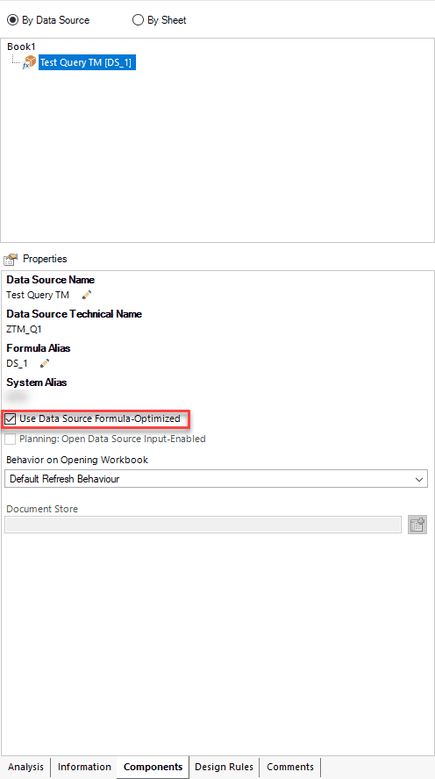
    First I logged to my BW 7.5 and selected my query. You have to make sure that the option Use Data Source Formula-Optimized is active. If not, you cannot use it. If
    it is not active you can in return create a Crosstab which you cannot do if it is formula optimized.

    Analysis Office Components tab - Use Data Source Formula-Optimized
    Analysis Office Components tab – Use Data Source Formula-Optimized

    So now just create an example. First I create a simple SAPSelectMember to use it for the next steps.


    =SAPSelectMember(„DS_1″;“0CALMONTH{pres=INTERNAL_KEY}=201705″;“0CALMONTH“;“Text“)


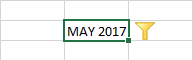
    This is how it looks like:

    Formula SAPSelectMember
    Formula SAPSelectMember

    Now I build a little compley formula to get my data.


    =SAPGetData(„DS_1“;F3;“0CALMONTH=“&SAPGetMember(„DS_1″;“0CALMONTH=“&I3;“KEY“))


    This is how it looks like:

    Formula SAPGetData
    Formula SAPGetData

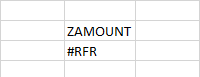
    As you might wonder, you see now #RFR. This mean you need to refresh your data source and now you see the result.

    Formula SAPGetData with value
    Formula SAPGetData with value

    After you change the Filter Component you always see the #RFR. This could be better, I hope SAP will make improvements here. Now you can use this „new“ function to build beautiful dashboards.


    But what is now the thing, why I should use the new function? You sure now the SAPGetData formula from earlier versions. But the SAPGetData formula in older versions need a query view  that contains
    all cells which you want to query. That means you have to drill down hierarchies and add dimensions if you want to query these characteristic combinations.


    This can mean, that you have to quest 100.000 cells to represent two values. In the new handling since the actual version it is the other way around. This mean you write the combination you need
    and Analysis Office generates the best possible queries.


    Thanks to Alexander Peter for clearing this up.

    author.


    I am Tobias, I write this blog since 2014, you can find me on twitter and youtube. If you want you can leave me a paypal coffee donation. You can also contact me directly if you want.

  • What’s new in Analysis Office 2.7

    Today Analysis Office 2.7 was released. Thanks to Zisi1990, who pointed me seconds after it was
    released that it is available. You can download it with a S-User. Here is a short overview what’s new in Analysis Office 2.7:

    • You now have to two ribbon tabs. One for the analysis and one for design
    • There is a new formula called SAPSelectMember. The formula returns a member of a dimension, this might be interressting for VBA.
    • You can now save comments to BW/4HANA. The history of these comments is available in the new tab Comments in the design panel and you can now select the preffered platform for your comments.
      Either BW/4HANA or BI platform.
    • There are also two new file system parameter:
      • PreferredDocumentStorage
      • EnablePreferredDocumentStorage
    • You now can use Planning Data with SAP Analytics Could models.

    author.


    I am Tobias, I write this blog since 2014, you can find me on twitter and youtube. If you want you can leave me a paypal coffee donation. You can also contact me directly if you want.

  • What’s new in Analysis Office 2.6 SP3

    After a short vacation over Pentecost I have now time to write „What’s new in Analysis Office 2.6 SP3“. A short overview yo find in this post. The user guide shows some new things:

    • The formula SAPSetFilterComponent has two new parameters: MEMBERSELECTOR
    • You can now copy Table Design from one Crosstab to another. This is really cool.
    • Table Design formulas can now be restricted


    The admin guide has 20 new pages to the Analysis Office 2.6 guide. The settings chapter is new organized and in my
    opinion a little bit better organized than before. Also new is the topic how to use the BI Platform with hyperlinks and variables like the old BI Portal. This is described in section 5.9.4 in the
    admin guide.

    author.


    I am Tobias, I write this blog since 2014, you can find me on twitter and youtube. If you want you can leave me a paypal coffee donation. You can also contact me directly if you want.

  • Analysis Office 2.6 SP3 is available

    Since yesterday Analysis Office 2.6 SP3 is available. You need as always a S-User to download the latest version. Here is a short overview what it might fix.

    • „Create Web Application“ button is not enabled when SAP Lumira Designer is installed (s-note 2636541)
    • Correct sorting of members of type CalendarDay or DateTime in Filter Dialog (s-note 2625487)
    • Exception after saving workbook as PDF (s-note 2633496)
    • Filter Dialog does not update Hierarchy after switch of Access Mode (s-note 2637491)
    • Grouped Crosstabs: Expanding and Filtering in the Columns does not work (s-note 2637846)
    • Inserted chart does not reflect complete data (s-note 2635814)
    • Link Dimensions: Issues with drag and drop (s-note
      2610471
      )
    • Performance Issue related to many Shared Strings in Workbook (s-note 2638243)
    • Restart option missing (s-note 2633506)

    An overview what’s new will be released soon. If you find something interesting, please feel free to post a comment.

    author.


    I am Tobias, I write this blog since 2014, you can find me on twitter and youtube. If you want you can leave me a paypal coffee donation. You can also contact me directly if you want.

  • SAP Analysis Office Book is available

    Since last week the new version of my book SAP Analysis Office – The Comprehensive Guide is now available. You can find it only here
    in my shop. The book is based on Analysis Office 2.6 and covers
    now all about:

    • Customizing Analysis Office including file system settings
    • The basic stuff with Analytics Cloud
    • The advanced stuff like Table Design and Group Members
    • The API and formula functions
    • Troubleshooting and so on

    The table of content can be found here. If you have any questions feel free to
    write them into the comments.


    One question from me:

    Is it ok, that there is only Paypal as payment method or do you need more? Just write it in the comments and I will see what I can do.

    author.


    I am Tobias, I write this blog since 2014, you can find me on twitter and youtube. If you want you can leave me a paypal coffee donation. You can also contact me directly if you want.

  • What’s new in Analysis Office 2.6 SP2

    Analysis Office 2.6 SP2 is available since two weeks. There are only some slight changes to Analysis Office 2.6 SP1. You are now able to set the selection type for the formula
    SAPSetFilterComponent to MEMBERSELECTORBYRANGE. So you can use it to define the filter dialog with range option as standard.


    Also a new selection type for the VBA API SAPCallMemberSelector is now available. It is called MULTIPLEBYRANGE, which allows you to select a range of members for
    filtering. So if you found new functions, feel free to write them down in the comments.

    author.


    I am Tobias, I write this blog since 2014, you can find me on twitter and youtube. If you want you can leave me a paypal coffee donation. You can also contact me directly if you want.

  • Analysis Office 2.6 SP2 is available

    Since two days the new version of Analysis Office 2.6 is available. You need as always a S-User to download the latest version. Here
    is a short overview what it might fix:

    • AO 2.x: Table Design Formulas causes crash on initialze of Design Rules Tab if no applicable Data was found (s-note 2609841)
    • Analysis Office: Existing workbook in favorites folders on BIP will not be overwritten (s-note 2614892)
    • Analysis Office: Grouping crosstabs from different worksheets throws an exception (s-note 2614536)
    • Analysis Office: System alias of a query defined on BIP server is overwritten (s-note 2616663)
    • Filter Component results in error with Manual Calculation Mode (s-note 2605076)
    • Filter on Characteristics used in Restriction is lost after additional characteristic is used (s-note 2614466)
    • No drop down to select the date for between condition (s-note 2615430)
    • Undo operation for restriction fails (s-note 2606838)

    A overview what’s new will be available next week. If you find something interesting, please feel free to post a comment.

    author.


    I am Tobias, I write this blog since 2014, you can find me on twitter and youtube. If you want you can leave me a paypal coffee donation. You can also contact me directly if you want.